Start by choosing a console that supports local co-op for the adventure you want to play, then check which controllers you’ll need. With tall windows, visibility depends mainly on reflections on the screen you’re using; 4K or HDR output won’t prevent glare. The Switch 2 also offers tabletop and handheld play, while the choice between a disc drive and all-digital games is another factor with other consoles.
Who is this for?
Sofa co-op adventurers
You want to play through the same adventure on one console with another player. In that case, the local game mode and compatible controllers matter more than general console specifications. The Mulier Institute reports that 47% of gamers played with friends or family in 2024; this figure describes gamers, not the reasons console buyers make a purchase.
Players in a bright living room
You play during the day with tall windows opposite you and want to avoid reflections obscuring details on the shared screen. So look beyond the console itself and consider the position and features of the screen you’ll be using.
Flexible co-op players
You want to play on the TV sometimes and at a table at other times. The available play modes, the size of the shared screen and the controller layout all determine whether that flexibility works for you.
What should you consider when choosing?
Nintendo Switch 2
A good fit if: you want tabletop or handheld play as well as TV gaming, and the game you have in mind can be played locally on Switch 2.
Keep in mind: you need the Switch 2 dock for TV mode; according to Nintendo Netherlands, not all older Switch games are fully compatible.
Nintendo Switch – OLED Model
A good fit if: you mainly want to play Switch games and value a built-in 7-inch OLED screen and an adjustable stand. Nintendo Netherlands gives this screen size for the OLED model.
Keep in mind: the OLED model can’t play titles made exclusively for Switch 2; its built-in screen doesn’t change the picture on your TV.
PlayStation 5 with disc drive
A good fit if: the local co-op adventure you want is available on PS5 and you also want to use disc-based games.
Keep in mind: the 1 TB disc edition described by Sony comes with one DualSense controller; you may need an additional compatible controller for two players.
Xbox Series S, 512 GB
A good fit if: the adventure you want is available for Xbox Series X|S and you want to play digital games.
Keep in mind: Microsoft lists one controller as included; the Series S doesn’t have a disc drive.
| What to consider |
What should you check? |
Who is this important for? |
| Local co-op |
For the exact game and console version, check the local mode, player count and supported controllers. |
If I want to play one story together on one console, I’ll check the specific game mode before choosing a console. Around 33% of consumers say local story co-op is their main purchase priority. |
| Visibility in daylight |
Consider the position of the windows, reflections and the brightness of the TV or screen you’ll actually be using. RTINGS identifies direct reflections as something to consider when watching TV in bright rooms with large windows. |
If tall windows are opposite our screen, I want to know whether we can both see the shared picture. Around 27% of consumers prioritise visibility in daylight. |
| Changing where you play |
Compare TV, tabletop and handheld modes, and check that the game and controller layout you want work in that mode. |
If we sometimes want to play at a table instead of by the TV, a portable setup is a factor. Around 20% of consumers say this flexibility is their main purchase priority. |
| What you need for two players |
Check what’s included in the bundle, the game format and whether you need a second compatible controller. Sony and Microsoft list one controller with the PS5 disc edition and Xbox Series S described here. |
If I want to get started with two players, I want to know in advance which components and controllers we’ll need. Around 20% of consumers put these requirements first. |
Common pitfalls
-
Assuming 4K or HDR means less glare
Output resolution and reflections on the TV are different things. A console’s output specifications alone don’t tell you whether the screen will be easy to see with tall windows nearby.
Consider the position of the windows and reflections on the screen you want to use for playing together.
-
Assuming a standard console comes with two controllers
The PS5 disc edition described by Sony and the Xbox Series S described by Microsoft each come with one controller. Detachable Joy-Con only work as controllers for two players if the specific game supports this.
Compare the game’s controller requirements with what’s included in the exact bundle you’re considering.
-
Taking a screen type or model name as proof of game compatibility
A Switch game isn’t automatically fully compatible with Switch 2, and a title made exclusively for Switch 2 won’t work on the Switch OLED model. The Xbox Series S can’t play game discs.
Check the exact console version, game version and game format.
-
Assuming similar product names mean identical versions
Another version or bundle may differ in its components or contents. The product name alone won’t tell you whether the included accessories meet your needs.
Check the full model details and bundle contents on the product page.
Brands to compare
Nintendo
Nintendo offers the Switch 2 for new and compatible older Switch games, and a separate Switch OLED option for Switch games.
- Nintendo lists two Joy-Con 2 controllers and a 7.9-inch screen for Switch 2.
- Nintendo warns that some older Switch games may not be supported or may not be fully compatible with Switch 2.
Sony PlayStation
PS5 could suit players who want to play a particular local co-op adventure on PlayStation; the game mode varies by title.
- Sony lists local multiplayer games for PS5 and a disc drive with the 1 TB version described here.
- The disc edition described comes with one DualSense controller; check what the game you choose requires for two players.
Microsoft Xbox
The Xbox Series S is an all-digital option for compatible Xbox Series X|S games.
- Microsoft lists a controller with the console and a digital game library.
- The Series S doesn’t have a disc drive; also check that the game you want supports local co-op.
Joybuy consoles for this gaming setup
This Joybuy selection includes home and handheld consoles. For each game and version, check that local co-op and your preferred screen setup are supported.
 No image available
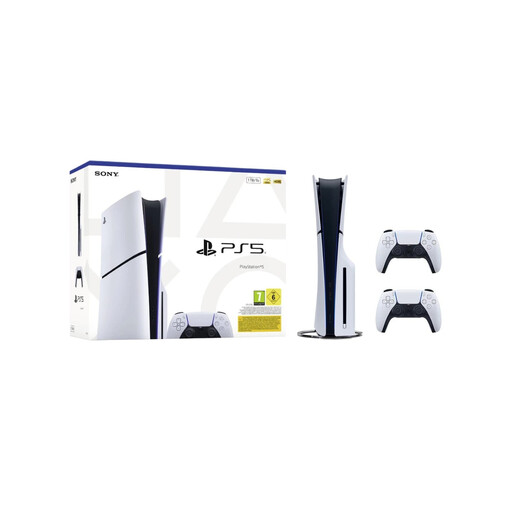
Sony PlayStation 5 Slim Disc Edition, 1 TB, bundle with 2 white DualSense controllers (EU version)
This bundle lists two controllers for playing together; check that the game you want supports local co-op.
Disc Edition; 1 TB; two white DualSense controllers; EU version.
View at Joybuy
 No image available
Lenovo Legion Go 8ASP2
This handheld offers a portable screen setup; check that the game you want to play supports local co-op and your preferred controls.
View at Joybuy
 No image available
Nintendo Switch 2 (2026, replaceable battery)
Switch 2 offers TV, tabletop and handheld modes; you need the Switch 2 dock for TV mode. Check compatibility for each older Switch game.
The product name specifies a 2026 version with a replaceable battery.
View at Joybuy
 No image available
Nintendo Switch bundle, 32 GB, with Mario Kart 8 Deluxe on a physical game card
The product information lists split-screen for Mario Kart 8 Deluxe; check that this way of playing suits your setup.
32 GB; physical game card with Mario Kart 8 Deluxe.
View at Joybuy
 No image available
Asus ROG Xbox Ally, 16 GB RAM, 512 GB SSD, white
This handheld console offers a different screen setup from a fixed TV; check that the game you want supports playing together on the device.
16 GB RAM; 512 GB SSD; white. The charger must be purchased separately.
View at Joybuy
Frequently asked questions
Is ‘multiplayer’ enough to play through the same adventure on one console?
No. Check whether the specific game version lists local co-op or two-player couch co-op. That’s different from simply playing online or competing against each other locally.
Does a 4K console help with reflections from tall windows?
No. Reflections depend on the position and features of the screen you’re using. Switch 2’s 4K output in TV mode doesn’t guarantee that the picture will be easy to see in daylight.
How do I use Nintendo Switch 2 in TV mode?
Place the Switch 2 in its dedicated Switch 2 dock. Nintendo Netherlands says the original Switch dock isn’t suitable as a replacement for the Switch 2 dock.
Do I always need an online subscription to play together locally?
Don’t assume so. Online and local play are different ways to play; check the terms for the exact game and choose the mode you want to use.
Can I play Switch games on Nintendo Switch 2?
Some Switch games work on Switch 2, but Nintendo Netherlands warns that certain titles may not be supported or may not be fully compatible. Check compatibility for the game you want to play.


