Who is this buying guide for?

Playing together on the sofa

You mainly want to play an adventure together on one console and one TV. Check the selected game’s local play mode and how many controllers you’ll need; PlayStation and Xbox list local multiplayer options for specific games.

Playing at the table

You also want to play together using the built-in screen without a TV, sometimes during the day. Nintendo describes tabletop mode for Switch 2 and Switch OLED; the location, viewing angle and light in the room all affect how well it suits your space.

Choosing a console for games you already own

You want to avoid finding out that your discs, downloads or favourite Switch games won’t work with the version you choose. Check the platform and version for each game; Nintendo notes that some Switch 2 games or features aren’t available on a standard Switch.

What should you consider when choosing?

What to consider What should you check? Who should prioritise this?
The right co-op game For the exact game and platform version, check the local play mode, the number of players and whether everyone needs a full controller. I mainly want to play a particular adventure together on one console, rather than find out after buying it that only online co-op is available. Around 40% of consumers prioritise having a suitable local co-op game.
Screen and playing space Choose between a TV and the built-in screen. For tabletop play, assess the light, reflections and viewing angle where you’ll be playing. If we’re playing at the table during the day, I want both players to be able to see the screen from where they’re sitting. Around 25% of consumers prioritise screen visibility in their playing space.
Games and format Check that you have the right console version for each game, and whether you need a disc, game card or download. I want to keep playing my existing games and avoid choosing a version that can’t play my discs. Around 17% of consumers prioritise compatibility and their preferred game format.
Complete setup Count the compatible controllers included and check which games and any add-ons you’ll need. I want to know what else we’ll need besides the console to start playing together. Around 18% of consumers focus on everything required for two players.

Common pitfalls

  • Assuming ‘online co-op’ means ‘together on one screen’

    Co-op isn’t always local. Play modes and player numbers vary by game, so a general ‘multiplayer’ label doesn’t confirm that you can play together on one console.

    Before buying a console, look for ‘offline’, ‘local’ or ‘split-screen’ play in the details for your chosen game and platform version.

    If the game you choose isn’t suitable, you may need a different version or another game.

  • Assuming the included controllers will always be enough

    Controller requirements depend on the game. The PS5 with disc drive reviewed here includes one DualSense controller. Detachable Joy-Con can be used separately, but controls vary between games and play modes.

    Check what’s included and the game’s controller requirements before you decide.

    Some setups require an additional compatible controller.

  • Assuming OLED or HDR guarantees comfortable play in direct sunlight

    The screen type or display feature alone doesn’t tell you how easy the screen will be to see where you play.

    Decide in advance whether you’ll use the built-in screen or a TV, and take the light, reflections and viewing angle into account.

  • Choosing a digital console when you want to use discs

    The PS5 Digital Edition has no disc drive, and the Xbox Series S is all-digital.

    First, make a list of the games you want to play, then check whether you own or want to buy them on disc, game card or as a download.

Relevant brands

Nintendo

A good choice if you want to play local co-op on both a TV and a shared built-in screen.

  • Nintendo describes TV, tabletop and handheld modes for Switch 2. Switch OLED has a 7-inch OLED screen and an adjustable stand.
  • Not all Switch games are fully compatible with Switch 2, and Switch 2-exclusive features don’t work on Switch OLED. These screen specifications don’t guarantee visibility in direct sunlight.

PlayStation

A good choice if your preferred local co-op game is available on PS5 and playing on a TV or monitor suits you.

  • PlayStation lists local multiplayer games for PS5. The PS5 with disc drive reviewed here comes with one DualSense controller.
  • The Digital Edition has no disc drive. Local multiplayer availability varies by game; a multiplayer label alone isn’t confirmation.

Xbox

A good choice if you’re looking for an all-digital console for a TV or monitor and plan to choose a compatible local co-op game in advance.

  • Xbox lists offline split-screen co-op for It Takes Two and local co-op for up to four players in Overcooked! 2.
  • The Series S is all-digital. The play modes and player numbers mentioned apply to those specific games, not every Xbox game.

Joybuy products

This Joybuy selection includes Nintendo Switch models, including Switch 2 bundles, a Switch bundle and Switch Lite. Check that the game you want to play supports the local play mode and controls you need.

Nintendo Switch 2 bundle with Nintendo Switch Sports Resort

Nintendo Switch 2 bundle with Nintendo Switch Sports Resort

Suitable if you want to play on a TV or at the table. Nintendo describes local co-op for specific Switch 2 games, but not every title.

7.9-inch LCD screen and Joy-Con 2 controllers. The product name also mentions 3 months of Nintendo Switch Online.

Joybuy

Nintendo Switch 2 console with replaceable battery (2026)

Nintendo Switch 2 console with replaceable battery (2026)

Suitable if you want to use Switch 2 on a TV or at the table. Check which local play mode and controls each game requires.

The product description mentions Joy-Con 2 controllers and TV, tabletop and handheld play.

Joybuy

32 GB Nintendo Switch bundle with physical Mario Kart 8 Deluxe game card

32 GB Nintendo Switch bundle with physical Mario Kart 8 Deluxe game card

Suitable if you’re looking for a Switch bundle with TV and tabletop modes. The product description says the included game supports local split-screen for up to four players; this doesn’t mean every adventure game supports co-op.

The product name mentions a physical Mario Kart 8 Deluxe game card.

Joybuy

Turquoise 32 GB Nintendo Switch Lite bundle

Turquoise 32 GB Nintendo Switch Lite bundle

Only suitable if you want to play in handheld mode: this model doesn’t support TV output, so it isn’t designed for playing together on a TV.

The product description mentions a 5.5-inch touchscreen. The product name mentions Tomodachi Life: Wo Träume wahr werden as a download and a 30-day Nintendo Switch Online trial.

Joybuy
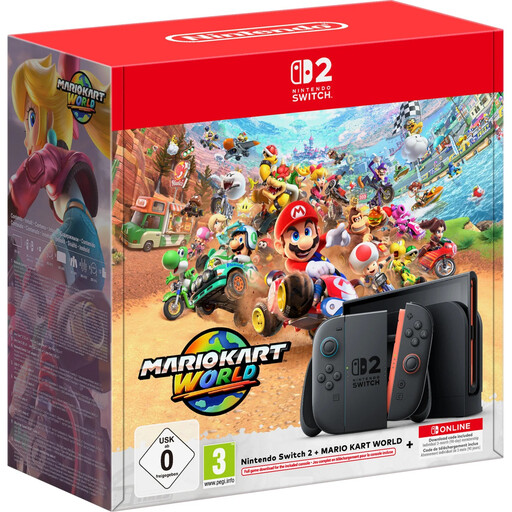
256 GB Nintendo Switch 2 bundle with Mario Kart World download

256 GB Nintendo Switch 2 bundle with Mario Kart World download

Suitable if you’re looking for a Switch 2 bundle for TV or handheld play. Check whether the game you choose supports local co-op.

The product description mentions a 7.9-inch LCD screen, a dock and 256 GB of storage. The product name also mentions 3 months of Nintendo Switch Online.

Joybuy

Frequently asked questions

Is a game with ‘multiplayer’ automatically suitable for playing together on one console?

No. Check the local or offline co-op mode for the exact game version and the number of players. Xbox lists offline split-screen co-op for It Takes Two, and local co-op for up to four players in Overcooked! 2.

How do you play together on Switch 2 on a TV or at the table?

For TV mode, place the Switch 2 in the dock and use the controllers separately from the system. For tabletop mode, open the stand and use the built-in screen. Nintendo warns that the dock for the older Switch doesn’t work with Switch 2. Also check the controls for the game you’ve chosen.

Does the Switch 2 brightness setting help when playing during the day?

In handheld and tabletop modes, you can adjust the brightness automatically or manually to suit the ambient light. Nintendo doesn’t guarantee that the screen will be easy to see in direct sunlight, so assess the place where you’ll actually be playing.

Do we need an online subscription for co-op on the sofa?

Not necessarily: Xbox distinguishes between offline split-screen co-op and online play in It Takes Two. Check the requirements for the specific game and any online features you want to use separately.

How can you check whether the console comes with enough controllers?

Compare the number of compatible controllers included with the game’s requirements and the number of players. The PS5 with disc drive reviewed here includes one DualSense controller; with detachable Joy-Con, the supported controls depend on the game.
