
Player with a set list of games
First, you check whether the historical adventures you want are available on the console. A specific game’s availability matters more than a general preference for a particular brand.


Start with the games you want to play: Kingdom Come: Deliverance II is listed for PS5 and Xbox Series X|S, while Assassin’s Creed Shadows is also listed for Nintendo Switch 2. Then choose based on your screen setup, whether you want to use physical games and whether you’d like to play away from your home office too. Check the exact console version, disc drive and storage requirements before you buy.
First, you check whether the historical adventures you want are available on the console. A specific game’s availability matters more than a general preference for a particular brand.
You’re looking for a console that works with your existing screen and desk setup, so you’ll want to check the connection and the system version.
You want to play a historical adventure at home, but also use the system without a fixed screen.
First, check the game pages for the titles on your list. Then choose a console to suit your screen, your existing game collection and where you want to play.
| What to consider | What should you check? | Who is this important for? |
|---|---|---|
| Game availability | Check the platform and edition for each title on its UK game page. PlayStation Store, Xbox and Nintendo list games by platform. | I want to make sure I can play the historical adventures I can’t do without before choosing a console. Around 33% of consumers put their specific game list first. |
| Desk and screen | Check the connection and supported display options for both the console and screen. Nintendo lists a built-in screen and HDMI output via the dock for Switch 2. | If my console will stay on one desk screen, I want to know whether the connection will work with my setup. Around 25% of consumers say their desk and screen are their main considerations when choosing. |
| Discs and storage | Check whether the exact version has a disc drive and whether there’s enough storage for downloads. Nintendo says that a game-key card requires a download first. | I want to know whether I can use my physical games and have enough room for downloads. Around 25% of consumers prioritise game format and storage. |
| Playing in different places | Check whether the console has a built-in screen and can also be used with an external screen. Nintendo lists both ways to use Switch 2. | If I want to play away from my home office too, being able to use the console without a fixed screen is essential. Around 17% of consumers prioritise this flexibility. |
A listing for one historical game doesn’t mean every title on your list is available. Kingdom Come: Deliverance II is listed for PS5 and Xbox Series X|S; Nintendo lists Assassin’s Creed Shadows for Switch 2.
Make a list of the games you can’t do without, then check the platform and edition for each one on its UK game page.
A fully digital console can’t play physical game discs. Console families are also available in versions both with and without a disc drive.
Check the product name and specifications for the exact version to see whether it has a disc drive.
Nintendo’s game-key cards don’t contain the game itself, so you’ll need to download it first.
Check the card type and available storage before choosing a physical edition.
A game-key card requires a download. If you need more storage, you may also need to buy a compatible microSD Express card separately.
According to the Dutch government, you’re entitled to a product that works as it should when you buy it. A paid extended warranty is separate from this.
Compare the terms of an extended warranty with your statutory rights before paying for it.
Worth considering if you want to play a historical game on PS5 and compare versions with and without a disc drive.
Worth considering if you want to play historical games from the Xbox range and compare a digital version with a model that has a disc drive.
Worth considering if you want to play Assassin’s Creed Shadows on a system with a built-in screen that can also be used with an external screen.
These product picks include digital and disc versions of the PS5 and a Nintendo Switch 2 console. They’re for anyone who wants to play a historical game on a compatible platform in the setup that suits them.
 No image available
Ideal if you want to play Kingdom Come: Deliverance II digitally on PS5.
Fully digital version without a disc drive; the product name specifies 825 GB.
 No image available
Ideal if you want to play Assassin’s Creed Shadows on Switch 2 and play without a fixed desk screen too.
Nintendo lists a 7.9-inch screen and 256 GB of system storage for Switch 2. You can also connect the system to an external screen using the dock.
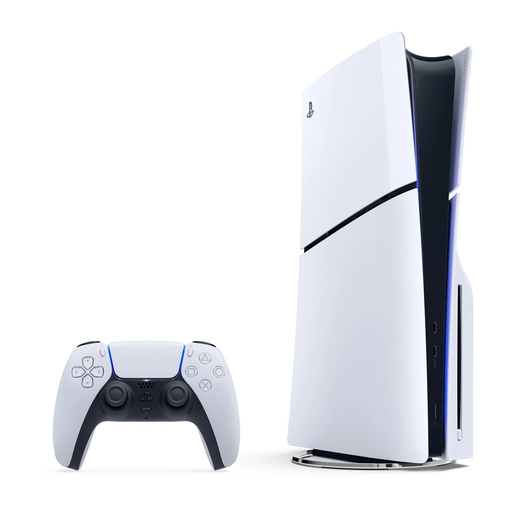 No image available
Ideal if you want to play Kingdom Come: Deliverance II on PS5 and use compatible physical games.
Version with a disc drive; the product name specifies 1 TB of storage.
The UK game pages for PlayStation and Xbox list PS5 and Xbox Series X|S. These listings don’t confirm a Switch 2 version, so check the platform for every game on your list.
Nintendo specifies HDMI video output via the dock, with a maximum output of 3840 × 2160 at 60 fps. Check that your screen supports the connection and display you want. The maximum output specification doesn’t tell you what resolution an individual game will reach.
No. Nintendo’s game-key cards don’t contain the game itself, so you’ll need to download it first. Check that you have enough free system storage, or whether you need a compatible microSD Express card.
If you have problems with heat, Nintendo recommends placing the dock in an open, well-ventilated space, away from heat sources. This is the manufacturer’s advice on placement and troubleshooting.
According to the Dutch government, you’re entitled to a product that works as it should when you buy it, and you can ask the seller to resolve any problems. When you buy at a distance, you’ll often have a 14-day cooling-off period. Check the terms and exceptions that apply to your purchase.