
Family with a regular games night
Wants accessible games with local play modes on one TV, and checks how many players each title supports and which controllers are needed.


Start with the games you want to play together on one TV, then check each title’s local play modes, player count and controller requirements. Nintendo Switch models with TV mode, PlayStation 5 and Xbox Series X|S each offer different game libraries. Also factor in the games you already own, the picture quality you want and whether you prefer discs or downloads.
Wants accessible games with local play modes on one TV, and checks how many players each title supports and which controllers are needed.
Wants games to play together or against each other on the same screen, not just titles with online multiplayer.
Want to know whether their games on disc or as downloads will work with the console edition they’re considering, and whether their controllers are compatible.
Choose this option if: you want to play Nintendo games such as Mario Kart World on your TV, but also want the option to play without one.
Bear in mind: the Joy-Con 2 controllers don’t automatically function as two full player controllers in every game; check the setup for each title.
Choose this option if: the games you want are available for the original Switch and playing on a TV matters to you; the OLED model has a dock with HDMI.
Bear in mind: the OLED screen is the built-in display, so it won’t automatically improve the picture on your TV. According to Nintendo, the Switch Lite doesn’t support TV mode.
Choose this option if: the local games you want are available on PS5; a disc edition is a good fit if you want to use compatible physical games.
Bear in mind: the standard edition with a disc drive comes with one DualSense controller; the Digital Edition only plays digital games.
Choose this option if: the local Xbox games you want are available; for example, Overcooked! 2 lists local co-op for two to four players on Xbox Series X|S.
Bear in mind: Series S is disc-free. Microsoft lists 4K gaming resolution for the Series X models compared here and 1440p for Series S; the game and TV also affect what you actually see.
| What to consider | What should you check? | Who is this relevant to? |
|---|---|---|
| Suitable games | Check the platform, local play mode and maximum player count for the specific game. | For a games night, I want to be sure everyone can join in on the same screen, not just online. Around 33% of consumers give priority to games suited to their group. |
| Controllers for your group | Check how many controllers are included in the exact bundle and how many the game you want requires; also check whether your existing controllers are compatible. | If everyone needs to be ready to play straight away, I want to make sure the controller setup suits both the group and the game. Around 27% of consumers prioritise having enough suitable controllers. |
| Picture on your TV | Compare the stated output with your TV and the games you want to play; a console’s maximum specifications don’t automatically apply to every game. | If picture quality on a big TV matters to me, I want to know what the games I’ve chosen and my TV support. Around 20% of consumers say picture quality is their main consideration. |
| Discs and total cost | Check whether the edition has a disc drive and what’s included in the bundle; also factor in the games and controllers you’ll need. | I want to keep using my existing physical games and know in advance what else I’ll need. Around 20% of consumers focus on the edition and the total they’ll need to buy. |
Local multiplayer can also mean that players use separate systems. Online play, local wireless play and shared-screen play are different setups.
Before choosing a console or bundle, check the local play mode and player count for the exact game.
The controller setup varies from game to game. So the number of controllers in the box doesn’t, on its own, tell you how many people can play that title.
Check both the game’s requirements and what’s included in the specific bundle. You may need extra controllers.
The PS5 Digital Edition and Xbox Series S don’t have a disc drive. You can’t play compatible physical games from disc on these editions.
Check your existing game collection and the exact edition before you decide.
The OLED screen on the Switch OLED is the built-in display. Nintendo states that Switch 2 supports output of up to 4K at 60 fps when both the game and TV support it.
Check the TV output, support for the games you want and your own TV separately.
Nintendo Switch models offer local games and TV mode on compatible editions. According to Nintendo, the Switch Lite doesn’t support TV mode.
PS5 is a TV console with games for local multiplayer; choosing between a disc drive and a Digital Edition determines which game formats you can use.
Xbox Series X and Series S offer games for local multiplayer, among other options; the disc drive and stated picture specifications vary by edition.
These Joybuy products include Nintendo Switch models and PlayStation 5 editions for use with a TV, with both disc and digital options. Check the local play mode and controller requirements for each game.
 No image available
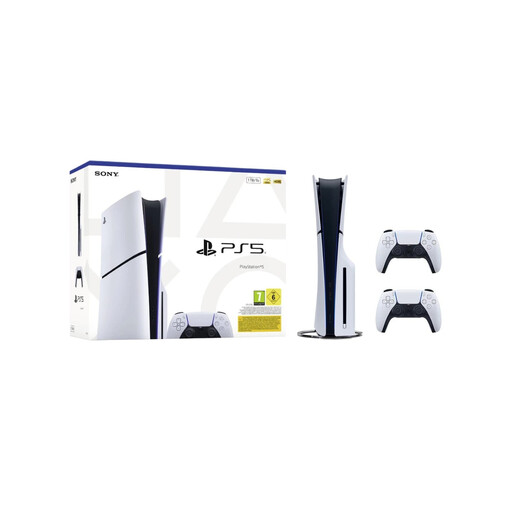
A good fit if you’re looking for a PS5 disc console with two controllers in the bundle for playing together.
The product information lists a disc console, 1 TB of storage, two DualSense controllers and local multiplayer.
 No image available
A good fit if you’re looking for a Switch bundle with a dock and a stated local split-screen mode for TV play.
The product information lists Mario Kart 8 Deluxe on a game card, Joy-Con controllers and split-screen for up to four players in TV mode.
 No image available
A good fit if you’re looking for a Switch 2 bundle with a dock, TV mode and Mario Kart World as a digital game.
The bundle lists 256 GB of storage, a dock and a three-month Nintendo Switch Online subscription. Check the game’s local play mode and controller setup.
 No image available
A good fit if you’re looking for a Switch 2 for TV play, with the option to play away from the TV too.
The product information lists a dock, TV mode and Joy-Con 2 controllers. Nintendo states that 4K TV output supports up to 60 fps when the game and TV support it.
 No image available
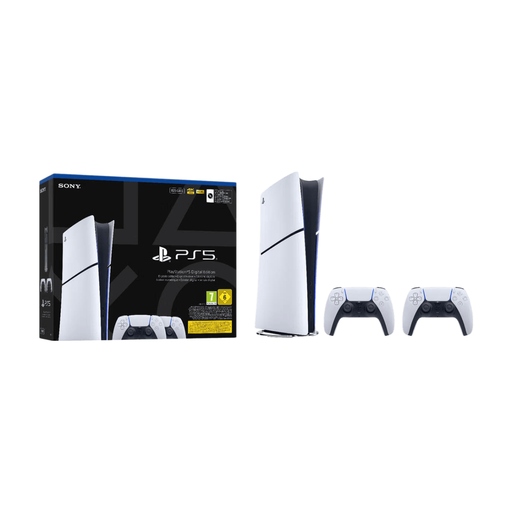
A good fit if you’re looking for a digital PS5 edition with two controllers for a TV setup.
The product information lists two wireless DualSense controllers and an HDMI connection to a TV. The Digital Edition plays digital games, not discs.
No. Local multiplayer can also mean playing on several separate systems. If you want to share a TV, check the play mode and player count for the game you’ve chosen.
Connect the power supply and HDMI cable to the compatible dock, select the right HDMI input on your TV and place the console in the dock. If needed, sync any separate Joy-Con controllers first. According to Nintendo, the Nintendo Switch Lite doesn’t support TV mode.
A subscription for online multiplayer isn’t automatically required for a local play mode. PlayStation lists PlayStation Plus for online multiplayer; check the terms for the specific game and remember that online play and local multiplayer are different.
Check the maximum number of local players and the required controller setup for each game. Then compare this with the number of controllers in the exact console bundle; the bundle contents alone don’t tell you how many players a game supports.
No. An edition without a disc drive can’t play games from physical discs. Check the exact edition and the format of your existing games before choosing a digital console.