
Players with specific story-driven games in mind
First, choose the adventure games you want to play and check which platform versions are available. Then compare the consoles that support those games.


Start with the adventure games you want to play, then check which platforms and versions they’re available for. Next, choose a console to suit your monitor, the space around your desk and whether you prefer discs, downloads or handheld gaming. The PS5 and Xbox Series X are available with a disc drive, the Xbox Series S is digital-only, and the Switch 2 can also be used as a handheld. The advertised picture capabilities depend on the game and the screen.
First, choose the adventure games you want to play and check which platform versions are available. Then compare the consoles that support those games.
You want to play cinematic games on your home office screen, so you’ll need to consider its connections and capabilities, as well as the space available for the console.
You want to play at your desk sometimes and elsewhere at other times. Handheld use and compatibility with your existing games are therefore worth considering.
Start with what matters most for the way you play: access to the games you want, a suitable monitor setup, handheld gaming, or the implications of digital access and any accessories you’ll need.
| What to consider | What to look for | Who will care most about this? |
|---|---|---|
| Game availability | Check the supported platform and the correct game version for each title you want; don’t assume older Switch games are fully compatible. | I want to know whether my adventure games are playable before choosing a console; around 40% of consumers say game availability is their main concern when buying. |
| Picture quality and placement | Check your monitor’s resolution, refresh rate and connections, as well as the space around the console. | I want to make sure my screen and desk work well with the console, without forgetting to leave room for ventilation; around 31% of consumers give picture quality and placement top priority. |
| Playing away from your desk | Consider whether you want to play in handheld mode, and check whether you’ll need a stand or dock to use an external screen. | I want to switch between my home office and another place to play; around 15% of consumers prioritise portability. |
| Games, storage and accessories | Compare the exact disc and storage options, and check which accessories you’ll actually need. | I want to factor in digital games and any storage or accessory choices in advance; around 14% of consumers say the total cost of use is their main buying concern. |
The result depends on the console version, the game and the screen. The Xbox Series S is designed for 1440p, with possible upscaling to 4K. That isn’t the same as native 4K output.
Check the capabilities of the specific game and monitor before choosing based on resolution. For Switch 2, 4K output is only available with supported games and a compatible screen.
The PS5 Digital Edition and Xbox Series S models we looked at don’t have a disc drive. The Xbox Series X is also available as a digital version.
Check whether the exact version has a disc drive and whether it suits the games you already own.
Nintendo states that a compatible microSD Express card is sold separately. Valve describes a dock for connecting a Steam Deck to an external screen.
Check what’s in the box, and only add the accessories you need for your gaming setup.
You may need to buy a compatible microSD Express card for Switch 2 or a dock for Steam Deck separately.
A PS5 option for players whose chosen adventure games are available on PlayStation and who want to choose between discs and digital games.
Series X and Series S options for players whose chosen games are available on Xbox.
Switch 2 combines handheld gaming with play on an external screen, provided your chosen games are available and compatible.
Steam Deck OLED is a portable PC gaming option for players who want to use their own Steam games and check compatibility for each title.
This selection includes PS5 consoles and systems for handheld gaming or connecting to an external screen. Always check the platform and compatibility of the exact version for the adventure games you want to play.
 No image available
Ideal if you want to play in handheld mode and connect to an external screen.
8.8-inch OLED touchscreen; USB4 with DisplayPort 2.1.
 No image available
An option for a dedicated gaming setup if digital PS5 games suit your needs.
825 GB SSD; no disc drive. Games are bought and downloaded digitally.
 No image available
Suitable for handheld gaming, with the option to connect to an external screen.
Windows 11; 7-inch FHD touchscreen; 16 GB RAM and 512 GB SSD.
Charger not included; must be purchased separately.
 No image available
For players who want to switch between handheld gaming and play on an external screen.
Built-in 7.9-inch screen; output of up to 4K in docked mode, with a suitable game and compatible screen.
Nintendo states that not all original Switch games are supported or fully compatible.
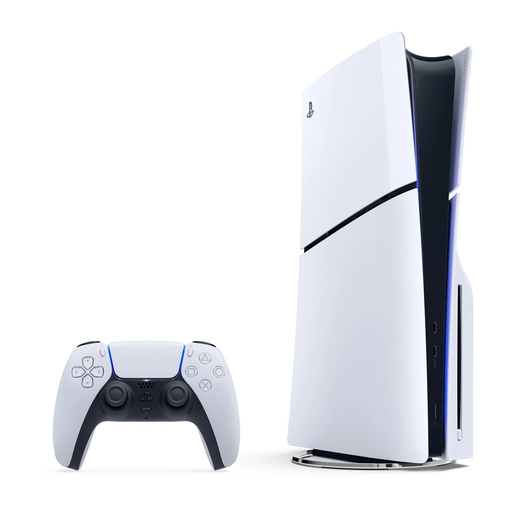 No image available
An option for a dedicated gaming setup if you want to use compatible physical games.
Disc drive and 1 TB SSD.
No, that’s not a general requirement for playing adventure games. It only matters if you want to use those output capabilities and the game, monitor and connection support them. For Switch 2, Nintendo specifies a maximum of 60 fps at 4K; Microsoft lists additional HDMI requirements for 4K at 120 Hz on Series X.
Microsoft advises against it. Its setup instructions recommend a stable, cool location with at least 10–15 cm of clearance on all sides and no blocked ventilation openings.
It depends on the game and the feature you want to use. For the PS5 version we looked at, Sony states that a paid PlayStation Plus subscription is required for online multiplayer; this doesn’t mean a subscription is required for every single-player game. Microsoft lists Game Pass Ultimate as available separately with the Series S we looked at.
According to the Dutch government, if there’s a problem with a product, the seller must provide a solution. For distance purchases, the seller must give you information about your cancellation period, which is usually 14 days. Check the terms that apply to your specific order.
The Dutch government describes age ratings for computer games, and PEGI explains that its classification is a guide to the suitability of the content, not the difficulty level. This information doesn’t establish a general legal minimum age for buying a console. For games for children, check the rating for the specific title and set up parental controls if needed.