What should you look for when watching concert films from a distance?
The app on your TV
Choose this option if: the concert film you want is available through a working app on your TV, and the picture, sound and connection meet your needs.
The trade-off: TV apps vary by model and may disappear later; this option won’t change your screen size or viewing distance.
A streaming stick over Wi-Fi
Choose this option if: you want to add a missing app, have a spare HDMI port and get a good Wi-Fi signal by your TV.
The trade-off: built-in Ethernet isn’t a given. Also check the exact version and which apps it supports.
A streaming box with Ethernet
Choose this option if: you want a separate app platform and have a reliable wired network connection by your TV.
The trade-off: a box needs space and connections. Check whether an HDMI cable is included and which generation you’re looking at.
Let your main priority guide your choice: seeing the picture from your sofa, accessing the film you want, getting the right sound or having a stable connection.
| Concern |
What to look for |
Who is this important to? |
| Seeing the picture from a distance |
Consider the screen resolution, the title you want to watch and where you sit. Sony Netherlands says the recommended viewing distance depends on screen size and resolution. |
If I want to see details and subtitles clearly from the sofa, I’ll check my screen and seating position first. Around 29% of consumers say visibility is their main buying concern. |
| Access to the concert film |
Check whether the title is available from a Dutch provider and whether the app works on your TV or streaming device. The Consumers’ Association notes that smart TV apps can disappear. |
If I want to watch a specific concert film, I’ll start by checking that the title is available and the app works. Around 29% of consumers prioritise access to the film they want. |
| Sound through your system |
Check the title’s audio options and whether your player and sound system support them. Netflix Help Centre lists Dolby Atmos for selected titles. |
If I want to play the sound through my soundbar or receiver, I’ll check the whole connection set-up. Around 24% of consumers prioritise getting the right concert sound. |
| A stable connection |
Test the Wi-Fi by your TV and check your streaming service’s recommendation. Netflix Help Centre recommends a speed of 15 Mbps or higher for 4K UHD streams. |
If interruptions during a long performance would be a problem for me, I’ll check the connection where my player will be. Around 18% of consumers say connection stability is their main buying concern. |
Products for streaming and projection
These products combine projection with built-in streaming features, for watching concert films on a projector screen. Visibility still depends on the screen and your viewing position. This is a different set-up from connecting a separate streaming device to your existing TV.
 No image available
XGIMI Vibe One Full HD 1080p projector, Match Night EU Edition
Google TV and projection come together for watching streamed content on a projector screen.
The title lists 250 ISO lumens, JBL Audio, a built-in battery and a projector screen with stand.
View at Joybuy
 No image available
Android 13 Smart Projector 1080P HD, white version
The title lists built-in streaming apps for a set-up that brings streaming and projection together.
The product name lists Wi-Fi 6 and Bluetooth 5.0; the description mentions a 360° rotating stand.
View at Joybuy
 No image available
XGIMI MoGo 4 Full HD 1080p projector, Match Night EU Edition
Google TV is built in for anyone who wants to combine streaming and projection in one device.
The title lists 450 ISO lumens, Harman Kardon Audio and a 2.5-hour battery. The Match Night EU Edition also lists an EA SPORTS FC 26 game code.
View at Joybuy
 No image available
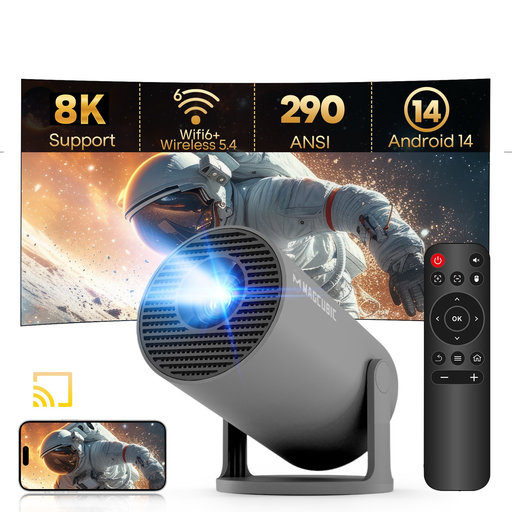
MAGCUBIC HY300Pro mini projector, grey version
The product name lists Android 14 and built-in streaming features for a projector set-up.
The title lists support for 1080P, Wi-Fi 6, Bluetooth 5.4 and 290 ANSI lumens. It also lists a 180° rotating stand.
View at Joybuy
 No image available
Yaber K2s projector with Google TV, native 1080p
Google TV is built into the projector for anyone who wants streaming and projection in one device.
The product name lists Wi-Fi 6, Bluetooth, JBL sound, Dolby Audio, autofocus and keystone correction. It has a native resolution of 1080p and is listed as supporting 4K.
View at Joybuy
Frequently asked questions
Will a 4K streaming device make a concert film look bigger or sharper from a distant seat?
Not automatically. A streaming device won’t change the physical size of your screen; according to Google TV Help, the Google TV Streamer can play video at up to 1080p on a 1080p TV. Consider your viewing position and screen separately.
How do you connect a streaming box if you also use a soundbar?
Check the connection instructions for the exact model and the HDMI ports on your TV and soundbar. Google explains how to connect the TV Streamer to a TV or audio equipment, and gives instructions for using your TV’s eARC port.
Is a 4K stream enough to hear every concert film in Dolby Atmos?
No. Netflix Help Centre lists Dolby Atmos for selected titles and says you need, among other things, a compatible subscription, playback device and Atmos audio system. Availability can also vary by language.
What cooling-off period and guarantee apply to an online purchase in the Netherlands?
For online purchases from a business, you usually have a 14-day cooling-off period. You’re also entitled to a product that works as it should. According to the Dutch Government, there’s no fixed statutory guarantee period in the Netherlands; if a product is faulty, contact the seller.
Can I download or share any concert film recording I find for free?
No. The Dutch Government says that sharing or making copyrighted films available to the public requires permission, and downloading from an illegal source is prohibited. Choose a provider that makes the film available legally; a streaming device doesn’t change those rules.


