What should you look for when choosing?
The app on your existing TV
When is this a good fit? If the concert film and the app you want are already on your TV and play without any issues.
Trade-off: You won’t be adding another device, but support can vary by TV model, app and title. Try the film on your current setup first.
A compact stick over Wi-Fi
When is this a good fit? If you mainly want to add a TV app that’s missing and the Wi-Fi signal by your TV is reliable enough.
Trade-off: You’ll still depend on Wi-Fi and on support for the specific title, app and audio setup.
A separate box
When is this a good fit? If you’re looking for a separate TV player and want the box’s connections or included cable to suit your setup.
Trade-off: Xiaomi Netherlands lists an HDMI cable in the box with the TV Box S (3rd Gen). Google Store Netherlands lists built-in gigabit ethernet for the Google TV Streamer (4K), but the certified HDMI 2.1 cable is sold separately.
When choosing a streamer for concert films in a kitchen-diner, consider whether the title and app are available, whether the picture and sound are supported, how stable your connection is and which extra items you’ll need.
| What to consider |
What to look for when buying |
Who is this most important to? |
| The film and app you want |
Check the exact title, the app on the device and whether a subscription is required. |
If I want to watch one particular concert film, I want to know first whether it’s available in an app on my TV or player. Around 36% of this group put the title and app first. |
| Sound and picture |
Check the quality labels for the title and whether your TV, player and audio system support the format you want. |
If I have a soundbar or receiver, I want the film, app and connections to work together to deliver the sound I’m after. Around 29% of this group put sound and picture first. |
| Connection by the TV |
Test the Wi-Fi where your TV is and check whether you can connect an ethernet cable there. |
If my Wi-Fi is unreliable, I want to know whether I can run a cable to the TV before choosing a model. Around 21% of this group prioritise network stability. |
| What else you’ll need |
Check what’s in the box and which cables, accounts or subscriptions you’ll need. |
If I only buy an extra device when it adds something, I also consider cables, accounts and subscriptions. Around 14% of this group prioritise a simple, complete purchase. |
Joybuy products
The Joybuy selection below features projectors with built-in streaming capabilities, not separate TV streamers. Check that the concert film and app you want work, and that projection suits the space you have. The Dutch Authority for Digital Infrastructure states that wireless equipment placed on the market in the Netherlands must meet the applicable European requirements and carry the correct CE marking; check the marking on the specific device.
 Image unavailable
Yaber K2s projector with Google TV
Suited to anyone who wants to open streaming apps directly on the projector instead of connecting a separate streamer.
The product name lists native 1080p, 4K support, Wi-Fi 6, Bluetooth, JBL stereo speakers and Dolby Audio.
Don’t look directly into the lens while the projector is in use, and leave at least 30 cm of clear space around the ventilation openings.
View at Joybuy
 Image unavailable
XGIMI Vibe One, Match Night EU Edition
Suited to anyone who wants to pair Google TV in a portable projector with a projection screen and stand.
The product name lists Full HD 1080p, 250 ISO Lumens, JBL audio and a built-in battery. The stated maximum video playback time on battery is 1.2 hours in Eco mode, which may not be enough for longer wireless viewing.
View at Joybuy
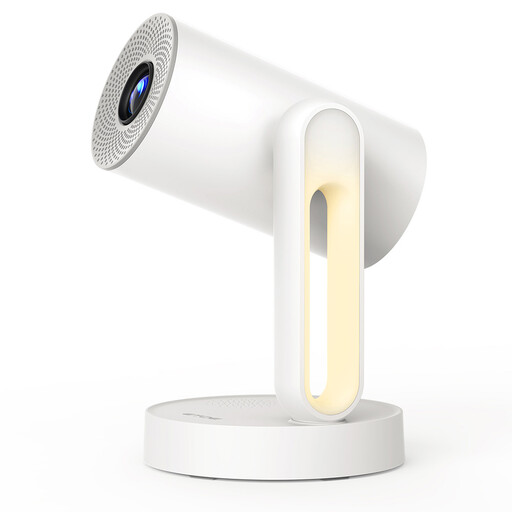 Image unavailable
ETOE Starfish projector with Android TV 11.0
Suited to anyone who wants to use streaming apps through Android TV on the projector and adjust the projection direction.
The product name lists a Bluetooth speaker function, voice-assisted setup and 140° rotation. The stated native resolution is 1280×720; 4K is listed for video decoding only.
View at Joybuy
 Image unavailable
Projector with built-in apps and Play Store
An option to compare if you want to open apps directly on a projector instead of using a separate streamer.
The product name lists Wi-Fi 6, Bluetooth, automatic keystone correction, 180° rotation, a screen size of 50–200″ and digital zoom of 50%–100%.
View at Joybuy
Frequently asked questions
Will a 4K or Atmos streamer play every concert film in 4K or surround sound?
No, not just because of the logo on the streamer. Check the specific title, subscription, and compatibility of your TV and audio system. YouTube Help notes that the 5.1 setting only appears for videos and devices that support 5.1; Netflix Help Centre also explains that requirements vary by title and device.
How can I check for buffering before buying another player?
Test the connection where your TV is and check the speed in the app you use. Netflix recommends a stable connection of at least 15 Mbps for UHD 4K through its service; this isn’t a general requirement for all concert services.
Will I need another cable or account to set it up?
It depends on the model. Google Store Netherlands lists a certified HDMI 2.1 cable, sold separately, for the Google TV Streamer (4K); Xiaomi Netherlands lists an HDMI cable in the box and a Google Account for the TV Box S (3rd Gen). Also check which account or subscription your streaming service requires.
What safety rules and cooling-off period apply when buying online in the Netherlands?
The Dutch Authority for Digital Infrastructure states that wireless equipment placed on the market in the Netherlands must meet the applicable European requirements and carry the correct CE marking; check this on the specific device. According to the Government of the Netherlands, online purchases from a business generally come with a 14-day cooling-off period, and it also outlines consumers’ rights to security updates for smart devices. These general rules don’t confirm that an individual device has been checked.


