Who is this choice right for?

Beginner sewing independently

You want to get started at a steady pace on a school project, keep the speed under control and stay on top of short seams. If a young learner will be sewing independently, pay particular attention to the controls and safety features of the specific model. For example, Brother lists speed control and a finger guard for the KD40s.

Maker sewing lots of patchwork seams

You’re joining lots of pieces of fabric and want a consistent seam allowance. Check which foot suits the required seam allowance and how the fabric is guided. For the 230DC Limited Edition, Janome lists an optional 1/4-inch seam foot.

Maker of large panels

You need to support a growing panel alongside the needle and have enough room to manoeuvre the fabric. Janome and BERNINA list an extension table for specific models; for the 435, BERNINA also specifies 18 cm of space to the right of the needle.

What should you look for when buying?

Easy controls for beginners

Choose this when: learning to use the machine and keeping the speed manageable matter more than having lots of decorative stitches. Brother lists both features for the KD40s.

Trade-off: a beginner model isn’t automatically the right choice for your project’s workspace or patchwork foot.

Space and support for panels

Choose this when: you’re making larger panels and need extra support. Janome lists an included extension table with the 230DC Limited Edition.

Trade-off: the 1/4-inch seam foot mentioned is optional; check that it suits the seam allowance required for your project.

More workspace for larger projects

Choose this when: your panel needs plenty of space alongside the needle. BERNINA lists an extension table for the 435, with 18 cm of space to the right of the needle.

Trade-off: you won’t need that extra space for every school project; compare your project’s dimensions with the machine.

What to consider What should you check? Who is this important for?
Consistent patchwork seams Check that the foot suits the required seam allowance, the machine and the stitch you’ve chosen. The Janome foot described is designed for a straight stitch with the needle in the centre position. When I’m joining lots of pieces of fabric, I want to keep the seam allowance consistent each time; around 36% of consumers prioritise consistent patchwork seams.
Controls while learning Look at the speed control and other controls, and read the manual for the exact model. If a young learner will be using it, also consider which safety features and level of supervision are appropriate. While I’m still practising short seams, I want to control the speed and understand the controls; around 29% of consumers prioritise controls that are suitable for learning.
Space for the panel Compare the workspace to the right of the needle with the panel’s dimensions, and check whether an extension table is included. As my panel gets bigger, I want to be able to support and manoeuvre the fabric; around 21% of consumers prioritise space for larger panels.
Accessories and total project costs Compare what’s included with the exact model against the feet you need, and check that optional accessories are compatible. I want to know in advance whether the machine and the accessories I need are right for the project; around 14% of consumers prioritise accessories and total project costs.

Avoiding common buying mistakes

  • Assuming a 1/4-inch seam foot is included as standard

    Janome lists the foot in question as optional. For the transparent foot described, Janome also specifies a straight stitch and the needle in the centre position.

    Follow the seam allowance required for your school project and check what’s included, compatibility and the instructions. You may need to buy a suitable foot separately.

  • Comparing only the number of stitches

    More programmes don’t automatically tell you how easy the machine is for a beginner to use or how well its features suit your patchwork project.

    First compare the speed control, the other controls, the fabric guidance you need and the support for the panel. Then see whether extra stitches would be useful for your design.

  • Assuming a beginner model is right for every learner

    Speed control or a finger guard on one model doesn’t replace considering the user, the manual and the supervision needed.

    Decide who’ll be using the machine, then check the features and instructions for the exact model.

Brands to compare

Brother

The KD40s may suit a beginner who wants to learn to sew independently; the computerised Innov-is A50 is an alternative if you’d like more decorative stitches.

  • Brother lists speed control and a finger guard for the KD40s. For the Innov-is A50, Brother lists adjustable stitches and speed control.
  • The patchwork foot set for the Innov-is A50 is listed as an optional accessory. These features apply to the models mentioned, not every machine from the brand.

Janome

The 230DC Limited Edition is worth comparing if an included extension table and access to suitable seam feet are important to you.

  • For this model, Janome lists an adjustable presser-foot pressure control and an extension table.
  • The 1/4-inch seam foot mentioned is optional. Check which version and feet are included with the offer.

BERNINA

The BERNINA 435 is worth comparing if larger panels need more space alongside the needle.

  • For the 435, BERNINA lists an extension table, adjustable presser-foot pressure and 18 cm of space to the right of the needle.
  • Check compatibility for each patchwork foot. The #97D foot mentioned is designed for 9-mm machines with the BERNINA Dual Feed system.

PFAFF

Models with IDT fabric feed are worth comparing if integrated feeding from above and below is important to you.

  • PFAFF describes IDT as an integrated system that feeds fabric from above and below.
  • This is the manufacturer’s description, not an independent performance test. For a specific model, check the version and which feet are included.

Sewing machines at Joybuy

This selection at Joybuy is aimed at beginners looking for an electric sewing machine. Check that the controls and included accessories suit your school project.
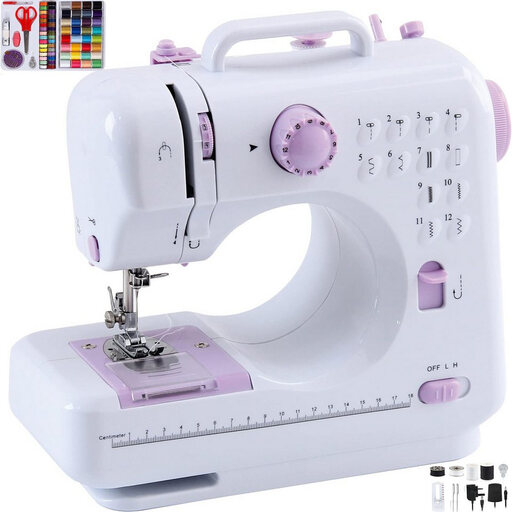
Electric sewing machine for beginners with 12 stitch programmes

Electric sewing machine for beginners, 12 stitch programmes

May suit a beginner who wants to choose between a foot pedal and a hand switch; check which control works best for the user.

Features listed: dual thread, 2 speeds, forward and reverse sewing, foot pedal and hand switch, LED light and thread cutter.

View at Joybuy

Frequently asked questions

Do I need lots of decorative stitches for patchwork panels?

Not necessarily. First check the seam allowance required for your project and whether the machine is easy to use with a suitable foot and stitch. Extra decorative stitches are most useful when embellishment is part of the design; they don’t replace the need to control your seams.

How do I start sewing safely and change a foot?

First read the manual for the exact model and follow its instructions for changing a foot. In its guide to setting up a sewing machine, Brother recommends switching the machine off before checking that the presser foot is attached. If a young learner will be using it, also consider the controls and the supervision needed.

Should I buy a walking foot or quilting foot separately?

Only if the method you’ve chosen requires one and it’s compatible with your model. Janome lists a quilting set with a walking foot and fabric guide that’s suitable for models including the 230DC; check with the retailer whether the set is included with the version you’ve chosen.

What are my rights when buying online or if a product is faulty?

For an ordinary online consumer purchase, you’ll generally have a 14-day cooling-off period from delivery, subject to legal exceptions, according to ACM ConsuWijzer. You also have rights against the seller if a product doesn’t meet the legal requirements; any manufacturer’s warranty doesn’t replace those statutory rights.

What should I know about Dutch product safety rules?

CE marking is required for products covered by EU rules that make the marking mandatory, according to Your Europe, the European Union’s official website. Check the relevant marking and safety information for the model on offer. A CE mark doesn’t automatically make a machine suitable for every learner or school project.
