What should you look for when choosing?
Controls for shared use
A good fit when: several users want simple controls for speed and stitch selection, for example on the Brother Innov-is A16 or Janome M30A.
Consider: the control features listed don’t, by themselves, tell you how the machine will handle your thickest seam crossing.
Extra adjustments for varying layers
A good fit when: you regularly work with outer fabric, lining and padded sections, and want to compare features such as the presser-foot pressure on the Janome 230DC Limited Edition or the feed system on the Brother Innov-is F400.
Consider: these manufacturer descriptions don’t guarantee a good result with every fabric combination, so a test seam is still essential.
More features for a range of projects
A good fit when: users also make other projects and want to save stitch settings, for example—a feature BERNINA describes on the 335 (Gen. 2).
Consider: a wider choice of stitches doesn’t prove that a machine will handle a simple glasses case better. Check that the controls are practical for everyone in the group.
Start with what the group needs every day: controls everyone can follow, good control on short seams and a test using the case materials. Then compare extra adjustments and stitch options.
| What to consider |
What to look for |
Who will find this most important? |
| Feeding layers of fabric |
Bring samples of the outer fabric, lining and padding. Test the thickest seam crossing too, using a suitable, sharp needle. |
If I mainly want to know whether the layers and seam crossing can be sewn together, I want to try that combination myself. Around 36% of consumers give feeding layers the highest priority. |
| Controls for multiple users |
Check that all users can understand the stitch selection, speed control and any start/stop function. |
When different people use the same machine, I want to be able to find and repeat settings easily. Around 29% of consumers prioritise shared controls. |
| Control on short seams |
Try sewing a corner and check the speed, needle-stop position and options for securing the seam. |
On short side and bottom seams, I want to be able to stop and turn slowly without losing the fabric’s position. Around 21% of consumers place the greatest importance on control at short seams and corners. |
| Maintenance and aftercare |
Check which presser feet and accessories are included, and agree who will replace needles and record settings. |
At a shared worktable, I want to know in advance who will look after the parts and how repairs will be arranged. Around 14% of consumers put maintenance and aftercare first. |
Joybuy products
The Joybuy products below are electric sewing machines whose product titles mention features including speed selection and different sewing options. Check that the controls and features suit your shared studio, and make a test seam using your intended materials.
 No image available
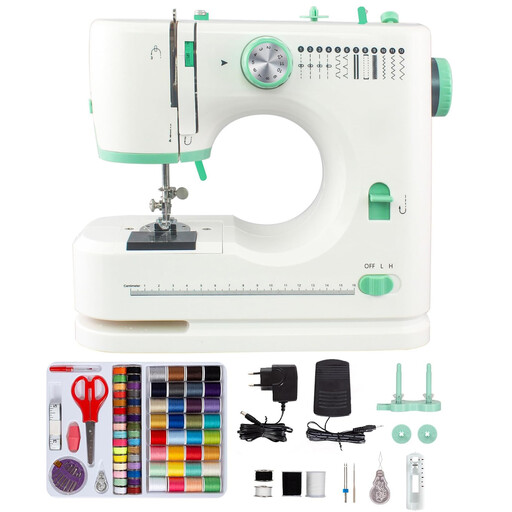
Multifunctional mini electric sewing machine, 12 stitch types, single and twin needle, 2 speeds, sewing kit
May be worth considering if you’re looking for an electric sewing machine with several speed settings. Test whether the controls suit the people using it in your studio.
The product title lists 12 stitch types, a single and twin needle, 2 speeds and a sewing kit.
View at Joybuy
 No image available
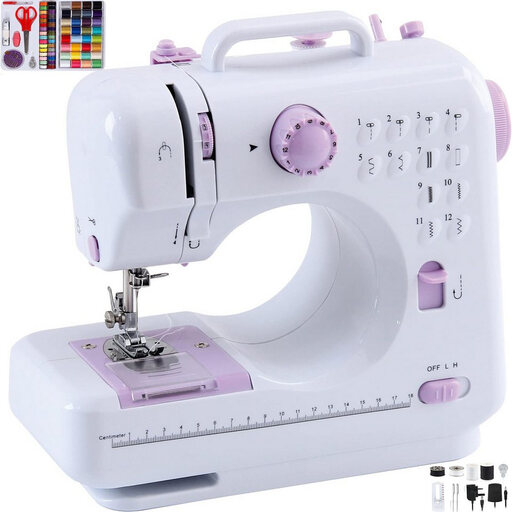
Electric sewing machine for beginners, 12 stitch programmes, 2 speeds, foot pedal and hand controls
May suit you if you want to compare different control options. Check that the controls available fit the arrangements in your studio.
The product title lists 12 stitch programmes, double-thread sewing, forward and reverse sewing, a foot pedal and hand switch, an LED light, thread cutter and accessories.
View at Joybuy
Frequently asked questions
Do you need lots of decorative stitches for a glasses case?
Not for the basic pattern described, with stitched side and bottom seams. Compare the controls first and make a test seam using the outer fabric, lining and thin padding. Extra stitches are mainly useful if you also make other projects.
How do you get started with a new material in a shared studio?
First, make a test seam using the same combination of fabric and padding, including a seam crossing. Brother recommends choosing a needle type and size to suit the fabric, and using a sharp, unworn needle. Note down the settings you choose for the next user.
Who arranges repairs if the machine breaks down?
For a qualifying consumer purchase, ACM ConsuWijzer says the seller is responsible for the statutory guarantee if a product is faulty. A purchase used mainly or exclusively for business isn’t automatically covered by the same consumer protection. Establish in advance who the contracting party is and what arrangements apply with the seller.
What safety rules apply to an electric machine in a shared studio?
For equipment covered by the EU Low Voltage Directive, including equipment with a rated AC voltage of 50 to 1,000 V, EUR-Lex sets out safety requirements and CE marking. Check the specifications of the specific appliance. If the studio has an employer and the machine is work equipment, that employer must determine, in accordance with Arboportaal, whether an installation or periodic inspection is required. Shared hobby use alone doesn’t establish that such an inspection is mandatory.


