
Vandaag of morgen in huis

Kwaliteit gegarandeerd

Welkomstaanbiedingen ontgrendelen: GRATIS bezorging | Tot 80% korting | Gratis 30 dagen JoyPlus-proefperiode
Download de app
A computer desk needs to do more than support a monitor and keyboard. People working from home, students, school pupils and gamers often use their desk for hours at a time. Yet many buyers focus mainly on colour and price. This can lead to practical problems: insufficient legroom, a wobbly frame or a desktop that cannot accommodate cables, books and equipment.
Use these checkpoints to compare a computer desk based on objective features. This helps ensure that appealing marketing language does not matter more than size, load capacity and ease of use.
A desk measuring 80 x 50 cm fits easily into a bedroom or student room. However, with a monitor, laptop stand, keyboard and notebook, the desktop can quickly become crowded. So check not only the external dimensions, but also how much space you actually need.
A compact desk may be sufficient for a basic laptop setup. Anyone working with a monitor, printer or multiple screens is more likely to need a large desk or a corner setup.
A desk may look sturdy but still wobble on an older wooden floor, laminate or tiled flooring with slight height differences. Adjustable desk legs or adjustable feet can help align the frame more effectively.
Also consider the materials. A combination of a metal frame and a chipboard or MDF desktop may be suitable for everyday use, but always check the specified maximum static load. Do not automatically place heavy equipment on just one side of the desktop.
Open shelves are useful for books and accessories, while drawers are better suited to documents and small items. A desk with drawers or desk with storage can reduce clutter, but it often takes up more floor space too.
With a corner desk, it is also important to consider which side the drawers or shelves are on. A reversible design gives you more flexibility when arranging the room.
A standard working height is often around 75 cm, but the correct height depends on your chair, height and posture. Check that you have enough room for your knees beneath the desktop and that armrests do not collide with the frame.
Pay attention to these measurements:
For a home-working desk, having at least enough room for a monitor, keyboard, mouse and documents is practical. A study-room desk should also provide space for books and writing materials.
Look at the combination of materials rather than relying solely on terms such as “sturdy” or “durable”. A metal frame can provide additional support. With a chipboard desktop, its thickness and the way it is attached to the frame are relevant.
According to the product information, the JOYFURNOS desk has a maximum static load capacity of 50 kg, with a steel frame and particleboard desktop. The same stated load capacity is given for the Writing Desk model. This is a product specification, not a guarantee that every setup or floor will provide the same level of stability.
A product description may quote a high capacity. So also check:
For a gaming desk, a headphone hook, monitor stand, PC holder or cable grommet are practical additions. When it comes to built-in power points and USB ports, pay attention to the safety instructions. Keep liquids away from electronic components and unplug the desk before cleaning it.
An L-shaped desk makes efficient use of a corner and can create two work zones. Before buying, check the orientation, the available wall dimensions and the space needed for the chair. Not every corner desk can be positioned on either the left or right side of the room.

Why it suits this profile: The compact 80 x 50 cm size is practical for a bedroom, student room or simple home workspace. According to the product information, the desk is suitable for work, study and gaming.
The stated dimensions and maximum static load capacity of 50 kg make the available space and load easy to assess in advance. The adjustable feet are designed to compensate for minor unevenness.
80 x 50 cm, black design, steel frame, particleboard desktop and adjustable feet.

Why it suits this profile: This spacious 160 x 80 cm desk accommodates a monitor, laptop, printer and writing materials. It suits professionals or people working from home who want one large desktop without a corner configuration.
The full dimensions, stated weight of 26 kg and adjustable feet provide more information than a general claim about stability. However, check the floor and how your equipment is distributed.
160 x 80 cm desktop, metal frame, two additional supports and adjustable feet.
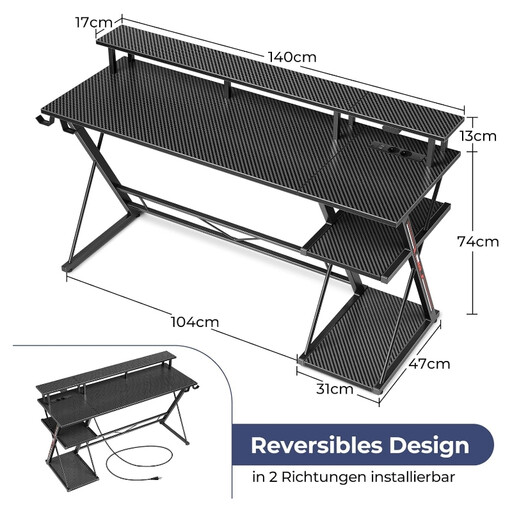
Why it suits this profile: According to the product information, gamers and users with multiple devices can make use of a monitor stand, headphone hook, CPU stand, RGB lighting, two power sockets and two USB ports.
The accessories are listed clearly, so you can check whether they are compatible with your equipment. According to the product information, the CPU stand is suitable for towers up to 47 cm; do not exceed the recommended load.
140 cm width, CPU stand, monitor stand, headphone hook and integrated connections.
Assemble the desk on a level surface and only partially tighten the screws at first, before aligning the frame properly. After a few days, check that all the connections are still secure. This is particularly important for a desk that is moved daily or subjected to heavy loads.
For a particleboard desktop, use a soft, slightly damp cloth and avoid harsh cleaning products. With a gaming desk featuring lighting, USB ports or power sockets, the connections must not get wet. Do not place liquids next to the electronic components.
If you are looking for a stable desk, it is worth measuring your chair, monitor and PC beforehand. This helps prevent a table that appears suitable on paper from proving awkward in the room.
We have put together a complete, up-to-date list of products that fully meet these strict selection criteria and the applicable European safety regulations.
For a laptop and one screen, 80 x 50 cm may be sufficient. For two screens, a printer or lots of study materials, a deeper or wider desktop is more practical. Also measure the available wall and floor space before ordering.
Place the desk on a level floor, distribute heavy equipment evenly and adjust the feet carefully. Also check that all frame connections have been assembled correctly. A corner desk needs sufficient support on both sides.
A standard desk without electronics does not use electricity itself. With a gaming desk featuring RGB lighting, USB ports or built-in power sockets, consumption depends on the connected devices and how long they are used. Switch off the lighting and connections when you do not need them.
