
Vandaag of morgen in huis

Kwaliteit gegarandeerd

Welkomstaanbiedingen ontgrendelen: GRATIS bezorging | Tot 80% korting | Gratis 30 dagen JoyPlus-proefperiode
Download de app
A computer desk needs to do more than look good in a product photo. It should fit your room, provide enough space for your equipment and remain stable during everyday use. For home workers, students, gamers and families, dimensions, load capacity and cable management are particularly important.
A low-priced desk may seem appealing, but you will quickly notice if you have made the wrong choice. Think about insufficient legroom, a wobbly frame or a desktop that barely fits your monitor, laptop and accessories. Use the points below to compare a computer desk based on verifiable features rather than marketing terms.
An 80 cm-wide desk may be suitable for a laptop or a single monitor, but it can feel cramped when you use a keyboard, documents and a second screen. So make sure you check the depth as well. A depth of 50 cm is compact, while 60 cm or more will generally give you extra room for monitors and cables.
If you are looking for a large 160 x 80 cm desk, you will have considerably more workspace. However, remember to consider the available space and the route the desk will need to take to reach the room.
A stated load capacity does not tell you everything about how a desk performs in use. The floor surface, frame construction and adjustable feet also play a part. A desk with a metal frame and good support may be more stable than a similar model with only a lightweight base.
Also look out for the term maximum static load. This is the weight that the product specifications say the desk can support while stationary. It is not an invitation to lean on or sit on the desk.
A desk with RGB lighting, USB ports or a monitor stand may sound practical, but check beforehand whether the connections are suitable for your equipment. A desk with USB-C, for example, is useful for certain devices, but it does not automatically replace a suitable charger or docking station.
An electric sit-stand desk also needs space around the desktop. Check that the desk will not hit a wall, windowsill or cupboard while it is being adjusted.
Start by measuring the available space. Do not just note the maximum width; also measure the depth and the legroom. For a compact desk for a home office or bedroom, models measuring around 80 x 50 cm are practical. They provide room for a laptop, monitor or study materials without filling the room.
For more intensive computer use, a 120 x 60 cm desktop may offer a better layout. A 160 x 80 cm desk is intended for spacious setups with multiple screens, a printer or documents.
A standard desk is often around 75 to 76 cm high. Check that this suits your office chair and height. A height-adjustable desk offers greater flexibility, allowing you to alternate between working seated and standing. According to the product description from the relevant brand, a model may include memory settings or break reminders; treat these as product features rather than medical functions.
For an electric sit-stand desk, the maximum load, adjustment range and motor information are also relevant. According to the product specifications, the JOYFURNOS model below has an adjustment range of 72 to 120 cm and a maximum static load of 70 kg.
Many affordable desks combine chipboard and steel. This is a common construction, but check the thickness of the desktop and how the frame is attached. Adjustable feet help compensate for minor unevenness in the floor. Even so, place the desk on a flat, stable surface.
Cable management prevents cables from hanging around your legs or getting caught behind the desk. An integrated cable tray, storage pouch or hook can help. With a gaming desk, a headphone hook, CPU holder and monitor stand are also useful details. Check whether these components are included rather than simply shown in the image.

Why it suits this profile: This compact desk for a home office, bedroom or study provides a simple surface for laptop work, homework and everyday computer use.
The dimensions of 80 x 50 x 76 cm and the maximum static load of 50 kg are clearly stated. Adjustable feet help keep the desk stable on a floor that is not completely level.
Steel frame, neutral brown and black finish, and labelled components for assembly according to the product description.

Why it suits this profile: Ideal for professionals or families looking for one spacious workstation for monitors, a printer, writing or a shared home office.
The product information lists the dimensions, a metal frame, additional steel supports and adjustable feet. Always check the stated load in relation to your own equipment.
Spacious 160 x 80 cm desktop and a stated weight of 26 kg; assembly with the supplied Allen key is mentioned.
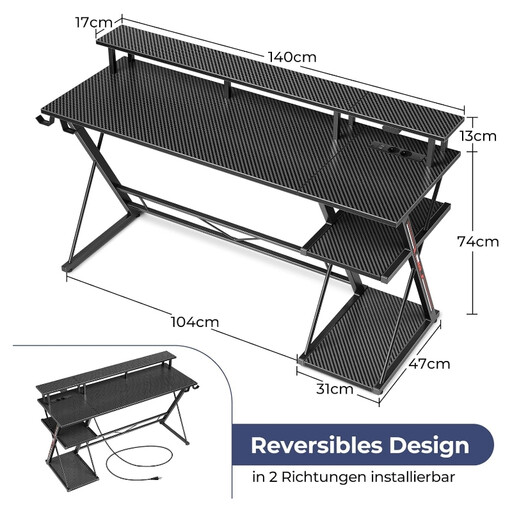
Why it suits this profile: Designed for gamers and users with multiple accessories who want a monitor stand, headphone hook, CPU holder and additional connections.
The features are clearly described: two power sockets, two USB ports, RGB lighting, a monitor stand and a CPU stand. Place the desk on a level surface and keep liquids away from the electronic components.
140 cm-wide desktop, adjustable CPU stand and integrated features for cables and peripherals according to the product description.

Why it suits this profile: A good choice if you regularly switch between sitting and standing and are looking for a desk with USB-C, cable management and storage hooks.
The product information includes the adjustment range of 72 to 120 cm, the maximum static load of 70 kg and warnings regarding overheating. Leave enough space for the moving desktop.
Electric height adjustment, memory function, USB-C port, cable management and three hooks according to the product specifications.
We have put together a complete, up-to-date list of products that fully meet these strict selection criteria and the applicable European safety regulations.
A desk that is easy to assemble is particularly useful if you have little experience with furniture assembly. Check whether the instructions, screws and required tools are included. Initially tighten the connections loosely, then check that the frame is straight before fully tightening everything.
Place the desk on a level surface and observe the stated maximum load. For models with power sockets, USB ports or motors, keep liquids away. Use a soft cloth for maintenance and follow the manufacturer’s instructions.
For a laptop or single monitor, 80 x 50 cm is often sufficient. For a monitor, keyboard, documents and accessories, 120 x 60 cm is more practical. Choose 160 x 80 cm if you use multiple screens or additional equipment and have enough floor space.
Its lifespan depends on the materials, assembly, load and everyday use. A sturdy steel frame, correct installation and avoiding overloading will help limit wear and tear. Check regularly that the screws are still tight and that the desktop shows no signs of damage.
Power consumption depends on the type of motor, how long it is used and its standby mode. An electric desk mainly uses energy while it is being adjusted. Consult the product specifications or manual for the exact power rating, and switch off the power supply when this can be done safely according to the manufacturer.
