
Vandaag of morgen in huis

Kwaliteit gegarandeerd

Welkomstaanbiedingen ontgrendelen: GRATIS bezorging | Tot 80% korting | Gratis 30 dagen JoyPlus-proefperiode
Download de app
A computer desk may seem straightforward to choose at first glance. Yet many buyers are swayed by an attractive design, a low price or an impressive weight capacity without checking whether the desk really suits their space and intended use. A worktop that is too small, wobbly legs or unclear assembly instructions can quickly lead to frustration.
In this buying guide, you can compare the most important features of a desk for working from home, studying and gaming. You will find practical considerations and several product options with verifiable specifications.
A modern desk with a slim top and minimalist frame can work well in a bedroom or living room. However, its appearance tells you little about its stability. Always check the material used for the desktop, the type of frame and how the legs are attached.
A desk with a steel frame can generally provide a sturdy base, but the construction remains important. Additional connections, reinforcements and adjustable feet have more influence on stability than simply having steel in the design.
A desk measuring 80 x 50 cm is suitable for a laptop, monitor and basic accessories, but offers less room for multiple screens or a large printer. A width of 160 cm gives you more freedom, but naturally requires more floor space.
Do not measure only the available wall space. Also take the following into account:
The stated weight capacity is usually a maximum static load. This means the weight is resting evenly and without movement on the desk. It is not an invitation to place heavy equipment on one corner or lean against the desktop.
Also check whether the manufacturer provides information about the weight of the desk itself. A lightweight desk may be easier to move, while a heavier frame is often less likely to shift. Always place the desk on a level, stable surface and do not exceed the stated capacity.
For a compact home office desk or bedroom desk, 80 x 50 cm is a practical size. The available depth of 50 cm is sufficient for many laptops and compact monitor setups, but measure the base of your monitor and the space needed for your keyboard and mouse beforehand.
A height of around 75 to 76 cm is common for fixed-height desks. Check that it works with your chair. Your forearms should be able to rest approximately horizontally while typing. A desk with adjustable legs can help compensate for small differences in the floor, but it is not the same as a fully height-adjustable sit-stand desk.
Many affordable desks combine chipboard with a steel frame. Chipboard is relatively lightweight and suitable for everyday use when the desktop is properly supported. Pay attention to the edge finish and avoid prolonged contact with moisture.
The connections and feet are particularly important when it comes to the frame. Adjustable feet can make a desk more stable on an uneven floor and help reduce scratches on the flooring. However, they will not solve a problem caused by a crookedly assembled frame.
A desk that is easy to assemble should come with clear instructions and recognisable parts. Do not fully tighten the screws during the first step; this allows you to align the frame before tightening everything securely.
After assembly, check:

Why it suits this profile: This compact desk is suitable for a laptop, monitor or simple study setup in a bedroom, student room or small home office.
The product information specifies a steel frame, adjustable feet and a maximum static load of 50 kg. This means you can check these features in advance rather than relying on appearance alone.
Dimensions of 80 x 50 x 75,5 cm, black chipboard top, steel frame and a stated weight capacity of 50 kg.

Why it suits this profile: The spacious desktop can accommodate multiple screens, a printer, writing materials and accessories for a complete home office setup.
The stated construction includes a powder-coated steel frame, additional supports and adjustable feet. According to the product information, the maximum load is 400 kg; use this as a product specification and distribute the weight evenly.
Desktop measuring 160 x 80 cm, height of 75 cm, adjustable legs and assembly instructions stating an assembly time of under 30 minutes.
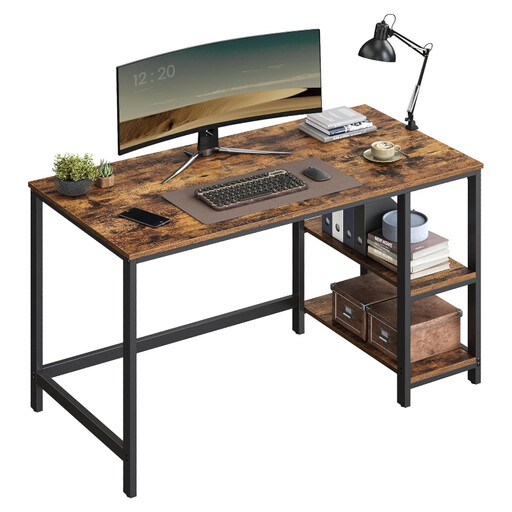
Why it suits this profile: The two adjustable shelves are practical for users who want to organise peripherals, books or accessories alongside the desktop.
The product listing mentions a steel frame and adjustable shelves. Before buying, check the model's full dimensions and weight capacities, as this information is not provided in full in the available description.
Industrial look, steel frame and two adjustable storage shelves for an organised gaming or work area.
Why it suits this profile: The neutral colour combination works well in a bright bedroom, study or living room where a striking gaming desk would not be desirable.
The stated dimensions, materials and maximum static load of 50 kg make comparisons straightforward. The adjustable feet are designed to compensate for small uneven areas in the floor.
Compact dimensions of 80 x 50 x 75,5 cm, chipboard and steel construction, greige with black and a stated weight capacity of 50 kg.
We have put together a complete, up-to-date list of products that fully meet these strict selection criteria and the applicable European safety regulations.
A fixed height of around 75 to 76 cm suits many standard office chairs. Always check this in combination with your chair. Your knees should be able to bend comfortably, and your shoulders should remain relaxed while typing.
Its lifespan depends on the material, assembly, load and exposure to moisture. A chipboard top with a steel frame can be suitable for everyday use when the desk is level, not overloaded and kept dry. Retighten the fittings after a while if they become loose.
A fixed computer desk does not use electricity itself. The ongoing costs mainly come from equipment such as your monitor, computer, lamp and chargers. A desk with a cable tray or storage space can help keep your workspace tidy, but it does not change the energy consumption of those devices.
