Who is this buying guide for?

Someone with a small shared desk

You already have a monitor or have limited space, and want to check whether the computer and video connections will work with your setup. Coolblue describes mini PCs, standard desktops and all-in-ones as different types of desktop computer.

A team sharing the same computer

You share a computer for presentations and want to align accounts, file access and collaboration with the team’s arrangements. Microsoft Support explains user accounts in Windows and collaborating on PowerPoint presentations through OneDrive or SharePoint.

Someone buying a complete workstation

You don’t yet have a suitable monitor and want to know which items come with the computer and what else you’ll need. Lenovo, for example, states that the monitor and keyboard for the ThinkCentre Neo 50q Gen 4 are sold separately.

What should you look for when choosing a computer for a shared desk?

Mini PC

A good fit if: you have limited desk space and already own a suitable monitor.

Bear in mind: a monitor and possibly a keyboard may need to be bought separately; ports vary by model.

All-in-one

A good fit if: you want to buy the computer and monitor as one setup.

Bear in mind: assess the built-in monitor and connections alongside the computer.

Larger desktop

A good fit if: you want to do more demanding computer work as well as presentations, or prefer a larger case.

Bear in mind: a larger case takes up more space than a mini PC; assess the monitor separately.

What to consider What should you check? Who should pay particular attention?
Positioning and monitors Compare the video outputs on the exact model with the inputs and cables on your monitors. Also check whether a monitor is included. If I’m putting a computer on a small shared desk, I want to know whether the case will fit and connect to the monitors. Around 31% of consumers give positioning and monitor connections top priority.
Accounts and collaboration Agree who will manage accounts and access rights. Check where presentation files will be stored and which software is available. If several colleagues use the same computer, I want separate access and to know how we’ll work on files together. Around 25% of consumers prioritise accounts and collaboration.
Software and workload Check the operating system and make sure the required apps and files work in your working environment. Compare the memory and storage on the exact model. If I use presentations alongside other programmes, I want to know in advance whether the apps will suit the way we work. Around 25% of consumers give software and workload top priority.
Complete workstation Check which display and input devices are included. Consider separately which software, subscriptions and services you’ll need. If I’m setting up a workstation from scratch, I want to weigh up the required components and software together. Around 19% of consumers prioritise buying a complete setup.

Avoiding common buying mistakes

  • Comparing only the computer case

    The monitor and keyboard are sold separately with the Lenovo ThinkCentre Neo 50q Gen 4. What’s included in a deal can vary by model.

    Compare the components you need with what’s included with the specific model.

    If you don’t already have a suitable monitor or keyboard, factor them into the cost of your complete workstation.

  • Assuming USB-C will always connect to your monitor

    Available video outputs vary by configuration. So a product range description doesn’t automatically tell you whether the computer you choose will connect directly to your monitor.

    Compare the stated video output with the monitor input and cables for the exact models.

    Depending on the connections, you may need a different cable or adapter.

  • Choosing a Windows 10 computer without a support plan

    Microsoft states that regular support and security updates for Windows 10 ended on 14 October 2025. The fact that a computer still works doesn’t mean its operating system remains supported.

    Check which operating system comes with the model you’ve chosen and how you’ll continue to use supported software.

    Moving to a supported system may mean upgrading or replacing your computer.

Brands to compare

Lenovo

The ThinkCentre Neo range includes small desktops and all-in-ones. The Neo 50q Gen 4 Tiny is one option for a desk that already has a monitor.

  • For the Neo 50q Gen 4, Lenovo lists a compact case, USB-C and HDMI, among other features.
  • The monitor and keyboard are sold separately with this model. Check the ports and included components for the configuration you’re considering.

HP

The Pro Mini 400 G9 is a small business desktop. The 6D494EA#ABH model reviewed here lists Windows 11 Pro, 16 GB RAM and a 512 GB SSD.

  • HP lists flexible port configurations and security features for this product range.
  • These are HP’s descriptions, not independently tested performance claims. Check the connections on the model you choose.

Dell

The Dell Pro Micro QCM1250 is a compact business desktop. The Dutch configuration listed has Windows 11 Pro, 16 GB DDR5 and a 512 GB SSD.

  • Dell positions this model for compact business use and manageability.
  • Dell warns that images may differ from the configuration selected. So check the actual components and ports.

MSI

The Cubi 5 12M is a mini PC range. The 12M-002EU model lists 8 GB RAM and a 512 GB SSD; the configuration details come from an official MSI page in Poland.

  • MSI lists HDMI, DisplayPort and Thunderbolt for the range.
  • MSI says that features vary by configuration. The Polish product page alone doesn’t indicate the terms of delivery in the Netherlands.

Apple

The Mac mini offers a compact macOS option if your presentation apps and working methods are already set up for macOS.

  • Apple lists HDMI, Thunderbolt and apps such as Microsoft 365 and Keynote.
  • Check that your licence, existing files and required working methods are compatible with the model you choose.

Joybuy product picks

This selection includes mini PCs for compact workspaces and an all-in-one for anyone who wants to use the computer and monitor together.

Lenovo Yoga Mini 01IPH11 Copilot+ PC mini desktop

Lenovo Yoga Mini 01IPH11 Copilot+ PC

The mini desktop form may suit a desk with limited space.

This model has a 0.65-litre case. It lists an Intel Core Ultra 5 325, 16 GB LPDDR5X, a 512 GB SSD, HDMI 2.1 and Windows 11 Home.

The description states that it supports up to four monitors; check that the connections will work with your monitors.

View at Joybuy

Lenovo IdeaCentre Mini mini PC

Lenovo IdeaCentre Mini

The mini PC form may suit a compact shared workspace.

The description lists a 1-litre case, 16 GB DDR5, a 512 GB SSD and Windows 11 Home.

The stated connections are HDMI, DisplayPort and Thunderbolt; the description says it supports up to three monitors. Check that it will connect to your monitor.

View at Joybuy
MSI Cubi NUC AI 1UMG-005EU mini PC

MSI Cubi NUC AI 1UMG-005EU

This mini PC is an option to compare if you’re looking for a compact computer for a shared desk.

The product name and description list an Intel Core Ultra 7 155H, 16 GB DDR5, a 1 TB SSD and Windows 11 Pro.

The description states that it supports up to four monitors and VESA mounting; check that the connections and positioning will work with your setup.

View at Joybuy
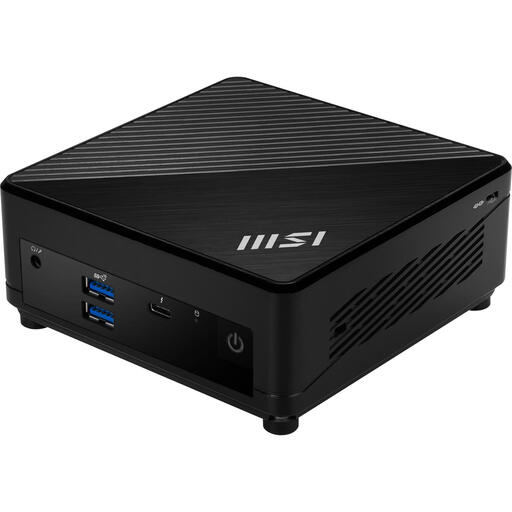
MSI Cubi 5 12M-002EU mini PC

MSI Cubi 5 12M-002EU

The mini PC form may suit a compact workspace where you want to use an existing monitor.

This model lists an Intel Core i5-1235U, 8 GB DDR4, a 512 GB SSD and Windows 11 Pro.

The description lists HDMI and VESA mounting. Check how the complete setup will connect to your monitor.

View at Joybuy

Lenovo Yoga AIO 27IAH10 F0J2001DNY all-in-one desktop with 27-inch QHD monitor

Lenovo Yoga AIO 27IAH10 F0J2001DNY

An all-in-one is a good option if you want to use the computer and monitor as one setup.

This model lists a built-in 27-inch QHD monitor, 16 GB LPDDR5X, a 1 TB SSD and Windows 11 Home.

The description lists an HDMI input, plus a wireless keyboard and mouse as included items. Check the model and connections for your workspace.

View at Joybuy

Frequently asked questions

Can I connect my existing monitor to a mini PC?

That depends on the video output on the exact PC model and the input on your monitor. MSI lists HDMI, DisplayPort and Thunderbolt for the Cubi 5 12M range, but says features vary by configuration. So check the connections and available cables before you buy.

How do we set up a Windows computer for multiple users?

Windows lets you add user accounts. Ask the person managing the shared workstation to decide which accounts and access rights are needed. For collaborating on PowerPoint files, Microsoft Support describes saving them in OneDrive or SharePoint.

What should I consider when positioning and maintaining a mini PC?

Follow the instructions for the model you choose. For example, the Lenovo IdeaCentre Mini product information warns against blocking the ventilation openings and advises disconnecting the power before cleaning. Check the instructions for your own model before following these steps.

Does the manufacturer’s warranty cover the full statutory warranty in the Netherlands?

No. Your statutory rights are separate from any retailer’s or manufacturer’s warranty. According to ACM ConsuWijzer, the retailer must offer a solution if a product breaks sooner than you could reasonably expect under normal use; a stated manufacturer’s warranty period does not automatically limit your statutory rights.

Can I return a desktop bought online within 14 days?

For many distance purchases made by consumers, the Dutch government says there is a 14-day cooling-off period. Check whether it applies to your specific purchase, and don’t assume the same rules apply to a business purchase.
