
Vandaag of morgen in huis

Kwaliteit gegarandeerd

Welkomstaanbiedingen ontgrendelen: GRATIS bezorging | Tot 80% korting | Gratis 30 dagen JoyPlus-proefperiode
Download de app
A good set of computer peripherals can be the difference between a productive workday and pure frustration. But the market is flooded with marketing terms and features that sound better than they are. As a Product Recommendation Officer at Joybuy, I cut through the noise and give you practical advice to choose the right PC accessories, without falling into the usual traps.
Before you make a purchase, it's important to recognise three common marketing traps that often lead to buyer's remorse.
Focus on the specifications that truly matter. These three points are a solid foundation for your choice.
The feel and sound of a keyboard are determined by its switches. A mechanical keyboard provides distinct feedback with every keystroke. The main types are:
Also, consider the size. A full-size keyboard includes a numeric keypad, while a Tenkeyless (TKL) or 60% model is more compact, leaving more room for your mouse.
Don't be misled by extremely high DPI (Dots Per Inch) values. For most users, including gamers, a range between 800 and 3200 DPI is more than sufficient. A higher DPI means a faster mouse cursor, but not necessarily a more accurate one. The quality of the optical sensor is more important.
For a wireless mouse, the connection method is crucial. A 2.4 GHz connection via a USB dongle typically offers the lowest latency and is more stable, which is essential for gaming. Bluetooth is more convenient for use with multiple devices like a laptop or a tablet with a keyboard, but can have a slightly slower response time.
For clear video calls, a webcam for PC with a resolution of at least 720p (HD) is the baseline. For a more professional appearance, 1080p (Full HD) is the recommended standard. Also, pay attention to the frame rate (fps); 30 fps is standard, but 60 fps provides smoother video. Features like automatic light correction are indispensable if you often work in varying lighting conditions, for example when working from home.
Below is a selection of products that suit different user profiles, based on their objective specifications.
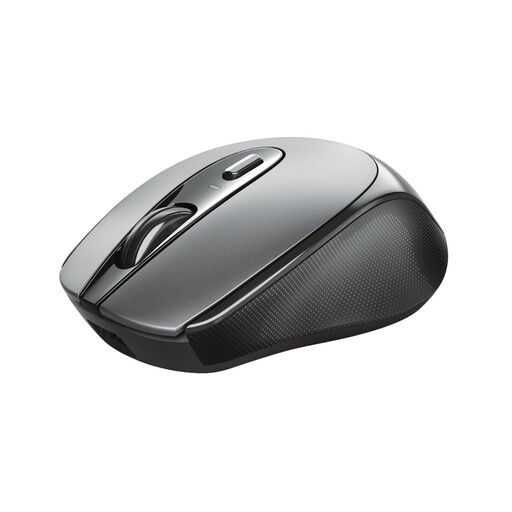
Why This Fits Their Persona: Ideal for students and home workers looking for a reliable, no-nonsense wireless mouse. Its compact and symmetrical design makes it suitable for anyone, without the complexity of extra buttons.
This mouse bypasses the "wireless" pitfall by offering a built-in rechargeable battery. No hassle or extra costs for disposable batteries. It focuses on core functions that work, without unnecessary gaming extras.
Rechargeable via USB-C: Modern and practical. Ambidextrous design: Suitable for both left- and right-handed users.
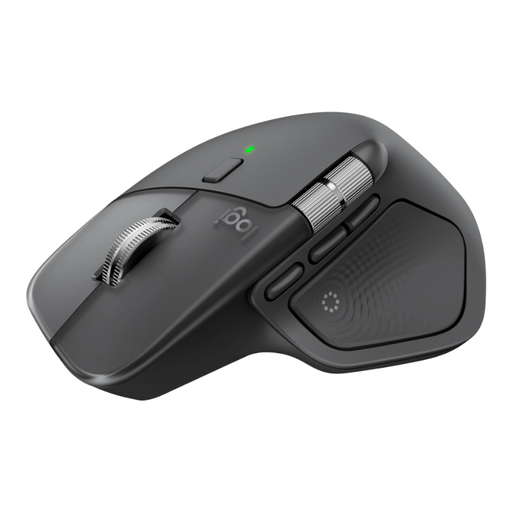
Why This Fits Their Persona: For the power user who spends all day at the computer. This mouse is designed for maximum productivity and comfort during long work sessions, with features that genuinely speed up workflow.
This is an example of a true ergonomic mouse, where the design is based on a natural hand posture. Its features, like the MagSpeed scroll wheel and multi-device switching, are not gimmicks but tangible productivity enhancers.
MagSpeed Scroll Wheel: Automatically switches between precise and hyper-fast scrolling. Multi-device connectivity: Works seamlessly with up to 3 devices simultaneously.
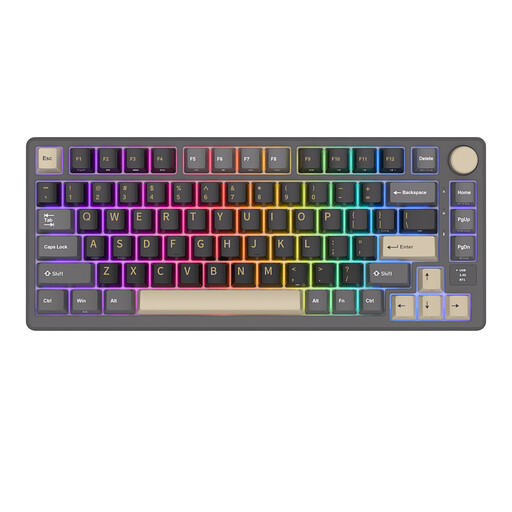
Why This Fits Their Persona: For the enthusiast who demands performance and customisation. This gaming keyboard delivers the features that matter: a superior typing experience, low latency, and the freedom to tailor the keyboard to their own taste.
This keyboard doesn't fall into the "gaming" trap, focusing instead on what truly counts. The gasket-mount construction and hot-swappable switches are serious upgrades for the typing experience, rather than just visual extras.
Gasket-mount: Provides a soft and cushioned typing sound. Hot-swappable: Replace switches without soldering for a personalised feel.
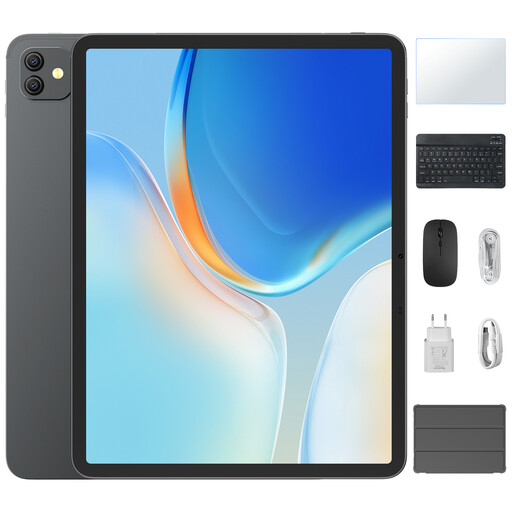
Why This Fits Their Persona: Perfect for students who need a flexible solution for lectures, the library, and home. This bundle combines the portability of a tablet with the productivity of a laptop.
This product solves the search for a compatible tablet with a keyboard in one go. You don't have to hunt for separate accessories and hope they work well together. Everything is designed to function right out of the box.
Complete Set: Includes tablet, keyboard, stylus, and case. PC Mode: Offers a desktop-like interface for serious productivity.
We have compiled a complete, up-to-date list of products that fully meet these strict selection criteria and local regulations.
This varies greatly by model and usage. Products with a built-in rechargeable battery often provide an estimate in weeks or months. Models that run on AA or AAA batteries can last for months or even a year or more, depending on battery quality and intensity of use. Features like RGB lighting will significantly shorten battery life.
For people who type a lot, a mechanical keyboard can be a worthwhile investment. The tactile feedback and consistent actuation can increase typing speed and comfort. However, it is a matter of personal preference. If you get the chance, try out different switch types (linear, tactile) to see what you find most comfortable.
Most modern computer peripherals are 'plug-and-play': you connect them, and they work immediately. However, to customise advanced features, such as programming keys, setting up RGB lighting, or fine-tuning a webcam, you will often need the manufacturer's software. This is usually available as a free download from their website.
