
Vandaag of morgen in huis

Kwaliteit gegarandeerd

Welkomstaanbiedingen ontgrendelen: GRATIS bezorging | Tot 80% korting | Gratis 30 dagen JoyPlus-proefperiode
Download de app
A computer mouse might seem like a simple product, but small differences can determine whether it’s comfortable to use or ends up forgotten in a drawer after a few weeks. A wireless mouse, for example, can help keep your desk tidy, while a wired model doesn’t need batteries. A high DPI might sound appealing, but it isn’t automatically useful for office work.
The most common buying mistakes come down to three pitfalls:
A mouse with a 2.4 GHz wireless connection usually works via a small USB receiver. This is practical for desktop computers and laptops with a free USB port. Check that the receiver won’t be easy to lose and that your laptop has a suitable port.
A Bluetooth mouse connects directly to a compatible device. This saves a USB port, which is especially useful with slim laptops. Some models support multiple connections, so you can switch between a laptop, desktop computer and tablet.
A wired USB mouse is less flexible, but doesn’t need batteries or recharging. For gaming, a cable can also provide a dependable connection. Check the cable length and USB connector type.
An optical mouse uses a sensor to track movement across a surface. The DPI figure indicates how far the cursor moves for a given physical hand movement. Around 1,000 to 2,000 DPI is often enough for documents, email and web pages. Adjustable DPI can be useful for image editing or gaming.
A high-DPI mouse mainly gives you more choice over sensitivity. A figure of 24,000 or 30,000 DPI isn’t essential for every user. Also consider whether the DPI is adjustable, the polling rate, how well it tracks on your mouse mat and whether you can fine-tune the sensor.
Check whether the model is suitable for left- or right-handed use. A compact laptop mouse is easy to carry around, but may offer less support for larger hands. An ergonomic shape with a rubberised grip can feel comfortable during long working days, but the right fit is still a personal choice.
A silent mouse reduces click noise according to the brand’s specifications. For example, Logitech says its SilentTouch technology reduces click noise by up to 90 per cent compared with traditional mice. This is a manufacturer’s claim; the noise level you experience can vary depending on the surface and user.
A vertical mouse places your hand in a different position. According to product information from Trust and Logitech, their vertical models have an angle of around 57 degrees. This may suit users looking for an alternative grip, but it takes time to get used to. If discomfort persists, stop using it and adjust your workspace.
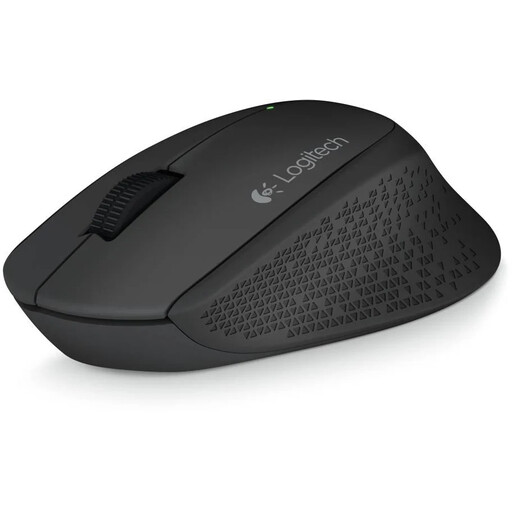
Why it suits this profile: This wireless mouse for right-handed users has three buttons, a 1,000 DPI optical sensor and a AA battery included. It’s designed for everyday browsing at home or in the office.
The specifications make it clear that this isn’t a gaming model with an excessively high DPI. The 2.4 GHz receiver and range of up to 10 metres give you a clear idea of the connection before you buy.
Rubber grips, a weight of 81 grams and operation using a single AA battery.

Why it suits this profile: This vertical mouse for right-handed users combines an ergonomic shape with Bluetooth, Razer HyperSpeed and an optical sensor with up to 30,000 DPI.
The product information covers both the vertical shape and the supported connection types. This makes it clear that comfort, use with multiple devices and custom settings are all part of the choice.
Six buttons, programmable functions, USB-C and a stated battery life of up to six months.
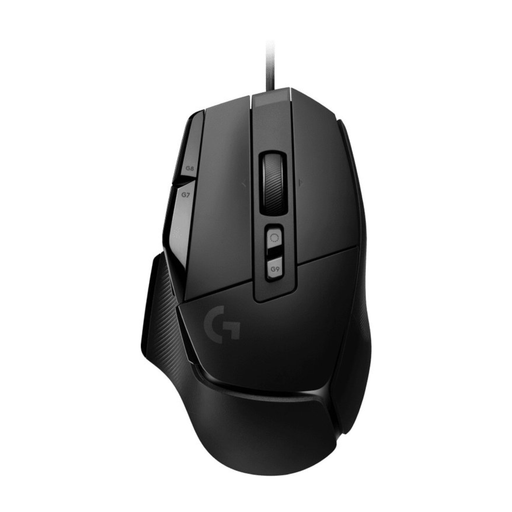
Why it suits this profile: This wired gaming mouse is designed for right-handed players who want plenty of buttons, customisable functions and a high sensor resolution.
The cable means you won’t need to worry about battery life during long sessions. Check in advance that your computer has a USB Type-A port.
Optical sensor up to 25,600 DPI, 1,000 Hz polling rate and programmable buttons.
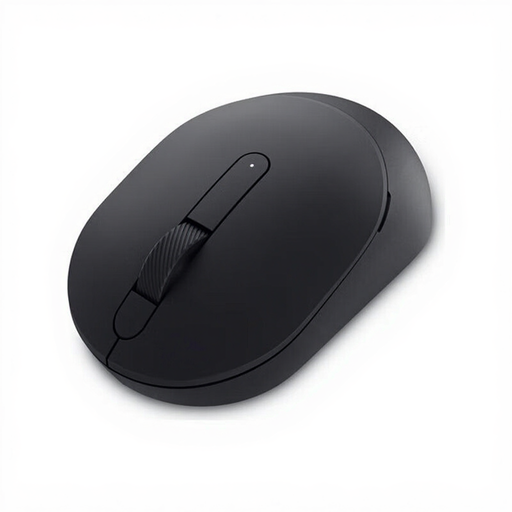
Why it suits this profile: This compact, ambidextrous silent mouse is suitable for shared workspaces and working from home, and for users who want to switch between Bluetooth and RF.
You’re not limited to one connection method: the specifications list both Bluetooth and RF. The DPI is adjustable up to 4,020, rather than being presented as just a marketing figure.
Ambidextrous design, three buttons and a stated battery life of up to 36 months.
We’ve put together a complete, up-to-date list of products that meet these strict selection criteria and the applicable European safety regulations.
A compact wireless mouse or Bluetooth mouse is a practical choice for a laptop. Bluetooth saves a USB port, while a model with a nano receiver is often easy to use straight out of the box. Check that it’s compatible with your operating system and the ports available on your device.
Battery life depends on the battery type, sleep mode and how intensively you use the mouse. Manufacturers sometimes give a maximum battery life, such as a number of months or years. Treat this as a specification based on certain conditions. A rechargeable mouse avoids the need for loose batteries, but needs charging from time to time.
Not necessarily. An average DPI setting is often enough for word processing and browsing the internet. Adjustable DPI is more useful than simply having a high maximum, as you can tailor the cursor to your screen size, mouse mat and personal preference. When buying, consider the sensor, shape, connection and adjustment options together.
