
Vandaag of morgen in huis

Kwaliteit gegarandeerd

Welkomstaanbiedingen ontgrendelen: GRATIS bezorging | Tot 80% korting | Gratis 30 dagen JoyPlus-proefperiode
Download de app
A computer mouse may seem simple, but you quickly notice when you have made the wrong choice. A mouse may be too small for your hand, awkward to use with a laptop that has no spare USB-A port, or irritating after a short time because of loud clicks. High DPI and RGB figures also do not automatically mean that a model is right for the way you use it.
Pay particular attention to the connection, shape, sensor and power supply. Below, you can find out which specifications matter, which marketing claims to question and which models suit different users in the Netherlands.
DPI indicates how sensitively the cursor responds to movement. A mouse with 10,000 or 26,000 DPI is not necessarily more useful for everyone than a model with 1,000 or 1,600 DPI. For office work, browsing and administration, moderate sensitivity is often more practical. Gamers can adjust a mouse with adjustable DPI to suit different games.
So check:
A wireless mouse usually works via a 2.4GHz USB receiver, Bluetooth or both. A USB receiver is generally easy to connect, but it does require a free USB-A port. Bluetooth is useful for a laptop or tablet, provided the device supports Bluetooth.
Also consider the difference between replaceable batteries and a built-in battery. With replaceable batteries, you can carry on immediately after changing them. You need to charge a rechargeable mouse in good time, although some models can still be used while charging.
‘Ergonomic’ is no guarantee that a mouse will be comfortable for every hand. A compact mouse may be convenient when travelling, but less suitable for larger hands. A vertical mouse has a different grip from a standard model and often takes some getting used to.
Check the dimensions, weight and hand orientation. A right-handed shape is not automatically suitable for left-handed use. If you work at a computer for long periods, also take regular short breaks and pay attention to the height of your desk and armrest.
A USB mouse with a cable is ready to use straight away and does not need a battery. The HP 125 Wired Mouse, for example, has a USB-A connection, three buttons, a 1,200 DPI optical sensor and a 1.8-metre cable. This makes it suitable for a fixed workstation with an available USB port.
A wireless mouse with a nano receiver is useful if you want fewer cables on your desk. The Philips 3000 Series uses a 2.4GHz connection, has a USB receiver and a stated resolution of 1,600 DPI. According to the product description, it features quiet clicks. With a laptop, check whether you have a USB-A port or need an adapter.
A Bluetooth mouse saves a USB port. Models such as the Microsoft Surface Arc Mouse require Bluetooth 4.0 or higher. Check this in advance on your laptop, PC or tablet.
Optical sensors work on many desk surfaces, but glass and highly reflective surfaces can cause problems. A mouse mat often provides a more consistent surface. DPI is primarily an adjustable sensitivity value, not an independent measure of quality.
For everyday use, 1,000 to 1,600 DPI is often sufficient. For gaming, a wider range can be useful. According to the product specifications, the Trust GXT 929 Helox offers adjustable settings from 800 to 4,800 DPI and a polling rate of up to 1,000 Hz. These are measurable features, but your own screen resolution, game and preferences remain decisive.
A quiet mouse can be useful in an office, shared study or during meetings. As well as the noise level, consider the shape and number of buttons. Extra programmable mouse buttons are useful for shortcuts or games, but may be unnecessary for basic office work.
A gaming mouse with RGB lighting mainly adds a visual element. With an RGB gaming mouse, it is sensible to look first at the weight, sensor, cable or wireless connection and software options. Lighting does not automatically make a mouse more accurate.
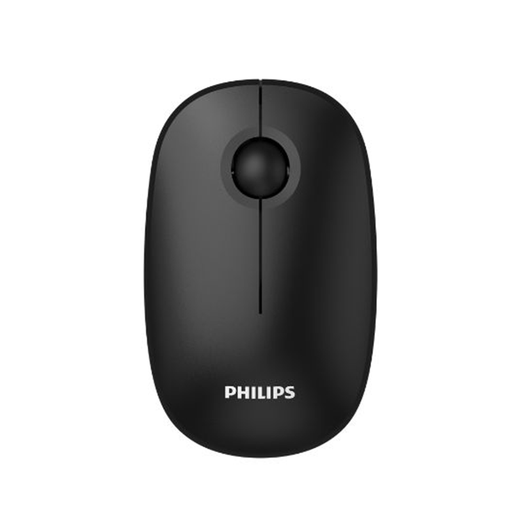
Why it suits this profile: A practical wireless mouse for everyday use with a laptop or PC, without extra gaming features you may never use.
The product details state 1,600 DPI, a 2.4GHz connection and quiet clicks, so you do not have to pay for unnecessarily high gaming specifications.
USB receiver, optical sensor and stated quiet-click function.
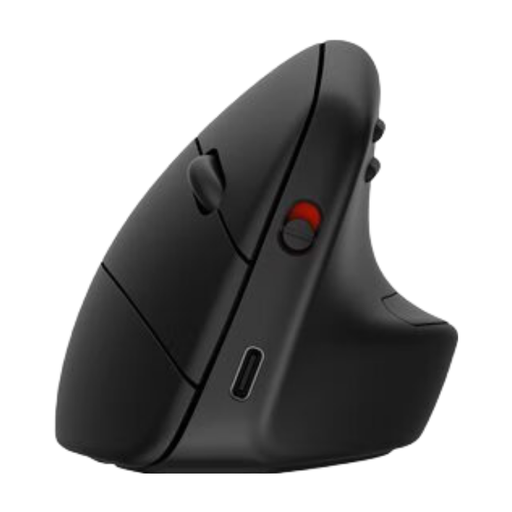
Why it suits this profile: Designed for office professionals who value a vertical shape, multiple connection options and a rechargeable battery.
The shape, hand orientation and dimensions are specified. According to HP’s own research, the design reduces muscle activity; this is a brand claim, not a guarantee of personal comfort.
Bluetooth 5.3 and USB receiver, adjustable up to 4,000 DPI and USB-C charging.
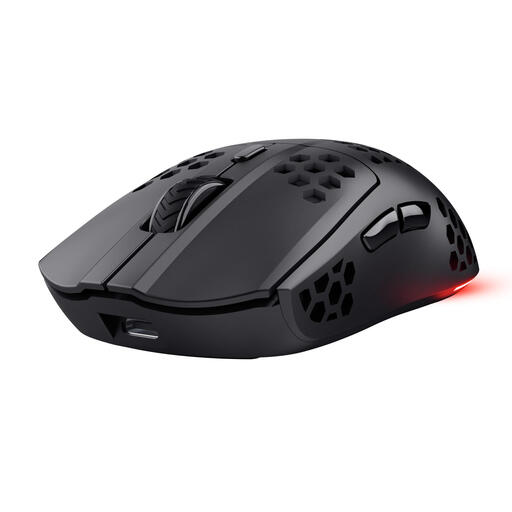
Why it suits this profile: For PC and laptop gamers who want to play wirelessly and value a low weight, adjustable DPI and extra buttons.
The product specifications mention a 2.4GHz receiver, a 1,000Hz polling rate and a USB-C cable that lets you continue using the mouse while it charges.
75 grams, adjustable from 800 to 4,800 DPI, six programmable buttons and RGB lighting.
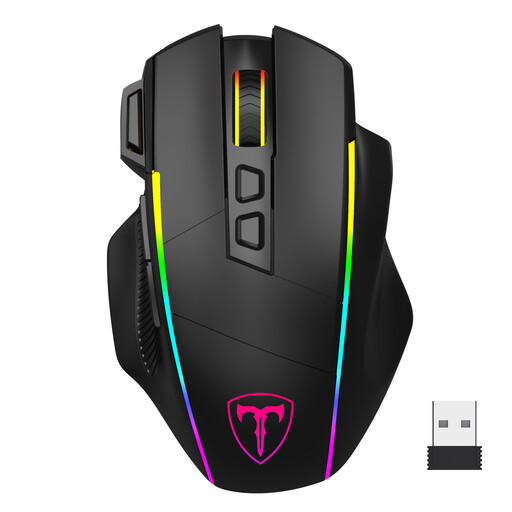
Why it suits this profile: Handy for users who want to use one mouse with a PC, laptop and Mac via 2.4GHz, Bluetooth or a USB-C cable.
The connection options and software limitations are described: according to the product information, the programming software only works on Windows and in wired mode.
Three connection modes, six DPI levels up to 10,000 DPI, eight programmable buttons and a built-in battery.
We have put together a complete, up-to-date list of products that fully meet these strict selection criteria and the applicable European safety regulations.
For a laptop, a compact wireless mouse or Bluetooth mouse is a practical choice. Bluetooth saves a USB port, while a 2.4GHz model often works easily with the included receiver. Always check which ports and Bluetooth version your laptop supports.
Its lifespan depends on usage, click load, cable or battery damage and maintenance. A wired mouse has no battery that can run flat, while a wireless model uses replaceable batteries or a rechargeable battery. Keep the sensor and surface clean and avoid contact with liquids.
It can be, but it is not always necessary. A gaming mouse often offers extra buttons, higher DPI and lighting. For office work, quiet clicks, straightforward software and a comfortable shape may be more important. Choose based on your everyday tasks, not just the gaming label.
