
Vandaag of morgen in huis

Kwaliteit gegarandeerd

Welkomstaanbiedingen ontgrendelen: GRATIS bezorging | Tot 80% korting | Gratis 30 dagen JoyPlus-proefperiode
Download de app
A computer mouse might seem like a simple product, but small differences in shape, connection and battery type can affect how comfortable it is to use every day. A wireless mouse, for example, can help keep your desk tidy, while a Bluetooth mouse may not work with every laptop or desktop computer. A high DPI rating also doesn’t automatically mean a mouse is better suited to your needs.
Here are some common pitfalls to watch out for:
A mouse with a 2.4GHz wireless connection works via a small USB receiver. This type is often easy to set up: plug in the receiver, switch on the mouse and you’re ready to go. Just check that your computer has a suitable USB port. If possible, store the receiver inside the mouse to reduce the chance of losing it.
A Bluetooth mouse connects directly to a compatible device. This is useful for laptops, tablets and workspaces with few spare ports. Before you buy, check that your system supports the required Bluetooth version. The Microsoft Surface Arc Mouse, for example, requires Bluetooth 4.0 or later.
A wired mouse doesn’t need a battery and usually works straight away via USB. This can be practical for a fixed desk or gaming set-up. However, a cable may be less convenient if you often change position.
DPI stands for dots per inch and indicates how far the cursor moves in response to a particular physical mouse movement. A mouse with adjustable DPI gives you more flexibility:
An optical sensor works on many desk surfaces, but very shiny or transparent surfaces can affect tracking. A mouse mat often provides a more consistent surface.
The polling rate is also relevant for gaming. A rate of 1000 Hz means, according to the product specification, that the mouse position is reported to the computer up to 1000 times per second. This can be useful for fast-paced games, but it’s less important for word processing and web browsing.
An ergonomic mouse should suit the size of your hand and the way you hold it. A vertical mouse places your hand at a different angle from a traditional model. Give yourself time to get used to this shape, and check whether the model is designed for right- or left-handed use.
A mouse with programmable buttons can run shortcuts, browser functions or game commands. However, more buttons also mean more settings and often require additional software.
If you work in a shared space, a quiet mouse can be more comfortable to use. According to the product description, Logitech claims that the M330’s click noise is more than 90% lower than that of traditional mice. HP also states that the HP 285 reduces noise by up to 90% for the left and right buttons. These are claims made in the brands’ product information; the perceived noise level can vary depending on the surface and the user.
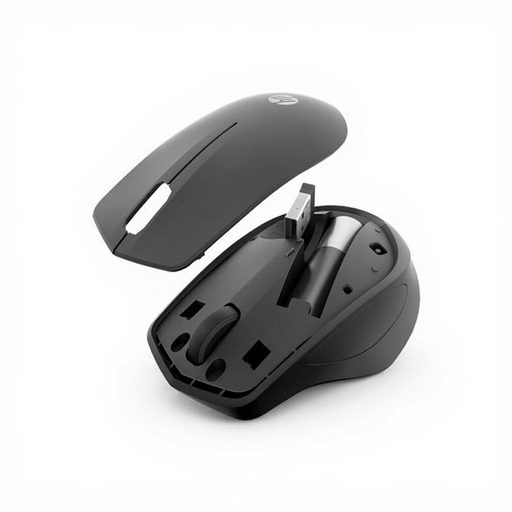
Why it suits this profile: A straightforward mouse for working from home, the office and everyday laptop use, with a 2.4GHz wireless connection and an ambidextrous design.
The product specification lists 1200 DPI, so you don’t pay for features you may not use for everyday office work. The USB receiver has a stated range of 10 metres.
Optical sensor, three buttons, a quiet-click feature according to HP, and a stated battery life of up to 18 months.

Why it suits this profile: For long hours of work with a vertical mouse, use with multiple devices and anyone who prefers a rechargeable mouse that connects via Bluetooth or a USB receiver.
The shape, 57-degree angle and right-handed design are clearly stated. This lets you check in advance whether the grip suits you, rather than relying on the word ‘ergonomic’ alone.
4000 DPI with adjustable speed, Bluetooth, a USB receiver, five buttons and a rechargeable battery with a stated usage time of up to four months.

Why it suits this profile: A wireless gaming mouse for PC and laptop gamers looking for a lightweight design, programmable buttons and a rechargeable battery.
The key gaming specifications are clearly stated: 2.4GHz connection, 1000Hz polling rate, 800–4800 DPI and a weight of approximately 73–75 grams.
Six programmable buttons, RGB lighting, USB-C charging and, according to the product description, a battery life of up to 80 hours.
We’ve put together a complete, up-to-date list of products that meet these strict selection criteria and the current European safety regulations.
Yes, as long as your laptop supports the right connection. A Bluetooth mouse doesn’t need a USB receiver, while a 2.4GHz model usually requires a spare USB port. If your laptop only has USB-C ports, you may need an adapter. Also check the range and whether the receiver is included in the box.
It varies by model and usage. Logitech states that the M330 has a battery life of up to 24 months, while the HP 285 is quoted as lasting up to 18 months. A rechargeable mouse often has a shorter usage time between charges, but you won’t need to replace AA or AAA batteries. Check whether you can keep using the mouse while it’s charging.
For office work, around 800 to 1600 DPI is enough for many users. Gamers sometimes choose a higher or adjustable setting, depending on screen resolution and the type of game. Don’t look only at the maximum DPI figure; consider the sensor, polling rate, shape and available software too. This helps ensure an impressive specification is also suited to your everyday use.
