
Vandaag of morgen in huis

Kwaliteit gegarandeerd

Welkomstaanbiedingen ontgrendelen: GRATIS bezorging | Tot 80% korting | Gratis 30 dagen JoyPlus-proefperiode
Download de app
Choosing a new computer mouse seems simple until you get tangled in a web of marketing jargon, sky-high specifications, and vague promises. Many users buy a mouse that looks great on paper but is uncomfortable in practice or doesn't perform as expected. As a Joybuy Product Recommendation Officer, I'll help you cut through the noise so you can find a model that truly suits you, without overpaying for features you don't need.
Before we get to the recommendations, let's first discuss the most common pitfalls:
ergonomic mouse is no guarantee of comfort. An improper fit for your hand size or grip style can actually lead to cramps or discomfort.wireless mouse is appealing, but a model with a low polling rate (the frequency at which the mouse reports its position) can cause noticeable lag. This is frustrating for fast-paced games and precision work.Focus on the specifications that are genuinely important for your use case. These are the three most critical factors to check before making a purchase.
office mouse often has a rate of 125 Hz. For smooth movements without visible lag, 500 Hz or higher is recommended, especially for a gaming mouse.The choice between a wired mouse and a wireless one depends on your priorities.
A mouse should feel like an extension of your hand. Pay attention to the following aspects:
vertical mouse can be a solution, as it keeps the wrist in a more natural, neutral position.lightweight mouse (under 80 grams) is better for fast, repetitive movements, such as in FPS games. A heavier mouse may feel more stable to some users for precision work.Below are a few models that align well with different user profiles, based on their objective specifications.
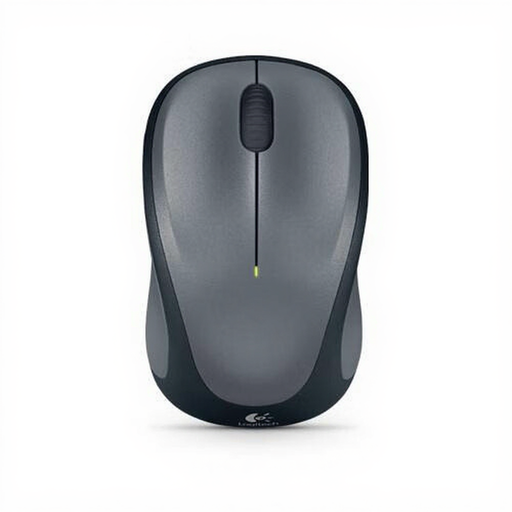
Why This Fits Their Persona: This mouse is designed for reliability and simplicity. Perfect for those who need a wireless mouse for daily tasks like email, browsing, and document editing, without unnecessary bells and whistles.
This model doesn't focus on an exaggeratedly high DPI. The 1000 DPI is perfectly tuned for office work. The reliable RF connection via a dongle prevents the lag you sometimes experience with cheaper Bluetooth mice.
Long battery life on a single AA battery and an ambidextrous (symmetrical) design, making it suitable for both left- and right-handed users.
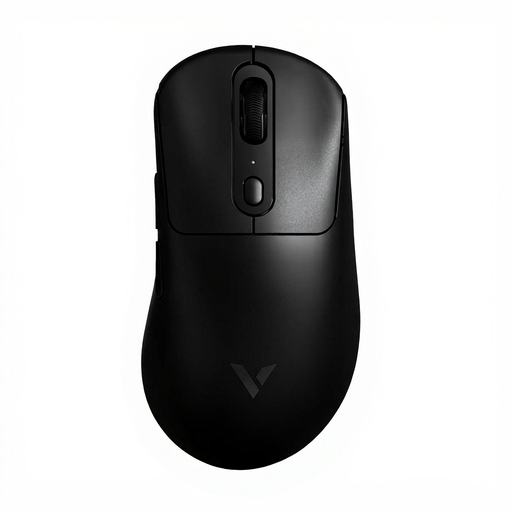
Why This Fits Their Persona: For gamers where every millisecond counts. This mouse is built for speed and precision, with specifications that directly contribute to better performance in competitive games.
This mouse bypasses the "wireless lag" trap with an 8KHz polling rate, which, according to the manufacturer Rapoo, ensures a virtually instantaneous response. Its ultra-light weight of 59 grams is a tangible benefit, not a marketing gimmick.
Equipped with a PAW 3950 optical sensor for high precision and a very long battery life of up to 200 hours. The programmable buttons offer additional in-game functionality.
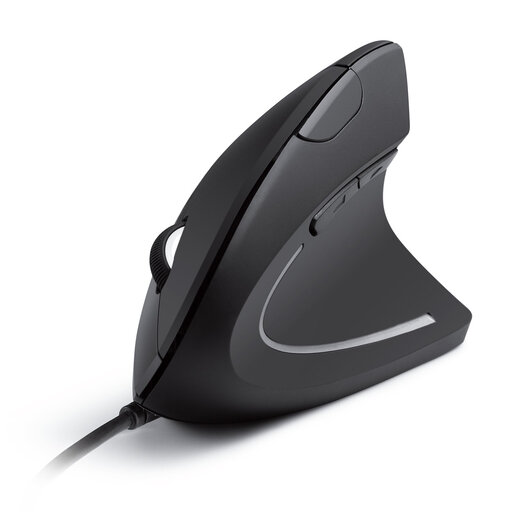
Why This Fits Their Persona: For anyone who spends long days at the computer and wants to prevent wrist or arm strain. This mouse is specifically designed to reduce tension in the forearm and wrist.
This is not a vague "ergonomic" promise. The vertical "handshake" grip is a fundamentally different design that promotes a proven, natural posture. It's a functional choice, not a marketing label.
The wired connection ensures reliable operation without batteries. The adjustable DPI (1000/1600) provides sufficient precision for all common office tasks.
We have compiled an up-to-date list of computer mice that meet strict selection criteria and EU guidelines.
For general office and home use, a setting between 800 and 1600 DPI is more than enough. This ensures a smooth and precise cursor. Gamers playing on high-resolution screens may benefit from settings up to 4000 DPI, but extremely high values are rarely practical. It is more important that the DPI is adjustable, so you can tailor the sensitivity to your task.
An RF (Radio Frequency) mouse uses a dedicated USB dongle for a direct, stable connection. This generally results in less latency, making it a popular choice for gaming. A Bluetooth mouse connects directly to the computer, which saves a USB port. This is convenient for laptops and tablets, but the connection can be slightly more susceptible to interference and have a fraction more delay.
This varies greatly by model. Simple office mice on AA or AAA batteries can last for months, or even more than a year. Rechargeable gaming mice have a shorter battery life, ranging from 40 to over 200 hours per charge, depending on usage and features like RGB lighting. Always check the manufacturer's specifications for an estimate.
