
Vandaag of morgen in huis

Kwaliteit gegarandeerd

Welkomstaanbiedingen ontgrendelen: GRATIS bezorging | Tot 80% korting | Gratis 30 dagen JoyPlus-proefperiode
Download de app
A computer mouse may seem like a simple accessory, but you’ll soon notice if you’ve chosen the wrong one. It might be too small, work awkwardly on your surface or need new batteries after only a short time. Features such as high DPI, quiet clicks and an ergonomic shape are also often made to sound more impressive than they are in practice.
Use this buying guide to compare the key features of a computer mouse. You’ll find out what to look for in a wireless mouse, gaming mouse, ergonomic mouse, quiet mouse, Bluetooth mouse and USB mouse.
DPI indicates how far the cursor moves in response to a particular hand movement. A higher value isn’t automatically useful. For office work, an adjustable setting of up to, for example, 2400 or 3200 DPI is often enough. Gamers may use more profiles, but the sensor, polling rate and personal preference matter too.
So don’t just check the maximum DPI figure. Check whether you can adjust it and whether you need software to change the settings.
A wireless mouse can connect via a USB receiver, Bluetooth or both. A USB receiver often works straight away with a desktop computer or laptop that has a USB-A port. Bluetooth is more convenient if you don’t want to use a dongle, but your computer must support Bluetooth.
Also check the difference between a mouse with replaceable batteries and a rechargeable mouse. A built-in battery means you won’t need loose batteries, but you’ll have to charge the device regularly.
A rounded mouse, vertical mouse and compact laptop mouse all feel very different. A vertical mouse positions your hand differently from a traditional model. Some users find this more comfortable, but it usually takes a little getting used to. Also check whether the mouse is designed for right-handed use only.
An ergonomic shape is no substitute for good posture. Make sure you have enough space, use a suitable mouse mat and take regular breaks.
An optical mouse uses an optical sensor to track movement. The surface matters: some sensors work less well on glass or highly reflective surfaces.
DPI determines cursor sensitivity. Adjustable DPI is useful if you use the same mouse for word processing, image editing and gaming. Polling rate is also relevant for gaming. A rate of 1000 Hz means that, according to the product specifications, the mouse can send data up to 1000 times per second. This isn’t the only factor that affects your gaming experience, but it is a measurable technical specification.
Look out for:
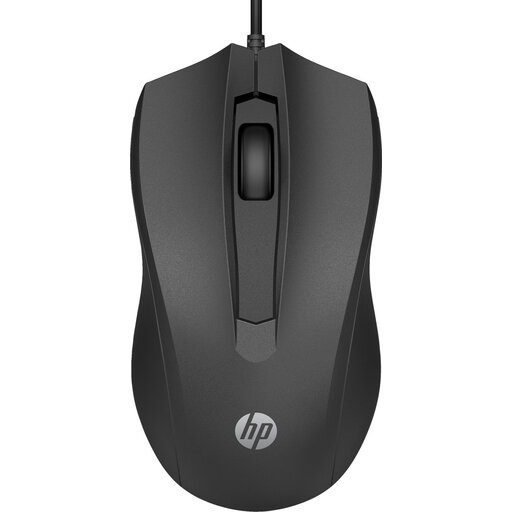
Why it suits this user: This USB mouse is easy to connect and suitable for both left- and right-handed users. Its 1600 DPI optical sensor and three buttons make it a good fit for everyday office and laptop use.
The specifications are straightforward: a wired USB connection, optical tracking and no need for batteries.
Ambidextrous design, 1600 DPI and compatibility with Windows and macOS according to the product specifications.

Why it suits this user: Its vertical shape, Bluetooth and 2.4 GHz connectivity, and rechargeable battery make this model suitable for long hours of office work across multiple devices.
The hand position and connection options are clearly described. Bear in mind that this is a right-handed model and may take some getting used to.
4000 DPI, adjustable speed, a rechargeable battery and a stated battery life of up to four months.

Why it suits this user: This wireless gaming mouse combines a 2.4 GHz receiver with an optical sensor, six programmable buttons and adjustable DPI.
The product specifications clearly state a weight of approximately 73 grams, a polling rate of up to 1000 Hz and battery life of up to 80 hours.
4800 DPI, USB-C charging while in use, six programmable buttons and RGB lighting.
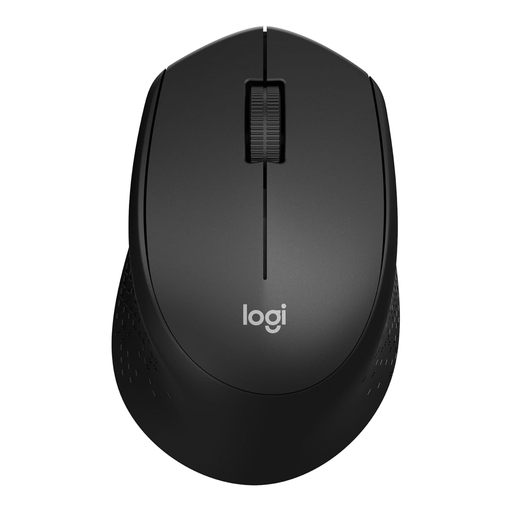
Why it suits this user: This quiet mouse uses a wireless USB receiver and is designed for quieter working at home or in the office.
The noise claim is presented as a Logitech product specification: according to Logitech, the clicks are up to 90% quieter than those of traditional mice. This is a right-handed mouse.
Optical tracking, three buttons, a range of up to 10 metres and a stated battery life of up to 24 months.
We’ve put together a complete, up-to-date list of products that meet these strict selection criteria and comply with the applicable European safety regulations.
No. Your laptop must support Bluetooth, and its operating system must be compatible. Also check whether the mouse can be paired via Bluetooth without a USB receiver. A model with a 2.4 GHz receiver is an alternative if your laptop doesn’t have Bluetooth.
Its lifespan depends on how it’s used, its construction, whether it’s wired or battery-powered, and how well it’s maintained. Manufacturers may state, for example, a click lifespan or battery life, but this isn’t a guarantee for every usage scenario. Keep the sensor and mouse feet clean, and protect the mouse from moisture and hard knocks.
It can be, but quiet mice are generally designed for low-noise office work. Gamers usually pay closer attention to polling rate, sensor, DPI, weight and programmable buttons. So choose a gaming mouse if response speed and adjustable controls matter more to you than quiet clicks.
