
Vandaag of morgen in huis

Kwaliteit gegarandeerd

Welkomstaanbiedingen ontgrendelen: GRATIS bezorging | Tot 80% korting | Gratis 30 dagen JoyPlus-proefperiode
Download de app
A computer mouse may seem like a simple product, but small differences can have a big impact on your comfort and ease of use every day. The wrong shape can feel awkward, a wireless mouse can run out of battery unexpectedly, and a high DPI rating doesn’t automatically mean the mouse is right for your work or gaming.
Use this buying guide to compare important features such as connectivity, shape, sensor, DPI, noise level and battery life. Then explore a few recommendations for different types of users.
DPI indicates how sensitively the cursor responds to movement. A mouse with 24,000 DPI may sound impressive, but that level is rarely necessary for word processing, browsing the internet or working with spreadsheets. It’s more important to be able to adjust the DPI and to have a sensor that works reliably on your desk surface.
A wireless mouse can connect via a 2.4GHz USB receiver, Bluetooth or both. A USB receiver takes up a port, but often works as soon as you plug it in. Bluetooth is useful for a laptop or tablet with no spare USB port. Always check which connection types your computer supports.
A wired USB mouse doesn’t need a battery and is ready to use straight away. However, the cable can restrict movement and make your desk feel more cluttered.
A vertical mouse or other ergonomic model often has a specific shape for either the right or left hand. A mouse that doesn’t suit your hand can actually feel uncomfortable. Check the dimensions, too: a compact model is handy when you’re on the go, while a larger mouse offers more palm support.
For a permanent workstation, a wired USB mouse is practical: there’s no need to charge it or use a wireless receiver. For a laptop, a Bluetooth mouse is a good choice if you want to keep your USB ports free. A wireless mouse with a receiver is a good option if you want a simple plug-and-play connection.
Use several devices? Look for models with multiple connection channels. According to the product information, the Trust Ozaa+ can connect to up to three devices using a 2.4GHz receiver and two Bluetooth channels.
An optical mouse uses a light sensor to track movement. For office work, a resolution of around 1,000 to 3,200 DPI is generally sufficient. A mouse with adjustable DPI lets you slow down the cursor for precise tasks or move around a large screen more quickly.
For gaming, the polling rate, weight and number of programmable buttons are also important. Check whether the stated specifications apply to wireless mode, wired mode or both.
A standard mouse works well for many everyday tasks. A vertical mouse positions your hand differently; the Trust Bayo II, for example, has a 57-degree angle and is designed for right-handed use. This doesn’t guarantee a particular health outcome, but it is a distinctive shape that’s worth considering before you buy.
A quiet mouse can be more pleasant to use in a shared workspace. Check whether only the main buttons are quieter, or whether the scroll wheel and other buttons are quiet, too.
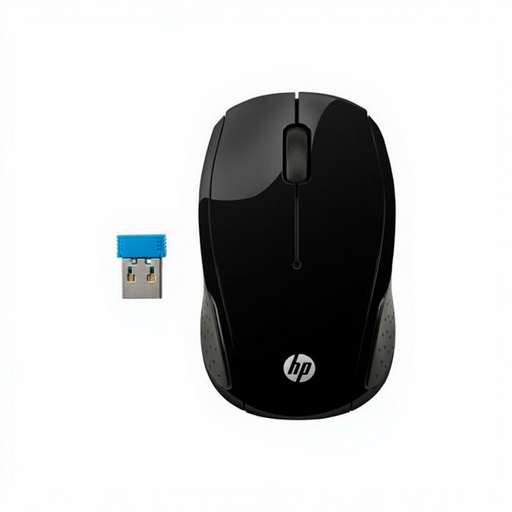
Why it suits this type of user: This wireless mouse is designed for straightforward everyday use, with a 2.4GHz USB receiver, optical sensor and two AAA batteries included.
The connection and power supply are clearly specified: a USB receiver, two AAA batteries and no software installation required, according to the product information.
Ambidextrous design, optical sensor with 1,000 DPI and wireless range of up to 10 metres.
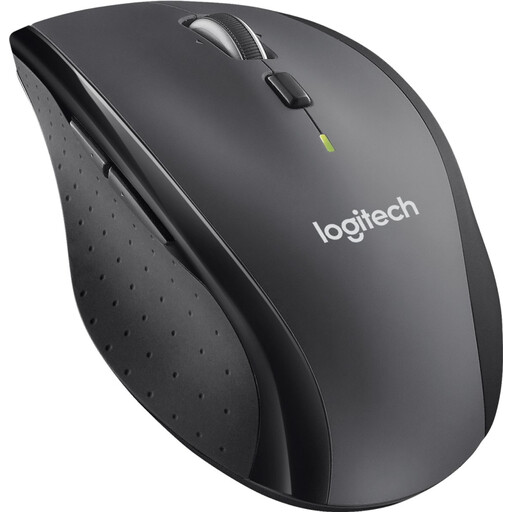
Why it suits this type of user: This right-handed model is designed for extended use at home or in the office. It features seven buttons, fast scrolling and adjustable DPI.
Logitech states that the battery lasts for up to three years. Make sure you check the battery type and compatibility with your USB port.
Seven buttons, laser tracking, adjustable DPI and a USB receiver for up to six compatible devices.
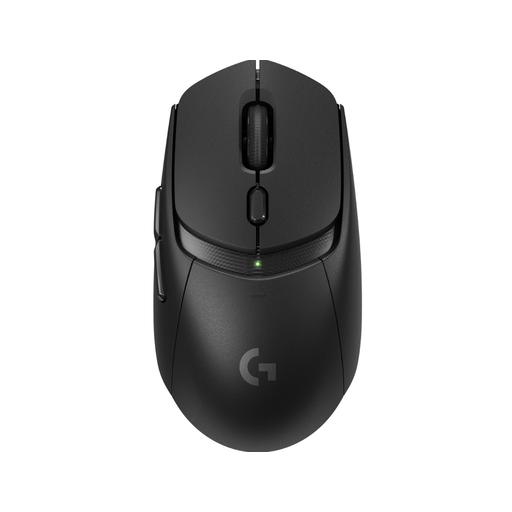
Why it suits this type of user: This wireless gaming mouse combines Lightspeed and Bluetooth connectivity with six programmable buttons and an optical sensor.
The connection options are specified: Lightspeed via a USB receiver and Bluetooth. This model isn’t designed to be a quiet or vertical mouse.
Up to 25600 DPI according to the product specifications, six programmable buttons and a stated battery life of more than 300 hours with an AA battery.
We’ve put together a complete, up-to-date list of products that meet these strict selection criteria and current European safety regulations.
Yes, as long as you choose the right connection type. A model with a USB receiver is practical for a desktop PC. Bluetooth is useful for laptops and tablets. Also check the battery life, battery type and whether you can continue using the mouse while it’s charging.
A mouse’s lifespan depends on how it’s used, its build quality, switches, cable and battery. A wired mouse has fewer parts that need charging, while a wireless model relies on batteries or a built-in rechargeable battery. Keep the USB receiver somewhere safe, and clean the sensor and scroll wheel regularly.
Choose a model with Bluetooth and a USB receiver if you want to switch between devices. If you only need it for one computer, a USB mouse or a basic wireless model is usually enough. Before you order, check the available ports, the shape and how the mouse fits your hand, as well as its size.
