
Vandaag of morgen in huis

Kwaliteit gegarandeerd

Welkomstaanbiedingen ontgrendelen: GRATIS bezorging | Tot 80% korting | Gratis 30 dagen JoyPlus-proefperiode
Download de app
Buying a new computer mouse seems simple until you get tangled in a web of technical specifications, marketing terms, and hundreds of models. Manufacturers throw around terms like DPI, polling rate, and ergonomic shapes, but what do they really mean for your daily use? Many people fall for the trap of unnecessary features and end up with a mouse that isn't comfortable or even causes strain.
Before you make a decision, it's wise to know the most common pitfalls:
ergonomic mouse isn't a luxury; for many, it's a necessity.To avoid making the wrong choice, it's smart to focus on the specifications that truly matter for your situation. Here are the three most important factors.
The choice between a wireless mouse and a wired mouse depends on your priorities.
gaming mouse.With a wireless mouse, always pay attention to the battery life and how it's charged (replaceable batteries or a rechargeable one).
DPI stands for Dots Per Inch and determines how sensitive the mouse is. A higher DPI means the cursor travels a greater distance on the screen with a small movement of your hand.
gaming mouse with adjustable DPI levels (e.g., 1600 to 6400) offers this flexibility.So, don't just fixate on the highest DPI; choose a mouse with a range that suits your usage and screen resolution.
The shape of the mouse is crucial for comfort and preventing strain.
ergonomic mouse that places your hand in a "handshake" position. This significantly reduces tension in the wrist and forearm and can help prevent or alleviate RSI symptoms.Based on objective specifications, we have selected a few models that fit different user profiles.
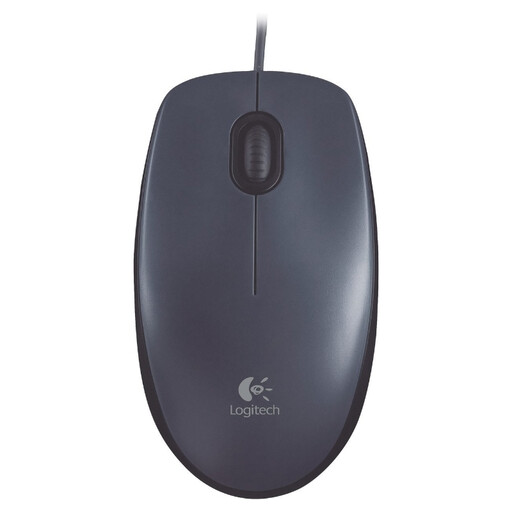
Why This Fits Their Persona: This is a reliable, no-nonsense mouse for daily tasks. No complicated software or unnecessary buttons—just plug-and-play. Ideal for the office or a home workspace.
This mouse doesn't compete in the DPI race. Its 1000 DPI is perfectly tuned for office work. The symmetrical design is functional and suitable for both left- and right-handed users, without the false promise of a universal ergonomic fit.
The wired USB connection ensures interference-free operation without batteries. A simple and durable choice from a renowned brand like Logitech.
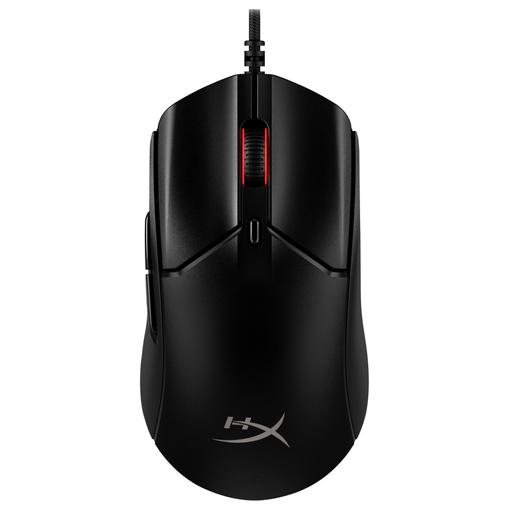
Why This Fits Their Persona: For gamers, every millisecond counts. This mouse is designed for speed and precision, with an ultra-lightweight build and a top-performing sensor. The programmable buttons and RGB mouse lighting complete the setup.
Here, the high DPI isn't a gimmick. The HyperX 26K sensor with up to 26,000 DPI is functional for fast-paced actions in games. The wired connection eliminates any concerns about wireless latency, a common pitfall with inferior wireless gaming mice.
The extremely high 8000 Hz polling rate ensures a near-instantaneous response. Weighing only 52 grams, the mouse is effortless to move, reducing fatigue during long gaming sessions.

Why This Fits Their Persona: For professionals who work long hours, comfort is not a luxury. This vertical mouse is designed to reduce muscle strain in the arm and wrist, lowering the risk of discomfort.
This model directly addresses the "one-size-fits-all" pitfall. Its 57-degree vertical angle is based on ergonomic principles for a natural hand posture, rather than a generic design that's perfect for no one.
According to Logitech, the natural handshake position reduces muscle activity by 10%. The mouse is wireless (Bluetooth and USB receiver) and has a long-lasting rechargeable battery.
For general office and home use, a DPI value between 800 and 1600 is more than enough. Gamers can benefit from adjustable values up to around 6400 DPI for flexibility. Higher values are rarely practical and are mostly a marketing tool.
A 2.4GHz connection via a USB dongle generally offers a faster and more stable response, making it more suitable for gaming. Bluetooth is more convenient as it doesn't occupy a USB port and easily switches between devices, but it can have a fraction more latency.
The lifespan depends on the quality and usage. The durability of the buttons is often expressed in millions of clicks. A quality mouse from a brand like Logitech or HyperX can easily last 3 to 5 years or more with normal use. Cheaper models often need to be replaced sooner.
