Who is this choice relevant to?

Layout designer beside a bright window

You want to assess text, photos and page previews as the daylight changes. Screen position and potential reflections are therefore important considerations. Arboportaal advises positioning your viewing direction parallel to the window.

Club volunteer with an existing monitor

You want to add a desktop computer without replacing a monitor that still works well. Check that the connections are compatible and find out which components come with the computer you choose. Lenovo states that the screen, keyboard and mouse are sold separately for the ThinkCentre neo 50q Gen 5 configuration 13B9007CEZ.

Designer of a multi-page handbook

You use layout software and want to check in advance that the memory, operating system and screen are compatible with your programme and version. Adobe lists a minimum of 8 GB RAM for the InDesign version described and recommends 16 GB.

What should you consider when choosing?

Mini PC with separate monitor

A good fit if: you have limited desk space or already own a suitable monitor.

Bear in mind: the monitor and input devices may be sold separately with the Lenovo configuration we looked at.

Tower with separate monitor

A good fit if: you want to choose the monitor independently of the computer and have room for a larger case.

Bear in mind: you’ll need to consider your choice of monitor and where to put it on your desk separately.

All-in-one

A good fit if: you want an integrated computer and screen, and the built-in display is easy to read in your workspace.

Bear in mind: you’re choosing the built-in display as part of the package, rather than selecting a separate matte monitor straight away.

Consideration What should you check? Who is this important for?
Reflections from the window See whether you can position the screen parallel to the window, and check the finish of the exact screen configuration. BenQ says a matte finish can reduce glare; assess the screen in your own lighting conditions. If I want to see text and images in changing daylight, I’ll check the screen position and finish first; around 33% of consumers prioritise glare management.
Page readability Compare the screen size, resolution and finish of the exact configuration. Apple specifies a 24-inch 4.5K display for the iMac with M4 chip; that specification alone says nothing about reflections from your window. When laying out multiple pages, I want to be able to assess text and page previews on screen; around 27% of consumers give readable page layouts top priority.
Suitability for layout software Make a note of your programme and version, then compare the system requirements. Adobe’s requirements for the InDesign version described are a minimum of 8 GB RAM, with 16 GB recommended; check the other requirements too. If I work with layout software, I want to check first that the exact configuration is right for my programme; around 20% of consumers prioritise software compatibility.
Complete workspace Check which components you already have and which you still need. Lenovo states that the screen, keyboard and mouse are sold separately for the ThinkCentre neo 50q Gen 5, configuration 13B9007CEZ. HP lists 16 GB RAM and a 512 GB SSD for the OmniDesk 16L M03-0610nd. When starting from scratch, I want to know in advance what I need for a complete workspace; around 20% of consumers prioritise the components needed for a complete setup.

Pitfalls to avoid

  • Comparing a mini PC directly with a complete all-in-one

    The computer alone won’t tell you whether you already have a usable monitor and input devices. You could end up comparing incomplete setups.

    Make a list for each setup of what you already own and what you still need.

  • Assuming a sharp picture will solve reflections

    Resolution doesn’t describe how light from the window falls on the screen. Screen position and finish are separate considerations.

    First assess where the screen will go, then check the finish of the exact configuration.

  • Mistaking an announced model generation for a current configuration

    Model names can look similar even when they refer to different generations. Apple states that the iMac with M6 chip will be available from 6 November 2026.

    When comparing, check the full model name, chip generation and current availability of the specific configuration.

Brands to consider

Lenovo

The ThinkCentre neo 50q Gen 5, configuration 13B9007CEZ, is a compact computer for which you choose the monitor separately.

  • Lenovo lists 16 GB RAM and a 512 GB SSD for this configuration.
  • According to Lenovo, the screen, keyboard and mouse are sold separately, so check what you need for your complete setup.

HP

The OmniDesk 16L M03-0610nd is a tower for which you choose the monitor separately.

  • HP lists 16 GB RAM, a 512 GB SSD and support for up to two monitors via DisplayPort and HDMI for this configuration.
  • Those connections don’t automatically mean that your specific monitor and software configuration will be compatible.

Apple

The iMac with M4 chip combines the computer and screen; the Mac mini is an option with a separate monitor.

  • Apple specifies a 24-inch 4.5K display for the iMac with M4 chip.
  • With an integrated setup, you’re choosing the built-in display too. Check the required macOS and app versions when choosing your software.

BenQ

BenQ offers separate monitors and explains the differences between matte and glossy finishes.

  • According to BenQ, a matte finish can reduce glare.
  • This is the manufacturer’s guidance on screens, not a guarantee that a particular screen will be easy to read beside your window.

Joybuy products

This selection includes tower desktops and a compact mini PC for anyone considering a computer with a separately chosen monitor. Check the screen connections, software requirements and components you’ll need for your workspace for each model.

Shark Ultimator R700 Gaming PC, RTX 5070, Ryzen 7 7800X3D, 16 GB RAM, 1 TB SSD

Shark Ultimator R700 Gaming PC, RTX 5070, Ryzen 7 7800X3D, 16 GB RAM, 1 TB SSD

A tower option if you want to match your choice of monitor to the light in your workspace; check the connections and your layout software requirements.

The description lists a Ryzen 7 7800X3D, 16 GB DDR5, a 1 TB NVMe SSD and Windows 11 Home.

Joybuy
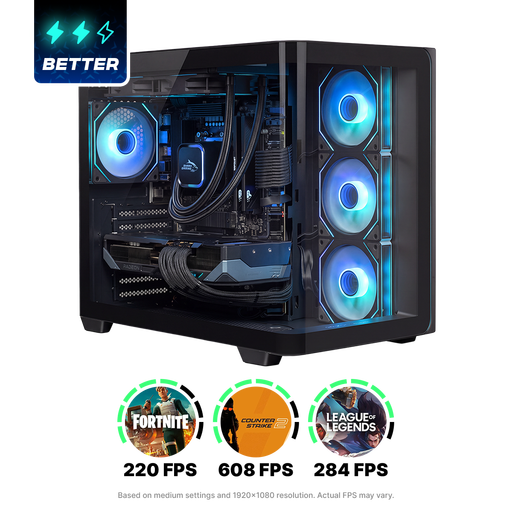
Shak RGBeast R700 Gaming PC, RX 9070 XT, Ryzen 7 9800X3D, 16 GB RAM, 1 TB SSD

Shak RGBeast R700 Gaming PC, RX 9070 XT, Ryzen 7 9800X3D, 16 GB RAM, 1 TB SSD

This tower suits a setup where you want to choose a monitor separately; before buying, check that the connections are compatible with your screen.

The description lists a Ryzen 7 9800X3D, a Radeon RX 9070 XT with 16 GB graphics memory, 16 GB DDR5, a 1 TB NVMe SSD and Windows 11 Home.

Joybuy

ASUS ROG G700TF-07265F666W, Core Ultra 7 265F, 32 GB RAM, 1 TB SSD, RTX 5070 12 GB

ASUS ROG G700TF-07265F666W, Core Ultra 7 265F, 32 GB RAM, 1 TB SSD, RTX 5070 12 GB

A tower to consider if you want a separate monitor; before buying, check that the exact connection and software configuration are suitable for your workspace.

The product name lists an Intel Core Ultra 7 265F, 32 GB DDR5, a 1 TB SSD, an NVIDIA GeForce RTX 5070 with 12 GB and Windows 11 Home.

Joybuy
ASUS ROG G700TF-05225F170W, Core Ultra 5 225F, 32 GB RAM, 1 TB SSD, RTX 5070 12 GB

ASUS ROG G700TF-05225F170W, Core Ultra 5 225F, 32 GB RAM, 1 TB SSD, RTX 5070 12 GB

This desktop is an option for a computer setup with a separately chosen monitor; compare the connections and software requirements with your equipment.

The product name lists an Intel Core Ultra 5 225F, 32 GB DDR5, a 1 TB PCIe 4.0 SSD, an NVIDIA GeForce RTX 5070 with 12 GB and Windows 11 Home.

Joybuy

NVIDIA DGX Spark Founders Edition, GB10, 128 GB RAM, 4 TB SSD

NVIDIA DGX Spark Founders Edition, GB10, 128 GB RAM, 4 TB SSD

This mini PC is a compact option if you want to choose a separate monitor; check the connection to your monitor and the software requirements for your handbook.

The product name lists 128 GB RAM and a 4 TB SSD. The description mentions an NVIDIA GB10 processor, NVIDIA DGX OS and HDMI and USB-C video outputs.

Joybuy

Frequently asked questions

Do you need to buy a different computer straight away because of the bright window?

Not necessarily: first assess where the screen will go and whether you can read it clearly there. Arboportaal advises positioning your viewing direction parallel to the window when working at a screen; this advice doesn’t guarantee that every screen will be easy to see in every lighting condition.

How do you connect your existing monitor to a mini PC or tower?

Before choosing a cable, compare the video output on the exact computer with the input and supported display mode on your monitor. Lenovo lists several display connections for the mini PC we looked at; HP lists DisplayPort and HDMI for the OmniDesk 16L M03-0610nd. Check that your own equipment is compatible.

How do you check whether a computer is suitable for your layout software?

Compare the specifications of the exact configuration with the requirements for your programme and version. Adobe lists a minimum of 8 GB RAM for the InDesign version described and recommends 16 GB; these requirements don’t automatically apply to other programmes.

What cooling-off period and warranty apply when buying online in the Netherlands?

For an online consumer purchase, a 14-day cooling-off period generally applies after delivery, with some exceptions. Your statutory rights if a product doesn’t conform to the contract are separate. ACM ConsuWijzer explains the cooling-off period, while the Authority for Consumers and Markets explains the statutory guarantee. If you’re buying on behalf of an association or business, check who the contracting party is: consumer rules don’t automatically apply to a business purchase.
