
Vandaag of morgen in huis

Kwaliteit gegarandeerd

Welkomstaanbiedingen ontgrendelen: GRATIS bezorging | Tot 80% korting | Gratis 30 dagen JoyPlus-proefperiode
Download de app
A computer desk needs to do more than look good in a product photo. It should fit your space, remain stable during everyday use and provide enough room for a monitor, keyboard, PC and accessories. For home workers, students, gamers and professionals, the most important factors are the dimensions, layout and load capacity.
A desk that is 120 cm wide may seem spacious, but monitor stands, speakers and a laptop can quickly take up a lot of room. So don’t just check the width; also consider the desktop depth. For a screen and keyboard, a depth of around 60 cm is often more practical than a shallow desktop.
Also measure the available space. Take skirting boards, doors, radiators and the space your chair needs into account. A corner desk or L-shaped desk can provide more workspace in a corner, but it requires careful checking of the dimensions.
Marketing copy often uses terms such as sturdy or durable without providing clear evidence. So look at the stated materials, the construction and any information about load capacity. With a desk featuring a metal frame, the stability of the legs and the ability to compensate for uneven surfaces are also relevant.
For the LANTINE model, the product information lists a metal frame, E1 particle board and adjustable feet. This tells you something about the stated construction, but actual suitability also depends on assembly and use.
A desk without drawers may seem more affordable, but loose cables, documents and accessories will then remain on the desktop. A desk with drawers is practical for students and home workers who want to keep paperwork or small items out of sight. Do check the position of the drawers, however: on some models, the layout cannot be changed, which can be inconvenient in a small room.
Use these guidelines as a starting point:
The LANTINE desk measures 150 x 110 x 75 cm. Its L-shape provides two desktops, and the drawers can be fitted on the left or right according to the product description. This makes it suitable for spaces where the layout has not yet been fully decided.
Particle board with an E1 classification refers to a formaldehyde emission class under a relevant European standard. It is not a guarantee that every component will continue to function without problems for years. Always check the assembly instructions, tighten screws carefully and do not load the desk beyond the limit specified by the supplier.
For a gaming desk with a heavy PC, multiple screens or a microphone arm, the total load is important. Don’t just look at the desktop; also consider the attachment points for accessories.
A standard desk usually has a fixed height. This can work well if your chair is sufficiently adjustable, but not every user is the same height. A sit-stand desk or adjustable desk offers greater flexibility. When checking one, consider:
The Neomounts DS90-325BL1 is a mounted workstation for screens measuring 17 to 32 inches. According to the product specifications, the arm supports up to 9 kg, or 6 kg for curved screens. The adjustment range is 44 to 95 cm. Before purchasing, check that your monitor has a VESA pattern of 75 x 75 or 100 x 100 mm and that your desktop is suitable for a clamp or through-desk mounting system.
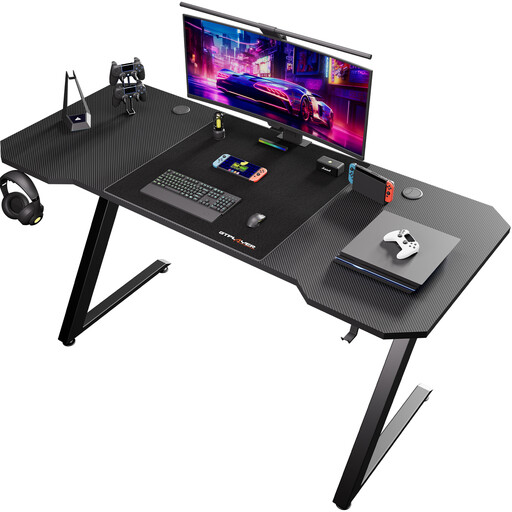
Why it suits this profile: The 120 x 60 cm size is manageable for a student bedroom or compact home office. The product name mentions a carbon fibre surface and a headphone hook.
The fixed dimensions make it easy to measure your space beforehand. Do check that a depth of 60 cm is enough for your monitor and keyboard.
Compact desktop; headphone hook according to the product name; designed for PC and gaming use.

Why it suits this profile: This model combines a large corner desktop with four drawers and two open shelves. It is suitable for home workers or professionals who want to organise equipment and documents in one place.
The dimensions and storage layout are clearly stated. The reversible drawer placement means you are not tied to one fixed corner layout in advance.
150 x 110 x 75 cm; four drawers; two shelves; adjustable feet according to the product description.
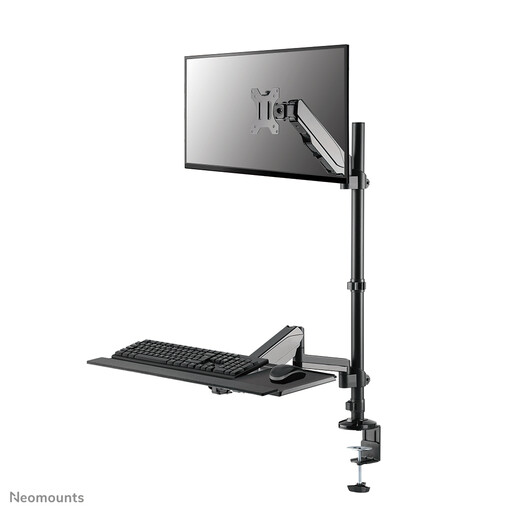
Why it suits this profile: This workstation is designed for users who want to position a screen and keyboard flexibly. The system supports seated and standing work, provided that the mounting system and existing desk are suitable.
The height range, screen size and load capacity are clearly specified. This lets you check before purchase whether your monitor is compatible.
Height adjustment from 44-95 cm; supports up to 9 kg; VESA 75 x 75 and 100 x 100 mm; cable management according to the product specifications.
We have put together a complete, up-to-date list of products that fully meet these strict selection criteria and the applicable European safety regulations.
For one monitor, a keyboard and a mouse, a depth of around 60 cm is a practical starting point. If you use a large screen, two monitors or additional speakers, you may need more space. A monitor arm can free up room by removing the monitor stand from the desktop.
It can be, as long as the dimensions and layout suit your work. Consider the depth, the space available for documents and whether cables can be neatly hidden away. A gaming desk with a carbon fibre surface and headphone hook is mainly designed for PC use; for lots of paperwork, a wider desk with drawers may be more practical.
A manual or gas-spring system generally does not use a constant power supply. With an electric sit-stand desk, energy consumption may depend on how often it is adjusted and the type of motor. So check the technical specifications and choose a mechanism that suits how often you want to change the height.
