
Vandaag of morgen in huis

Kwaliteit gegarandeerd

Welkomstaanbiedingen ontgrendelen: GRATIS bezorging | Tot 80% korting | Gratis 30 dagen JoyPlus-proefperiode
Download de app
A computer desk needs to do more than hold a laptop. People working from home need space for a monitor and keyboard, students often look for a compact study desk, while gamers pay attention to cables, accessories and stability. Yet when buying, people often look only at colour and price. As a result, the desk may not fit the room, wobble during use or lack sufficient storage space after assembly.
This buying guide from the Joybuy Product Recommendation Officer helps you compare options based on verifiable specifications. That way, you can make a more informed choice between a home office desk, writing desk, corner desk, gaming desk or work table.
A desk that is 80 cm wide may seem compact, but the available depth determines whether you can comfortably fit your monitor, keyboard and notebook. Always check the width, depth and height. Also measure the space between the wall, skirting board and cupboard. With a corner desk, you should also check whether the longer side extends to the left or right.
A manufacturer may state a maximum static load, but this figure does not tell you everything about everyday use. The construction, legs, joints and adjustable feet all help determine how stable a desk feels. According to the product description, the 160 x 80 cm LANTINE desk has a stated maximum load of 400 kg. This is a manufacturer’s product specification and does not guarantee that every floor or assembly method will provide the same experience.
Drawers, shelves, lighting, USB connections and a height-adjustable frame can be useful, but check what you really need. Electrical components require extra care around cables and liquids. With a gaming desk featuring RGB lighting, you should also consider access to a power socket and ensure there is enough space behind the desk.
For a simple laptop workspace, a compact desk of around 80 x 50 cm may be sufficient. If you work with a monitor, printer and paper, you will generally need more depth. A 160 x 80 cm work table provides room for several devices, but also requires a larger room.
Also consider the height. Many fixed desks are approximately 75 cm high. A height-adjustable desk allows you to alternate between sitting and standing. The stated height range of the Ochama model is 72 to 120 cm. According to the product description, this desk has four memory settings and a USB-C port. These features come from the brand’s product information; before buying, check that the connection and supplied adapter are suitable for your needs.
Chipboard or engineered wood is often more affordable and lighter than solid wood. Pay attention to how it is combined with the frame. A metal base can provide additional support, but the quality depends on the joints and the assembly.
Always check:
A stated load capacity generally applies to a stationary load. A monitor arm, speaker or PC case may place additional pressure on one point when moved.
A desk with drawers helps keep documents, chargers and small accessories out of sight. Open shelves are easy to access, but can create visual clutter. With a corner desk, it is important to ensure that drawers and shelves do not collide with a door or radiator.
You can use separate organisers for small items. A 5Five bamboo organiser measures 15 x 23 x 7 cm and, according to the product description, is intended for items including pens and small accessories. Storage boxes such as the ANQI set or transparent E-YAYUN boxes are particularly suitable for keeping accessories and supplies off the desktop. When stacking them, pay attention to the stated load capacity and place them on a stable surface.

Why it suits this profile: The dimensions make it suitable for a bedroom, student room or small work area. The desk is suitable for working, studying or light computer use.
The dimensions are clearly stated: 80 x 50 x 76 cm. This allows you to check in advance whether there is enough room for your monitor and chair.
Steel frame, adjustable feet and a stated maximum static load of 50 kg.

Why it suits this profile: The spacious work table has room for a monitor, laptop, printer and paper. Its industrial style suits a home office or creative workspace.
The product description mentions additional steel supports, a triangular connection and adjustable foot pads. These are verifiable construction details, rather than just a style claim.
160 x 80 cm tabletop, metal frame and assembly in under 30 minutes according to the description.
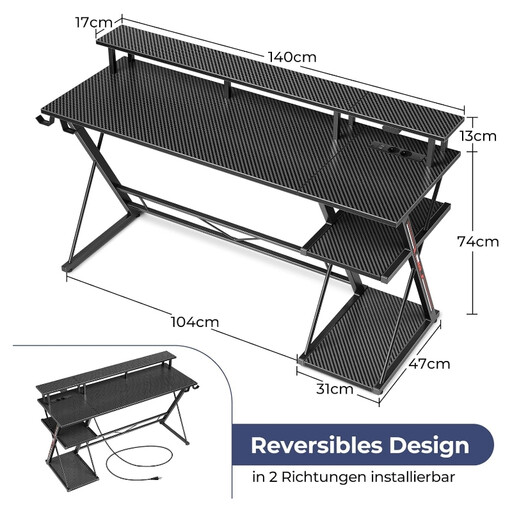
Why it suits this profile: This gaming desk is designed for a monitor, computer case and accessories. The PC stand, monitor stand, headphone hook and connections are suited to a permanent setup.
The extra features are clearly specified: RGB lighting, two power sockets, two USB ports and an adjustable PC stand. However, check the maximum load in advance and keep liquids away from the electronics.
Metal frame, thick chipboard tabletop and integrated gaming accessories according to the product description.

Why it suits this profile: This height-adjustable desk is intended for users who want to adapt their workspace for sitting and standing.
The height, maximum static load of 70 kg and safety instructions are stated. According to the description, prolonged adjustment may temporarily activate overheating protection.
Height range from 72 to 120 cm, four memory settings, cable management and USB-C port according to the product information.
We have put together a complete, up-to-date list of products that fully meet these strict selection criteria and the applicable European safety regulations.
Before assembly, check that all parts are numbered and place the tabletop on a soft surface. Loosely tighten the screws first, then fully tighten them once the frame is straight. Adjust the feet so that the desk is level and, after a few days, check whether any joints need tightening.
Do not place a computer desk directly next to a radiator and keep cables clear of moving parts. With electric models, the adapter, controller and connections must be kept dry. Never exceed the stated maximum load.
For a laptop, 80 x 50 cm is often a practical starting point. For a monitor, keyboard and documents, greater depth is more comfortable. If you use several devices, it is better to look for a width of around 140 to 160 cm.
A corner desk makes efficient use of a corner, but measure both sides carefully. Also check the opening direction of the drawers and the location of power sockets. According to the product description, a reversible model such as the LANTINE corner desk mentioned above can be assembled with the longer side on either the left or right.
Its lifespan depends on the material, load, assembly and maintenance. Position the desk securely, avoid overloading it and do not use harsh cleaners on chipboard or painted surfaces. With a desk containing electronics, take extra care around liquids.
