
Vandaag of morgen in huis

Kwaliteit gegarandeerd

Welkomstaanbiedingen ontgrendelen: GRATIS bezorging | Tot 80% korting | Gratis 30 dagen JoyPlus-proefperiode
Download de app
A computer desk for working from home may seem easy to choose: decide on the size you need, pick a style and place your order. In practice, problems often only become apparent after a few weeks. A desk may turn out to be too narrow for two monitors, cables can remain tangled or the monitor may sit too low. A gaming desk with lots of extra features will not necessarily suit a calm home office interior either.
This buying guide compares office desks, home-working desks and workstations based on practical considerations. This will help you decide which model is right for working from home, studying, gaming or a combination of these activities.
A 120 × 60 cm desktop may be sufficient for a laptop or one monitor. For a computer desk with two monitors, speakers, a printer and writing materials, space can quickly become tight. So do not just check the width: also consider the depth of the work surface and the available legroom.
Also pay attention to the position of the legs and cable ports. A large desktop is less practical if the legs end up against a radiator or cables cannot be routed to a power socket.
The term ergonomic desk does not say much by itself. A desk is only genuinely suitable for your situation when the height, monitor position and chair work well together. A fixed-height desk can work perfectly well when its height is right. If you want to alternate between sitting and standing, you need an adjustable workstation with a sufficient height range and good stability.
When choosing a monitor arm, always check the VESA size, screen weight and maximum screen size. Not every monitor stand is compatible with every monitor.
RGB lighting, a carbon-look finish or a striking design often attract attention. For everyday use, cable management, a sturdy construction, a monitor stand and plenty of space are usually more important. Also consider whether a desk with built-in power sockets and USB ports can be positioned safely and conveniently. Keep liquids away from electrical connections and check the assembly instructions.
First, measure the available space in the room. Take the chair, any nearby cabinet and the passage behind the desk into account. For a compact home-working area, 120 × 60 cm may be suitable. If you need space for a PC desk, monitor, keyboard and paperwork, 140 × 70 cm or 160 × 80 cm will often be more practical.
Next, check the stated load capacity. It needs to be sufficient for both the desktop and the equipment placed on it. With a monitor arm, check whether the stated capacity differs for a standard screen and a curved screen. According to the product details, the Neomounts DS90-325BL1 supports screens weighing up to 9 kg and curved screens weighing up to 6 kg.
A fixed height of around 72 to 75 cm is common for an office desk, but it will not suit everyone or every chair. An adjustable desk or desk riser offers more flexibility. Check the actual range in centimetres instead of relying solely on terms such as “sit-stand” or “ergonomic”.
The Neomounts DS90-325BL1 has a height range of 44 to 95 cm for the monitor arm and keyboard shelf. This means it can be used as a sit-stand workstation. The gas spring helps you move the monitor and keyboard tray. The integrated wrist rest and mouse mat are practical features, but comfort will still depend on your posture and settings.
The most common VESA mounting patterns are 75 × 75 mm and 100 × 100 mm. Measure the distance between the mounting holes on the back of your monitor before buying a monitor stand. Also check whether the clamp or grommet mount is suitable for the thickness of your desk.
A desk with cable management prevents power and display cables from hanging across the floor. This makes cleaning easier and reduces the chance of catching your feet on something. Also think about assembly: some desks require complete assembly, while a desk riser or monitor arm can be attached to an existing desktop.
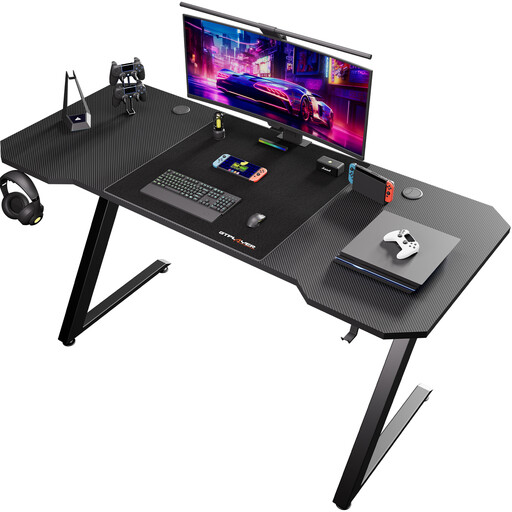
Why it suits this profile: This compact gaming desk is aimed at beginners looking for a simple PC or study area with a 120 × 60 cm desktop. The headphone hook keeps an accessory off the desktop.
The dimensions are clearly stated, so you can assess whether one monitor and its peripherals will fit. Before buying, do check the available legroom and stated load capacity.
120 × 60 cm, carbon-look desktop surface and a headphone hook according to the product listing.

Why it suits this profile: Its generous dimensions make it suitable for a professional, student or home worker who needs a large workstation for a monitor, PC, printer and documents.
The desktop is 80 cm deep, giving you more room to position your monitor and keyboard at a comfortable distance. The adjustable feet help keep the desk stable on an uneven floor.
160 × 80 cm, metal frame, adjustable feet and a stated maximum load capacity of 400 kg.
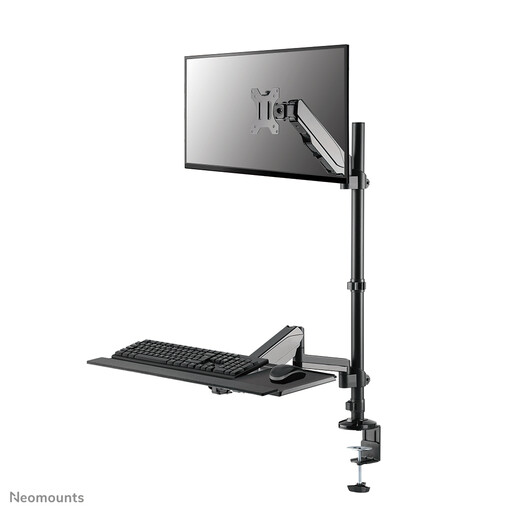
Why it suits this profile: This desk converter is designed for anyone who wants to turn an existing table into a sit-stand workstation without buying a completely new desk frame.
The product details specify VESA support for 75 × 75 and 100 × 100 mm, plus a maximum weight of 9 kg, or 6 kg for curved screens. This means you can check compatibility in advance.
Height range of 44–95 cm, tilt up to ±35°, swivel up to ±180° and cable management.
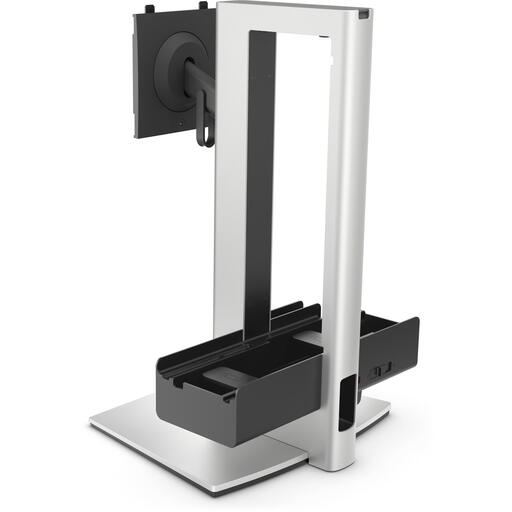
Why it suits this profile: This monitor stand is suitable for one screen up to 27 inches and can be useful when you want to make an existing office desk more organised.
The maximum load of 5.8 kg and VESA support are clearly stated. Check these details against your monitor’s weight and mounting connection.
Height adjustment of up to 150 mm, tilt, pivot up to 90° and cable management for one screen.
We have put together a complete, up-to-date list of products that fully meet these strict selection criteria and the applicable European safety requirements.
Use these points before ordering a computer desk for working from home:
For a laptop or one monitor, 120 × 60 cm may be sufficient. For a PC desk with an additional screen, speakers and documents, a larger desktop, such as 140 × 70 cm or 160 × 80 cm, is more practical. Always measure your complete set-up before ordering.
That depends on how you work and how often you want to adjust the height. A sit-stand workstation offers more adjustment options than a fixed home-working desk. A desk converter, such as an adjustable monitor and keyboard arm, can be an alternative if you want to keep using your existing table.
Choose a desk with cable management or use cable clips and a cable tray. Keep the extension lead accessible, but do not leave it loose on the floor. With a monitor stand, also check that cables do not become stretched when the screen is swivelled or adjusted.
