
Vandaag of morgen in huis

Kwaliteit gegarandeerd

Welkomstaanbiedingen ontgrendelen: GRATIS bezorging | Tot 80% korting | Gratis 30 dagen JoyPlus-proefperiode
Download de app
A computer desk may seem straightforward to choose, until you discover how much difference there can be in dimensions, legroom, materials and storage space. A desk that is too small will not have room for a monitor and laptop side by side. A wobbly frame makes working and gaming unnecessarily uncomfortable. And a corner desk that cannot be reversed may not suit the layout of your room.
For homeworkers, students, gamers and other computer users, these three pitfalls are particularly important:
As a Joybuy Product Recommendation Officer, I therefore focus mainly on verifiable features: dimensions, materials, storage space, load capacity, adjustability and the intended use.
First, measure the available wall or corner space. Also allow for the chair, walking space and any doors or drawers that need to open.
The height of the models mentioned is around 75 to 76 cm. Check that this suits your office chair and sitting position. With a large PC monitor, also pay attention to the depth: too little space may leave the screen too close to the user.
Many affordable desks are made from chipboard or E1 chipboard with a metal frame. This is not the same as solid wood, but it can be suitable for everyday home use when the frame is well constructed.
Pay attention to the following points:
A stated load capacity is a product specification, not a guarantee that every setup will be safe. Always place a desk on a level surface and follow the assembly and safety instructions.
A desk with drawers is practical for documents, cables and small accessories. Open shelves are suitable for books, a printer or decorations, but remain visible. If you want a tidy workspace, it is better to look for lockable or enclosed storage.
Gamers have other details to consider. A gaming desk may include a monitor stand, headphone hook, PC holder, lighting or USB connections. Check beforehand where the computer tower will be placed and whether the cables are long enough. Electronic features must be kept away from liquids and must not be overloaded.
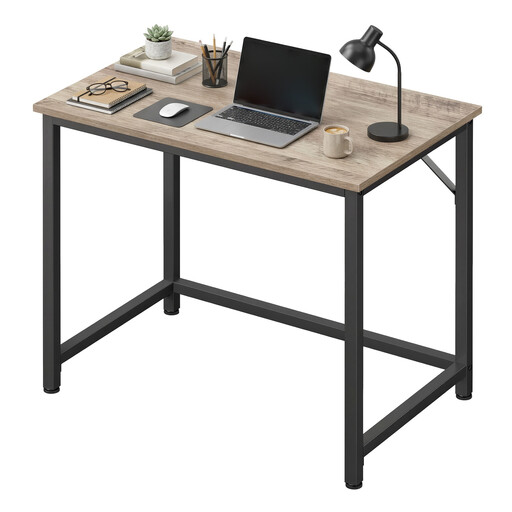
Why it suits this profile: This compact desk is suitable for a laptop, monitor or simple study setup in a bedroom, student room or home office.
The dimensions of 80 × 50 × 75.5 cm and the stated maximum static load of 50 kg make the choice more concrete than general terms such as “sturdy”.
Steel frame, adjustable feet and a neutral greige-and-black finish; suitable for work, study or light gaming.

Why it suits this profile: The spacious work surface is designed for intensive computer use, working from home, studying or a combination of monitor, laptop and printer.
The product specifications state 160 × 80 × 75 cm, adjustable feet and a metal frame with additional supports. However, check the weight of your equipment yourself.
Generous legroom and workspace, a powder-coated steel frame and assembly with the supplied Allen key.
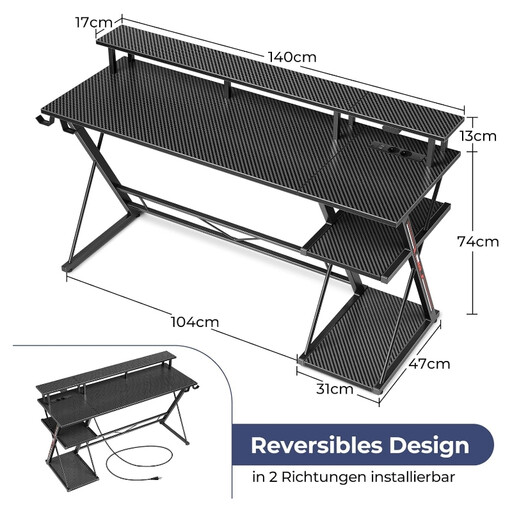
Why it suits this profile: This gaming desk is aimed at users who want a monitor stand, headphone hook, PC holder and integrated lighting in one setup.
The features are clearly specified: app-controlled RGB lighting, two sockets, two USB ports and an adjustable CPU stand. Keep liquids away from the electronic components.
140 cm wide, with a carbon-fibre-look desktop, monitor stand, cable-friendly connections and room for a PC tower up to 47 cm.
A corner desk works well when you want to combine two zones, such as a monitor on one side and writing or storage space on the other. The LANTINE model, measuring 150 × 110 × 75 cm, has two worktops, two open shelves and four drawers. According to the product description, the drawers can be installed on the left or right. This makes the layout more flexible than with a fixed L-shaped desk.
Do bear in mind the turning space needed for your chair and the position of power sockets. Measure the corner at two points, as skirting boards or radiators may reduce the available depth.
Before buying, check which parts are included and whether assembly requires two people. Start by tightening the screws loosely, align the frame and only then tighten everything fully. After a few weeks, check that the connections are still secure.
For maintenance, a soft, slightly damp cloth is usually sufficient. Do not use abrasive products on chipboard, decorative film or electronic components. The lifespan depends on the load, moisture, quality of assembly and everyday use. A desk will remain usable for longer if you respect the stated load capacity and do not hang from the desktop or frame.
For a laptop or one monitor, approximately 80 × 50 cm is often sufficient. For two screens, a printer or lots of documents, a width of 140 to 160 cm and a depth of around 70 to 80 cm is more practical.
That depends on how you use it. Drawers keep documents and accessories out of sight. An open desk often provides more legroom and a lower-profile construction. Choose based on the items you want to store every day.
The desk itself does not use electricity. Only features such as RGB lighting, USB ports or built-in sockets require power. Consumption depends on the connected equipment and how long the lighting is switched on.
We have put together a complete, up-to-date list of products that fully meet these strict selection criteria and the applicable European safety regulations.
