
Vandaag of morgen in huis

Kwaliteit gegarandeerd

Welkomstaanbiedingen ontgrendelen: GRATIS bezorging | Tot 80% korting | Gratis 30 dagen JoyPlus-proefperiode
Download de app
A computer desk may seem straightforward, but you will quickly notice if you make the wrong choice. A desktop that is too shallow leaves little room for your monitor, keyboard and mouse. A frame that merely looks sturdy may still move when you are typing or gaming. And a desktop computer can take up more space than expected, particularly when connections and cables have not been taken into account.
For homeworkers, students, school pupils and families, three pitfalls are particularly relevant:
For a home office desk or study desk, the available space is the first thing to check. Do not just measure the wall. Also allow for the chair, drawers, cables and walking space.
A compact desk measuring 80 x 50 cm is suitable for:
A height of around 75 to 76 cm suits a typical seated posture, but always check that it works with your chair. If you work long hours, you could also consider an adjustable desk or monitor stand. This raises the screen without making the desktop more crowded.
If you use several screens, a large keyboard or a gaming mouse that needs plenty of movement, a depth of 50 cm may be restrictive. A gaming desk with extra depth or cable management may be more practical.
A modern desk often consists of a chipboard or MDF desktop with a metal frame. Consider the combination, not just the colour. A desk with a steel frame can provide a sturdy base, but quality also depends on the joints, legs and adjustable feet.
Before buying, check the following:
A stable desk does not have to be heavy, but a lightweight model may be more sensitive to knocks. Avoid placing a heavy printer or desktop computer right at one corner, and do not exceed the stated load capacity.
The colour does not affect how practical the desk is, but it can change how large a room appears. A black desk complements a gaming setup and pairs easily with black monitors and accessories. A brown desk creates a warmer contrast in a bedroom or living room. Greige sits between grey and beige and suits neutral interiors.
Choose the dimensions and construction first. Use colour as the final filter. This helps prevent an attractive modern desk from ultimately proving too small or impractical.
A compact desktop computer can save space, but pay attention to ventilation and connections. According to the product specifications, the HP OmniDesk Slim is 10 cm deep and includes, among other features, Wi-Fi 6, Gigabit Ethernet, HDMI, USB-A, USB-C and a 3.5mm connection. This makes a setup without a separate Wi-Fi adapter possible.
The specifications also list:
A desktop computer with Windows 11 and a 512 GB SSD is particularly suitable for documents, internet use, streaming and everyday computing. For modern, graphically demanding games, integrated graphics are generally a limiting factor. Also check that you have a monitor, keyboard, mouse and power cable available.

Why it suits this profile: Its compact size is suitable for a laptop, schoolwork or one monitor in a smaller room.
The exact dimensions of 80 x 50 x 76 cm and the specified static load of 50 kg make comparisons easier.
Chipboard desktop, steel frame, adjustable feet and a brown-and-black finish.
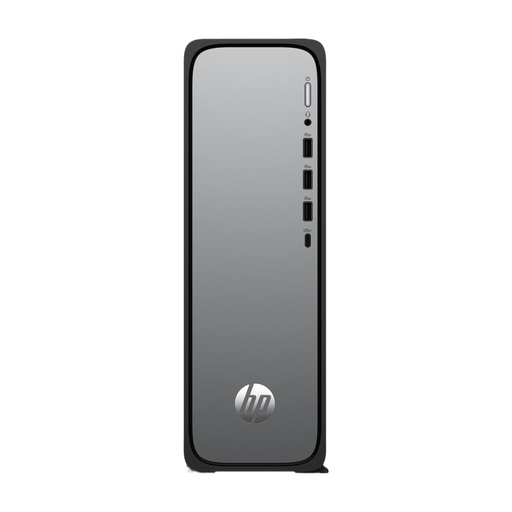
Why it suits this profile: This slim PC is designed for everyday use and takes up little space next to a computer desk, with a depth of just 10 cm.
The storage, memory, connections and depth are clearly stated. Please note: the charger is not supplied as standard.
8 GB DDR5, 512 GB SSD, Windows 11 Home, Wi-Fi 6 and multiple USB ports.
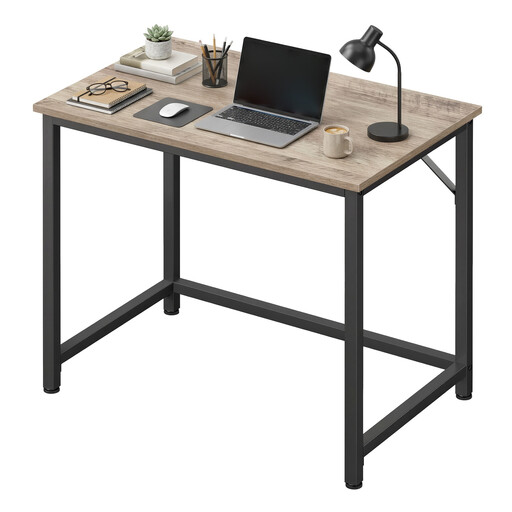
Why it suits this profile: The combination of compact dimensions and a neutral greige-and-black colour works well for working from home, studying and light gaming.
The product information states the 50 kg load limit and recommends placing it on a level, stable surface.
Reinforced metal frame, adjustable feet, 80 x 50 x 75.5 cm and assembly instructions.

Why it suits this profile: The black finish is easy to combine with different chairs, screens and accessories in a shared space.
The dimensions, materials and maximum static load are stated, allowing you to plan the space and equipment in advance.
Black chipboard desktop, steel frame, adjustable feet and a specified load capacity of 50 kg.
We have put together a complete, up-to-date list of products that fully meet these strict selection criteria and the applicable European safety regulations.
It depends on your equipment. For a laptop or one monitor with a compact desktop computer, 80 x 50 cm is often practical. For two screens, a large keyboard or gaming accessories, a depth of 50 cm may feel cramped. If necessary, mark out the required space on the floor before ordering.
Assemble all the connections according to the instructions and check after a few days whether any screws need tightening. Adjust the feet to suit the floor and do not place the desk on a thick, soft rug. Keep heavy equipment as central as possible and stay below the specified maximum static load.
Its lifespan depends on assembly, load, moisture and everyday use. A chipboard desktop should be kept dry and must not be overloaded for long periods. Check the frame, joints and feet regularly. With a desktop computer, sufficient ventilation space is also important to limit heat build-up around the case.
