
Vandaag of morgen in huis

Kwaliteit gegarandeerd

Welkomstaanbiedingen ontgrendelen: GRATIS bezorging | Tot 80% korting | Gratis 30 dagen JoyPlus-proefperiode
Download de app
A desk may seem like a straightforward purchase, until your everyday workspace wobbles, lacks sufficient depth or does not suit your chair. People working from home, students and gamers therefore look beyond colour and design. Dimensions, weight capacity, cable management and assembly all determine whether a computer desk remains comfortable to use.
Pay particular attention to these common pitfalls:
The right size depends on your equipment and the space available.
The height is important too. A fixed desk of around 75 cm will often work well with a standard office chair. With an electric sit-stand desk, check that the lowest and highest settings suit your height and chair. Also make sure the legs and cables can move freely when you adjust the desktop.
A sturdy desk consists of more than a thick desktop. Pay attention to the following specifications:
A chipboard desktop with a steel frame can be a practical choice for everyday computer use. However, check the assembly instructions and retighten the connections after the initial period of use if necessary.
A desk with a USB-C port can be useful for charging a phone or compatible accessories. Check whether the port is intended for charging, what charging capacity is specified and whether an adapter is included. Do not use an adapter with a voltage that is too high.
A desk with a memory function can save several preferred positions. This is useful when different people use the same desk or when you regularly switch between sitting and standing. A memory function does not replace good posture or a suitable chair.
For gamers, a cable grommet, headphone hook, monitor stand and sufficient mouse space are often more relevant than RGB lighting alone. With a gaming desk, also check where the computer tower will stand and how much room the legs take up beneath the desktop.

Why it suits this profile: This compact desk is suitable for a laptop, study books or a simple computer set-up in a smaller room.
The dimensions and maximum static load of 50 kg are clearly stated. Adjustable feet help compensate for minor unevenness in the floor.
Compact size, black design, steel frame and adjustable feet.
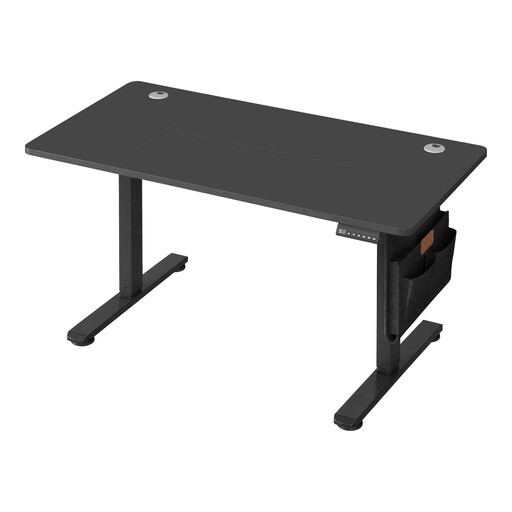
Why it suits this profile: The 140 x 60 cm desktop combines electric height adjustment with a memory function and USB-C connection for an organised home office.
The height range of 72 to 120 cm, maximum static load of 70 kg and safety instructions are specified.
Memory function, USB-C port, cable grommets, organiser and hook.

Why it suits this profile: The spacious 160 x 70 cm desktop has room for several monitors, office equipment or an extensive study set-up.
Alongside the size, the height range of 72 to 120 cm and maximum static load of 70 kg are stated. The sensor and overheating instructions require extra attention during use.
Spacious desktop, electric adjustment, memory function, USB-C connection and cable management.
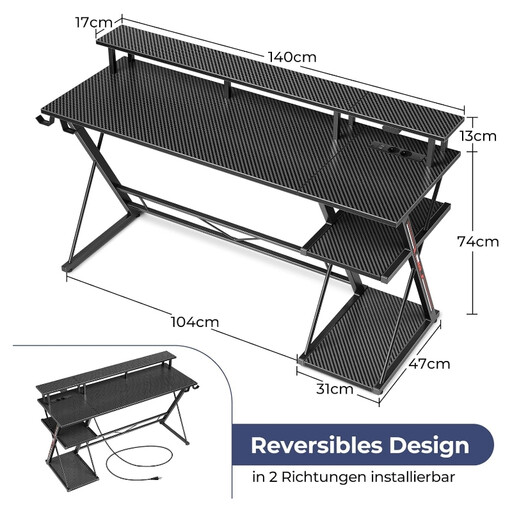
Why it suits this profile: This gaming desk is designed for a PC set-up with a monitor stand, CPU stand, headphone hook, LED lighting and connections.
The product information specifically mentions a metal frame, chipboard desktop, two power sockets and two USB ports. The stated load limits should be checked before assembly.
CPU stand, monitor stand, headphone hook, RGB LED lighting and built-in connections.
We have put together a complete, up-to-date list of products that fully meet these strict selection criteria and the applicable European safety regulations.
For a laptop or compact monitor, 50 to 60 cm may be sufficient. With a large screen, keyboard and mouse, a 70 cm depth is more practical. This leaves room for cables and accessories and allows you to position the monitor at a suitable distance.
Its lifespan depends on the motor, frame, load, assembly and frequency of use. Follow the maximum static load and make sure the desk does not stand against a wall or cupboard while adjusting it. On some models, the overheating protection temporarily switches on after prolonged continuous adjustment; refer to the product instructions for details.
An electric desk mainly uses electricity while moving up or down. Power consumption at rest depends on the controller and any features such as USB charging. An energy-saving mode can reduce standby consumption, but check the product specifications if electricity usage is an important factor for you.
