
Vandaag of morgen in huis

Kwaliteit gegarandeerd

Welkomstaanbiedingen ontgrendelen: GRATIS bezorging | Tot 80% korting | Gratis 30 dagen JoyPlus-proefperiode
Download de app
A computer desk needs to do more than simply support a screen. The right size, stability and layout determine whether you can work, study or game comfortably. However, product pages are not always as clear as they could be. A desk may look spacious in a photo, while its actual depth is limited. Extra features such as lighting, USB ports or a memory function are also not essential for every user.
This buying guide explains what to look out for and which types of computer desk are suitable for different uses.
A desk that is 120 cm wide may seem sufficient, but once you add a monitor, keyboard, speakers and accessories, there may be very little space left. Always consider both width and depth. For a single laptop, a depth of 50 or 60 cm is often practical. If you work with a monitor, documents or two screens, a more spacious desktop, such as 160 x 70 cm or 160 x 80 cm, is a better choice.
The stated maximum static load is a technical limit under stationary conditions. It does not automatically indicate how stable a desk feels while typing, gaming or moving equipment around. You should also check the materials and construction. A combination of chipboard and steel is common. The quality then depends on the thickness of the desktop, the joints and the shape of the frame.
A USB-C port, RGB lighting or memory function may sound useful, but check exactly what is included. With a USB-C connection, it is important to know whether it only supplies power or also transfers data. With an electric sit-stand desk, pay attention to the height range, controls, cables and the space around the desk.
According to the product descriptions provided by the relevant brands, some models feature a USB-C port with charging functionality. Treat this as a product specification and check the latest information on the product page before buying.
Use these guidelines as a starting point:
Measure not only the room, but also the route into it. Also check that drawers, doors and an office chair can still move freely.
A fixed desk has a simple construction and generally fewer parts that require maintenance. This makes this type appealing for students, bedrooms and compact home offices.
A height-adjustable desk offers greater flexibility. With electric models, check in particular:
A desk with a memory function can save pre-set heights. This is practical when several people use the desk or when you regularly switch between sitting and standing. It is not a substitute for a suitable chair, the correct monitor height or a proper working posture.
A desk with cable management helps route cables through cable grommets, organisers or hooks. Check how many cable openings there are and where they are positioned. On a gaming desk, a headphone hook, monitor stand or PC holder may be useful. With electric desks, take extra care to ensure that cables do not become trapped while the desk is being adjusted.

Why it suits this profile: The compact 80 x 50 cm size is well suited to a small room, student bedroom or simple home workstation with a laptop.
The dimensions and maximum static load of 50 kg are clearly stated. This allows you to assess in advance whether the workspace is large enough.
Steel frame, adjustable feet and a black desktop. The desk is designed for work, study or gaming and weighs 8.5 kg.

Why it suits this profile: The spacious work area and electric adjustment are well suited to professionals and home workers with multiple devices.
The specifications state a range of 72 to 120 cm, a load capacity of 70 kg, two cable grommets and a USB-C connection.
Memory function, cable organiser, hook and lockable controls. The electric system is intended for indoor use.
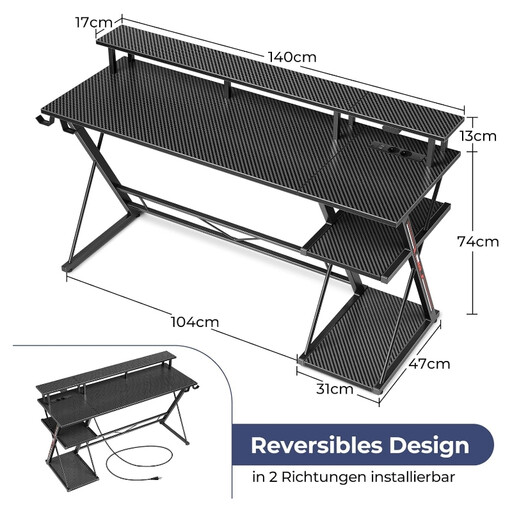
Why it suits this profile: Gamers who want to keep their monitor, PC, headphones and charging devices close at hand benefit from several built-in features.
The product information states that the desktop is made of chipboard and the frame is made of metal. It also provides warnings about liquids and maximum load.
RGB lighting, two power sockets, two USB ports, monitor stand, headphone hook and adjustable CPU stand.

Why it suits this profile: This large desk is suitable for anyone who wants to place a monitor, printer, documents or multiple work materials on a single surface.
The stated size of 160 x 80 cm makes the available space easy to assess. Adjustable foot pads help with positioning on a floor that is not completely even.
Steel frame, additional supports, triangular joints and a stated static capacity of 400 kg. Assembly is required.
Place the desk on a level, stable surface and tighten all connections according to the instructions. Adjustable feet can compensate for minor unevenness, but they cannot replace a stable floor. With an electric sit-stand desk, leave sufficient space between it and the wall, and check that cables, extension leads and accessories can move freely.
With models that contain electronic components, keep liquids away from them. Also follow the usage limitations in the instructions, such as a temporary cool-down period after prolonged, continuous adjustment. Only place a computer tower on a CPU stand if its dimensions and maximum load are suitable for it.
We have put together a complete, up-to-date list of products that fully meet these strict selection criteria and the applicable European safety regulations.
For a laptop, 80 x 50 cm may be sufficient. For a monitor, keyboard and documents, 120 x 60 cm is a useful starting point. If you work with multiple screens or peripherals, it is better to consider 140 x 60 cm, 160 x 70 cm or 160 x 80 cm.
An electric desk uses power while it is being adjusted and while the controls or adapter remain active. Actual consumption depends on the motor, how frequently it is used and its standby mode. According to the product descriptions of some models, an energy-saving mode may help reduce consumption. Check the latest technical information if electricity costs are an important consideration for you.
Its lifespan depends on the materials, assembly, load, moisture and everyday use. Keep the desktop within the stated maximum static load, lift the desk when moving it and retighten the fixings after assembly if necessary. A steel frame and a well-supported desktop can contribute to stability, but they do not guarantee a specific lifespan.
