
Vandaag of morgen in huis

Kwaliteit gegarandeerd

Welkomstaanbiedingen ontgrendelen: GRATIS bezorging | Tot 80% korting | Gratis 30 dagen JoyPlus-proefperiode
Download de app
A computer desk needs to do more than just hold a screen. The right size, enough stability and a sensible cable set-up all affect how comfortable it is to use every day. Yet many buyers focus mainly on colour and price. This can lead to familiar problems: a desk that is too shallow for a monitor and keyboard, wobbles on an uneven floor or doesn’t fit the planned space once assembled.
In this guide, you’ll find out what to look for in a computer desk, which specifications you can check and what type of desk suits your needs. That way, you can compare a desk for working from home, studying or gaming without being swayed by vague marketing claims.
A desk measuring 80 x 50 cm is compact and suitable for a bedroom, student room or small workspace. However, the depth is limited. A large screen, laptop, keyboard and mouse can quickly feel cramped. So measure not only the space where the desk will go, but also the equipment you plan to put on it.
Check the height too. A standard height of around 75 cm won’t automatically suit every chair or user. Leave enough room for your legs and check whether the armrests fit under the desktop.
A sturdy appearance in a product photo doesn’t tell you much. Look at the combination of material, frame and maximum static load capacity. According to the product information, the JOYFURNOS desk has a chipboard top, a steel frame and a maximum static load capacity of 50 kg. This is a specification you can check, but remember to add up the weight of your monitors, speakers and other accessories.
Also look for adjustable feet. They can help you level a desk on a slightly uneven floor. Always place the desk on a flat, stable surface and don’t exceed its stated load capacity.
A standard computer desk doesn’t automatically come with a monitor arm, cable management or adjustable height. If you want to work both sitting and standing, you’ll need an adjustable desk or a separate sit-stand solution. If you’re buying a monitor arm, check the screen size, weight and VESA pattern too.
A desk with a keyboard tray can be useful for a fixed desktop set-up. In a compact space, a separate monitor solution may offer more flexibility. You can also browse the desk with keyboard range.
Use this simple checklist:
A compact desk often works well in a bedroom or small study. For a large desktop computer, two screens and speakers, a wider top is more practical.
Chipboard is a commonly used material for affordable desk tops. Its quality depends on factors including thickness, finish and the support provided by the frame. A steel frame can offer extra support, but also check that the joints can be secured firmly.
A desk that’s easy to assemble is a welcome bonus, but ease of assembly shouldn’t be your only selection criterion. Check that the parts are clearly labelled, the instructions are included and all the screws are secure once assembly is complete.
An adjustable desk or sit-stand workstation may be worth considering if you want to change your working position regularly. For a monitor arm, these are the main things to check:
According to the product information, the Neomounts DS90-325BL1 workstation is suitable for screens from 17 to 32 inches and has a maximum load capacity of 9 kg. The same information gives a maximum of 6 kg for curved screens. This is a monitor solution for an existing desk, not a complete desktop with legs.

Why it suits this profile: Measuring 80 x 50 x 75.5 cm, it’s a good fit for a first home workspace, student room or compact gaming set-up.
The product information lists specific dimensions, a steel frame, adjustable feet and a maximum static load capacity of 50 kg.
Compact size, black finish and adjustable feet, according to the product description.
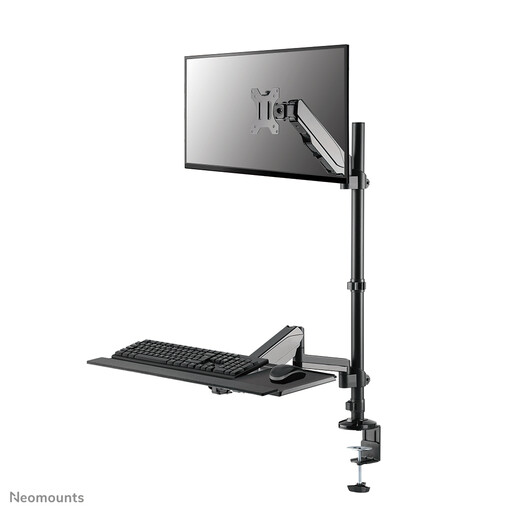
Why it suits this profile: Ideal if you want to add an adjustable monitor and keyboard set-up to an existing table.
The specifications include a height range of 44-95 cm, cable management and support for VESA 75 x 75 and 100 x 100 mm.
Gas-spring adjustment, a keyboard tray and a load capacity of up to 9 kg, according to the product information.
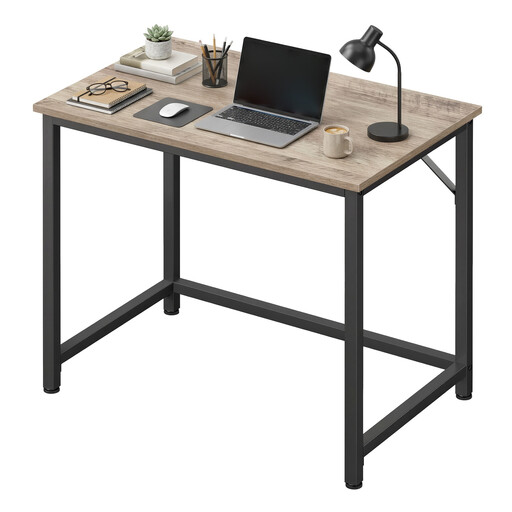
Why it suits this profile: The combination of greige and black is a good choice if you’re looking for a neutral workspace for your bedroom, living room or home office.
Here too, the product information lists the size, material, load capacity and adjustable feet.
80 x 50 cm, a steel frame and a stated maximum load of 50 kg.
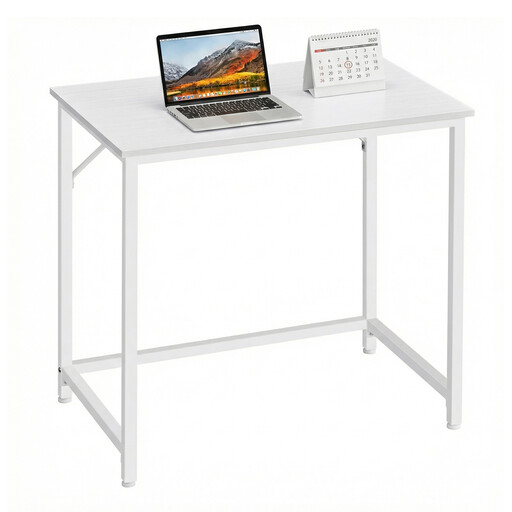
Why it suits this profile: The white version is a practical choice for a bright study area, home workspace or compact gaming corner.
The stated static load capacity of 50 kg and adjustable feet make the practical limits clear before you buy.
White top, compact size and assembly instructions with labelled parts, according to the product description.
We’ve put together a complete, up-to-date list of products that meet these strict selection criteria and the applicable European safety regulations.
It depends on your equipment. An 80 x 50 cm desk may be big enough for a laptop, one compact screen and a keyboard. If you use two monitors, a desktop computer or large speakers, a wider and deeper desk is likely to be more practical.
Place the desk on a level surface, tighten all the connections evenly and use the adjustable feet if it has them. Spread heavy equipment across the desktop as evenly as possible. Always keep the maximum static load capacity stated in the product information in mind.
No. Check that the desktop is suitable for a clamp or through-desk mount and that the construction is stable enough. For the monitor arm itself, check the screen size, weight and VESA size. A product such as the Neomounts DS90-325BL1 has specific limits listed for these; make sure they match your monitor.
