
Vandaag of morgen in huis

Kwaliteit gegarandeerd

Welkomstaanbiedingen ontgrendelen: GRATIS bezorging | Tot 80% korting | Gratis 30 dagen JoyPlus-proefperiode
Download de app
A computer desk may seem simple to choose, but the wrong size, a wobbly frame or an impractical layout can cause daily frustration. Online offers in particular often highlight certain features prominently, while important details are less visible. Think of a spacious desktop that is actually too shallow for a monitor, drawers that can only be fitted on one side, or a high load capacity that is not clearly explained.
With this guide, you can compare a computer desk based on practical considerations. This makes it easier to find the right desk for a home office, bedroom, living room or student room without relying solely on appearance or marketing copy.
A wide desk is not automatically suitable for a computer setup. Check the depth as well. A monitor, keyboard and mouse often require more space than a narrow writing desk. Also measure the area where the desk will stand, including skirting boards, radiators and doorways.
A desk with drawers or a desk with storage can help keep things organised, but pay attention to the layout. Can the drawers be fitted on the left or right? Can you still pull a desk chair up comfortably? Open shelves are easy to access, but can look untidier than enclosed storage.
A desk may have a high static load capacity according to its product description, but that does not tell you everything about its stability during everyday use. Also look at the frame type, adjustable feet, additional supports and the flooring. A metal frame and effective floor levelling are practical features for an office desk, study desk or gaming setup.
Compare the width, depth and height with your equipment and height. A standard height is often around 75 cm, but always check the product specifications. A desk measuring 80 x 50 cm is suitable for a compact laptop or monitor space; for multiple screens, a printer or lots of study materials, a longer desktop is more convenient.
A corner desk makes efficient use of a corner of the room. For an L-shaped model, check the length of both sides and whether the corner being on the left or right suits the layout of your space.
Many desks combine chipboard or MDF with a steel frame. Pay attention to the desktop thickness, the edge finish and the quality of the joints. A model with an E1 chipboard classification refers to a classification for formaldehyde emissions from board materials; check the exact product information and local requirements before drawing conclusions from this.
An industrial-style desk with metal legs often works well in a modern interior, but the style should not come at the expense of legroom. Check that a drawer unit, crossbar or CPU holder does not obstruct your legs.
Check whether the parts are numbered and whether tools are included. During assembly, initially tighten the screws loosely and only fully tighten them once the frame is correctly aligned. Place the desk on a level surface and do not exceed the stated static load capacity.
Extra care is needed with electrical features such as built-in sockets, USB ports or RGB lighting. Keep liquids away from electrical components and follow the supplied safety instructions.

Why it suits this profile: This compact desk is suitable for students, school pupils and home users with a laptop or single monitor. Measuring 80 x 50 x 76 cm, it is a practical choice for a smaller room.
The product description gives specific dimensions and mentions a steel frame, adjustable feet and a static load capacity of 50 kg. This makes it easier to compare its suitability than relying on style alone.
Compact size, adjustable feet and labelled parts according to the product information. Materials: chipboard and steel.

Why it suits this profile: This model is designed for users who want to keep multiple devices, documents and accessories close at hand. The L-shaped design works well in a home office or spacious bedroom.
The two work surfaces, two open shelves and four drawers provide clearly defined storage. According to the product description, the drawers can be fitted on the left or right.
Dimensions: 150 x 110 x 75 cm. The product information specifies E1 chipboard, a metal frame and adjustable feet.
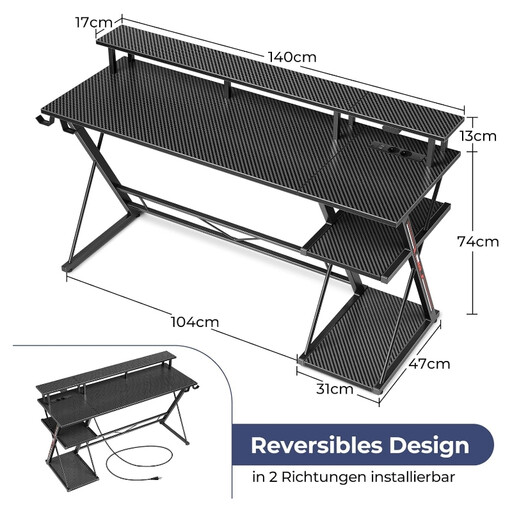
Why it suits this profile: Suitable for gamers and users with multiple peripherals who want extra connections and accessories on their desk.
The product description mentions a metal frame, monitor stand, headphone hook and adjustable CPU stand. Before use, check the recommended load capacity and make sure the desk is level.
140 cm wide, with RGB lighting, two sockets, two USB ports and a CPU stand according to the product details.
We have put together a complete, up-to-date list of products that fully meet these strict selection criteria and the applicable European safety regulations.
That depends on your equipment and working style. For a laptop, 80 x 50 cm may be sufficient. If you use a large screen, two monitors or a printer, look for a longer and deeper desktop, for example 140 to 160 cm wide. Also allow for walking space and the position of power sockets.
Place the desk on a level surface, tighten all the connections properly and use adjustable feet if available. After assembly, check that the frame is square. A high load capacity does not automatically prevent wobbling; the construction and flooring are just as important.
Its lifespan depends on the materials, assembly, load and maintenance. Use coasters, avoid leaving chipboard exposed to moisture for long periods and do not exceed the stated load capacity. After some time, check the screw connections and carefully tighten them if necessary.
