
Vandaag of morgen in huis

Kwaliteit gegarandeerd

Welkomstaanbiedingen ontgrendelen: GRATIS bezorging | Tot 80% korting | Gratis 30 dagen JoyPlus-proefperiode
Download de app
A computer desk may seem simple to choose: check the dimensions, pick a colour and place your order. Yet problems often only become apparent after a few weeks. The work surface turns out to be too small for the monitor and keyboard, the desk wobbles on an uneven floor or cables get in the way. By checking a few key points, you can avoid buying a desk that does not suit your space or how you use it.
A black computer desk or a greige and black desk can easily complement a modern interior. However, colour says little about stability, load capacity or ease of use. So also check the material, construction and maximum static load.
A compact computer desk is useful in a small bedroom, student room or home office. An 80 x 50 cm desk can accommodate a monitor, laptop or compact desktop PC, but the available space is reduced by a monitor stand, speakers and accessories. Do not just measure where the desk will stand; also measure how much working space you need.
A floor is not always completely level, particularly in older homes or on hard flooring with slight height differences. Without any way to make adjustments, a desk can wobble while you are typing or gaming. Adjustable feet help you level the furniture more accurately. They are not a substitute for a stable base: always place the desk on a level, solid floor.
Start by checking the width, depth and height. A home-office desk should provide enough room for the equipment you use every day. For a study, a width of 80 cm can be practical, as long as you work with one monitor or a laptop.
A height of around 75 to 76 cm is common for fixed desks. Check that your chair fits comfortably underneath. Your forearms should be as horizontal as possible while typing. A desk that is too high is more likely to result in an uncomfortable working position, while one that is too low can restrict your legroom.
The desks featured in this selection use a combination of chipboard and steel. Chipboard is relatively lightweight and suitable for everyday use, while a steel frame can provide additional support. Pay attention to the connections between the desktop and frame: a sturdy material is of little help if screws or fittings are not secured properly.
According to the product information, the JOYFURNOS model has a maximum static load of 50 kg. This means the total stationary weight that the desk can support according to the stated specification. Add up the weight of your monitor, PC, speakers, books and other items. Do not place heavy equipment on the desk if it exceeds the stated limit.
Check that the parts are clearly marked and that the assembly instructions are included in the package. After a few days of use, you may want to tighten the fixings again; materials can settle slightly during initial use.
A stable desk should stand on a level surface. Adjustable feet can compensate for minor unevenness and help protect the floor. They do not automatically make a desk suitable for a heavy gaming PC or multiple monitor arms. Always check the load capacity and mounting options for this.

Why it suits this profile: The compact size is suitable for a bedroom, student room or simple home workstation. The black finish is neutral and pairs easily with existing equipment.
The product information specifies adjustable feet and a steel frame. This allows you to compensate for minor floor unevenness, so you do not have to judge the desk by its appearance alone.
80 x 50 x 75.5 cm; chipboard and steel; stated static load capacity of 50 kg; adjustable feet.
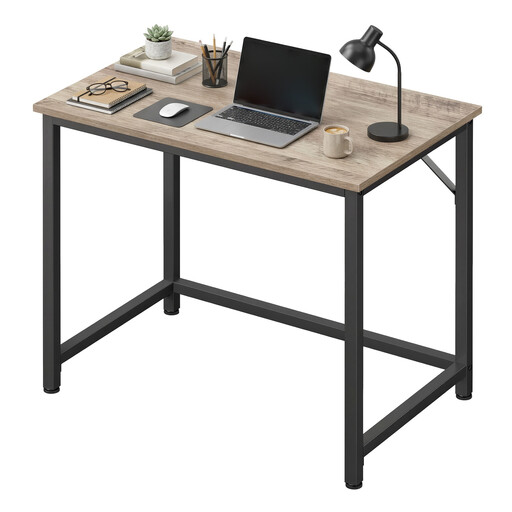
Why it suits this profile: This desk combines the same compact layout with a greige and black colour scheme. It is suitable for users who also want their desk to be a visible part of their interior.
Colour is not the only selection criterion: the stated dimensions, materials, assembly and adjustable feet can all be checked in advance in the product information.
Chipboard with steel frame; stated maximum static load of 50 kg; 80 x 50 x 75.5 cm; adjustable feet.
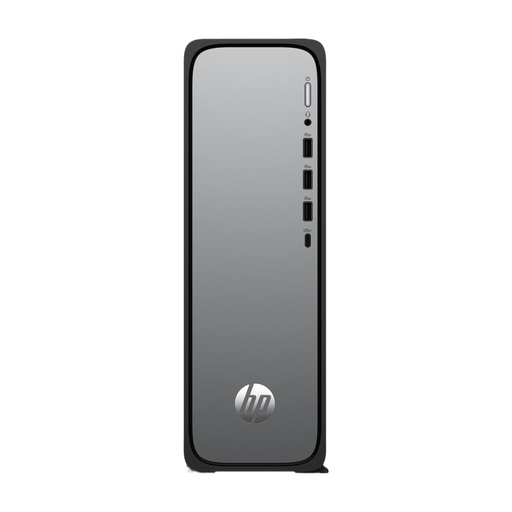
Why it suits this profile: If you are looking for a desk and a slim desktop PC for everyday use, this PC has a depth of 10 cm. That saves space on or next to a home-office desk.
The specifications make it clear what the device is designed for: everyday computing with 8 GB DDR5 memory and 512 GB SSD storage. Heavy gaming or professional video editing requires a separate comparison.
10 cm deep; Intel Core i3 300 with up to 3.9 GHz; 512 GB NVMe SSD; Wi-Fi 6; Windows 11 Home; multiple USB ports.
A gaming desk does not automatically need to be large or fitted with eye-catching accessories. For casual gaming, a compact desk may be sufficient, provided the monitor, keyboard and mouse fit comfortably. When using a gaming PC, check the weight and dimensions of the case.
For working from home and studying, cable management, legroom and a comfortable working height are often more important than additional decorative features. A compact model works particularly well if you clear the work surface after use. If you use two monitors, a printer and documents at the same time, you will probably need more depth or width.
With an HP desktop PC such as the OmniDesk Slim, you also need to take the monitor, keyboard and power supply into account. According to the product information, the charger is no longer supplied as a standard accessory; so check what else you need before buying. Place the PC in a well-ventilated area and keep the ventilation openings clear.
We have put together a complete, up-to-date list of products that fully meet these strict selection criteria and the applicable European safety regulations.
That depends on your equipment. For a laptop or one monitor, 80 x 50 cm is often sufficient. For two monitors, a desktop PC and paper documents, a depth of 50 cm may feel cramped. Set up your equipment on the floor or a table beforehand to check how much space you need.
Place the desk on a level, solid surface, tighten all fixings correctly and use the adjustable feet to compensate for minor height differences. Also check that the weight is evenly distributed. A heavy monitor on one side can make wobbling worse.
Its lifespan depends on the material, assembly, load and daily use. Keep to the maximum static load capacity, avoid getting the work surface wet and move the desk carefully. Check the screws and connections regularly, particularly if the desk is used intensively.
