
Vandaag of morgen in huis

Kwaliteit gegarandeerd

Welkomstaanbiedingen ontgrendelen: GRATIS bezorging | Tot 80% korting | Gratis 30 dagen JoyPlus-proefperiode
Download de app
Building a new PC seems straightforward: choose a fast processor, add plenty of RAM and select a powerful graphics card. In practice, most problems are not caused by one poor-quality component, but by parts that do not work well together. Examples include a processor designed for the wrong socket, laptop memory installed in a desktop or an SSD that cannot achieve its advertised speed through your motherboard.
With this guide to computer components, you can compare performance, connections, capacity and power consumption before you order. This makes it easier to choose the right setup for gaming, content creation, office work or a desktop upgrade.
A PCIe 5.0 graphics card or SSD will not automatically operate at its maximum specifications in every system. The available speed depends on the motherboard, processor, M.2 slot and sometimes the BIOS version. So do not just check the product name; check the exact interface as well.
With an NVMe SSD, you need to check whether your motherboard has an M.2 slot that supports PCIe. A PCIe 4.0 SSD, such as the Lexar NM790, requires a compatible PCIe 4.0 x4 slot to deliver its stated performance. An older PCIe 3.0 connection may limit the speed.
DDR4 RAM and DDR5 RAM are not interchangeable. The form factor is important too. The Kingston FURY 16GB 4800MT/s DDR5 Dual-Pack listed in the product information uses 262-pin SO-DIMM and is designed for laptops. For a desktop, you will generally need 288-pin DIMM memory.
So check the following:
A powerful CPU or GPU can improve system performance, but it also requires sufficient cooling, power and space. A 340 W graphics card places different demands on the power supply and airflow than a compact 135 W model. Also check the card’s length, height and number of expansion slots.
If a processor does not include a cooler, you will need to budget for a separate CPU cooler. According to the product specification, the AMD Ryzen 5 7600X3D Boxed does not include a heatsink in the box. The Intel Core Ultra 7 265F is supplied with an Intel Laminar RM2 cooler according to the product information provided, but it has no integrated graphics. A separate graphics card is therefore required for display output.
The processor and motherboard determine which platform you use. An AMD Ryzen processor for Socket AM5 will not fit an LGA 1700 motherboard. Conversely, an Intel Core processor for LGA 1700 will not work in an AM5 socket.
Pay attention to these points:
An AM5 motherboard such as the MSI MAG X870E TOMAHAWK WIFI supports AMD Ryzen 7000, 8000 and 9000 Series processors and DDR5 memory according to the product specification. An MSI PRO H610M-G, on the other hand, is an LGA 1700 motherboard for Intel processors and uses DDR4. These platforms are not interchangeable.
When comparing graphics cards, look beyond the model and consider the video memory, connections and dimensions. An NVIDIA GeForce RTX card may offer different features from an AMD Radeon RX model. Check that the card suits your monitor resolution, games and software.
At a minimum, check:
According to the product specification, the GIGABYTE GeForce RTX 5060 Ti EAGLE MAX OC 8G has 8 GB GDDR7, a PCIe 5.0 x16 interface and one 8-pin power connector. The card is 281 mm long. Before buying, check that your case and power supply can accommodate it.
For a modern gaming PC, an M.2 SSD is practical thanks to its compact installation and high transfer speeds. A 2TB SSD provides room for the operating system, software and several large games. For office work, 512 GB may be sufficient, while video editing and large media libraries will more quickly require 2 TB or more.
Check the following:
A PCIe 5.0 SSD, such as the Samsung 9100 PRO 2TB, requires a motherboard with a suitable PCIe 5.0 M.2 slot to make use of the stated interface. For many systems, a PCIe 4.0 SSD such as the Samsung 990 PRO 2TB is a more balanced choice.
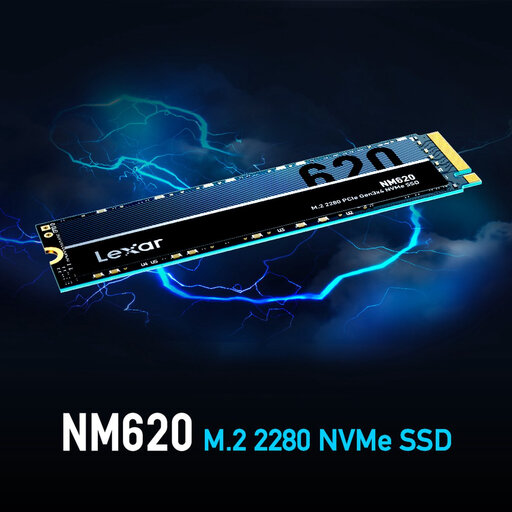
Why it suits this profile: A compact storage option for a first desktop, office PC or affordable upgrade with a compatible PCIe 3.0 M.2 slot.
The PCIe Gen3x4 interface is clearly stated, so you can match the SSD to the available connection rather than focusing solely on marketing terms such as NVMe.
512 GB of storage, M.2 2280 form factor and stated read speeds of up to 3,300 MB/s.
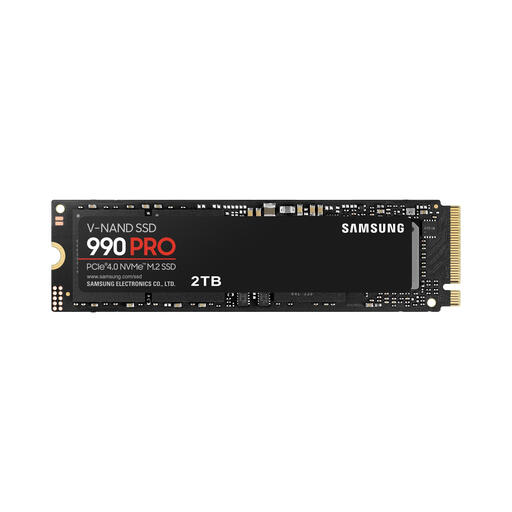
Why it suits this profile: Ideal for users who want to store plenty of games, video projects or large files on one fast PCIe 4.0 storage drive.
The PCIe 4.0 x4 interface and M.2 2280 dimensions are clearly specified. However, check that the motherboard provides a heatsink or sufficient cooling.
2 TB capacity, stated read speeds of up to 7,450 MB/s and TLC memory.
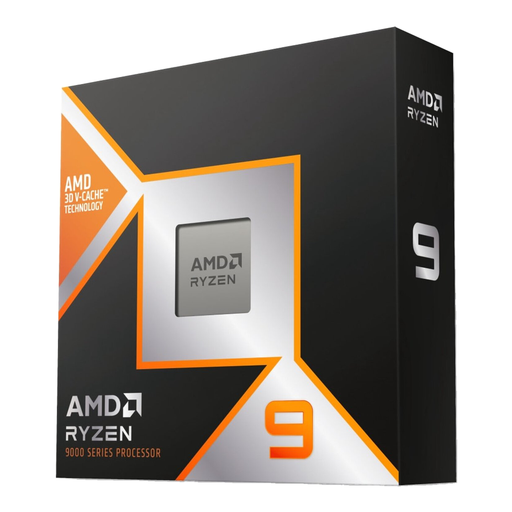
Why it suits this profile: Designed for streaming, rendering, demanding multitasking and gaming on an AM5 platform with adequate cooling.
The socket, number of cores and lack of an included cooler are specified. This allows you to choose an AM5 motherboard and suitable CPU cooler in advance.
12 cores, 24 threads, stated maximum speed of 5.5 GHz and 128 MB L3 cache.
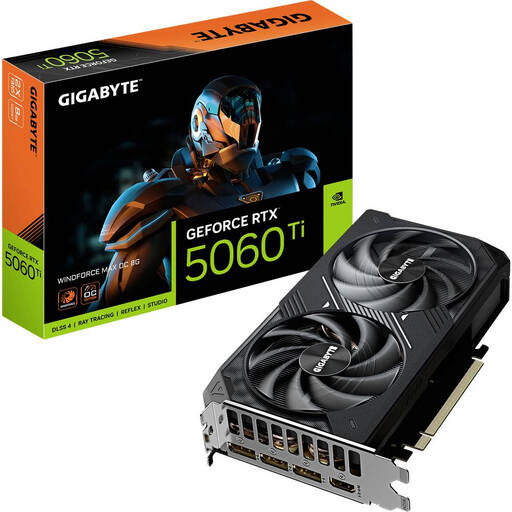
Why it suits this profile: A graphics card for a gaming PC focused on 1080p or balanced 1440p settings, provided the case offers enough room.
The 281 mm length, 2-slot design and recommended 650 W power supply are all details you can check alongside the GPU name.
8 GB GDDR7, three DisplayPort connections, HDMI 2.1b and PCIe 5.0 x16.
We have put together a complete, up-to-date list of products that fully meet these strict selection criteria and the applicable European safety regulations.
Use this quick checklist:
Product specifications are an important starting point, but claims made by brands about efficiency, noise levels or performance, for example, should be treated as information supplied by the manufacturer. A brand’s own testing may also produce different results depending on the system, software and settings.
For a complete desktop, you need at least a processor, motherboard, RAM, storage, power supply, case and usually a CPU cooler. For gaming or display output without integrated graphics, you will also need a graphics card. Also check that the case supports the size of the motherboard and graphics card.
A 2TB SSD provides room for the operating system, software and several large games. The capacity you need depends on your library and media files. If you mainly use lightweight applications, you can start with 512 GB and add a second SSD later, provided your motherboard has a spare M.2 or SATA slot.
Lifespan varies depending on the component, workload, temperature and maintenance. An SSD can operate for many years, but always back up important files. Dust-free airflow, a suitable power supply and correct installation help you use computer components within their recommended operating conditions. In the EU, consumers are entitled to at least the statutory guarantee of conformity; additional rights may apply under national regulations.
