
Vandaag of morgen in huis

Kwaliteit gegarandeerd

Welkomstaanbiedingen ontgrendelen: GRATIS bezorging | Tot 80% korting | Gratis 30 dagen JoyPlus-proefperiode
Download de app
Building a new gaming PC or upgrading your desktop starts with choosing the right computer components. Yet things often go wrong before you even switch the PC on. A graphics card might not fit in the case, DDR5 RAM won’t work with a DDR4 motherboard, or the PC power supply may not have enough connectors. Marketing claims such as “extreme speed” don’t mean much if the rest of your configuration isn’t compatible.
This buying guide helps gamers, PC builders, content creators and professionals compare PC components for compatibility, capacity, connections and practical use.
A high RAM clock speed or a high-wattage power supply might sound appealing, but it doesn’t tell the whole story. A DDR5 module won’t fit in a DDR4 slot. And a 1000-watt power supply doesn’t automatically come with all the cables you need. Always check the form factor, connectors and standard.
Modern gaming PC components, such as an RTX 5080, are often long and wide. According to the product specifications, the Gigabyte AORUS Master Ice is 360 mm long, 75 mm high and takes up four slots. The Gigabyte Gaming OC measures 340 × 140 × 70 mm and also takes up four slots. As well as checking the maximum GPU length, make sure there’s room for the power cable and adequate airflow.
Brands often describe their products as “quiet”, “stable” or “ideal for gaming”. Treat these as positioning, not guaranteed results. A brand’s own research or claims may describe how a product performs, but your PC configuration, BIOS settings, drivers and cooling also affect the outcome. Look for verifiable details such as PCIe version, memory type, capacity, dimensions and connectors.
The motherboard is the foundation of your PC. An AM5 motherboard is designed for compatible AMD processors with Socket AM5. According to the product information, the MSI PRO B840-P WIFI supports AMD Ryzen 7000, 8000 and 9000 Series processors and up to 256 GB of DDR5 memory. It has four DDR5 slots, two M.2 connectors and Wi-Fi 7.
When choosing computer memory, check:
The Kingston FURY Beast 16 GB DDR4-3200 is one affordable DDR4 upgrade option. For a DDR5 platform, kits such as the Kingston FURY Beast RGB 32 GB DDR5-6000 or G.Skill Trident Z5 Neo RGB 64 GB DDR5-6000 are worth considering. Always check your motherboard’s compatibility list.
A graphics card uses a PCIe x16 slot. The RTX 5080 models in this selection have a PCIe 5.0 x16 interface, 16 GB of GDDR7 memory and a stated power consumption of 360 watts. The product information lists a 12+4-pin PCIe Gen 5 connector. The Gigabyte Gaming OC product description recommends a power supply of at least 850 watts with an 80 Plus Gold rating.
Before buying, check:
A PC power supply needs to provide enough wattage and fit your case and connectors. The Corsair RM1000e delivers 1000 watts, has an 80 Plus Gold rating, supports ATX 3.1 and comes with fully modular cables. The MSI MEG Ai1300P delivers 1300 watts, uses an ATX form factor with a depth of 160 mm, and includes a 12+4-pin PCIe Gen 5 connector, among others.
For a small PC, an SFX model makes more sense. The Corsair SF850 has an SFX form factor, 850 watts, an 80 Plus Platinum rating and a fully modular design. Check which power cable is included, too. Some product listings may require you to buy a cable or adapter separately, so check the current package contents.
An NVMe SSD is compact and uses an M.2 slot on the motherboard. The Lexar NM790 1TB supports PCIe Gen4x4 and NVMe 2.0. Its stated sequential read and write speeds are up to 7400 MB/s and 6500 MB/s, respectively. In practice, load times also depend on the software, processor, file size and temperature.
Check that your motherboard supports the right M.2 length, usually 2280. Also check whether a heatsink is included and whether it will fit alongside your other components.
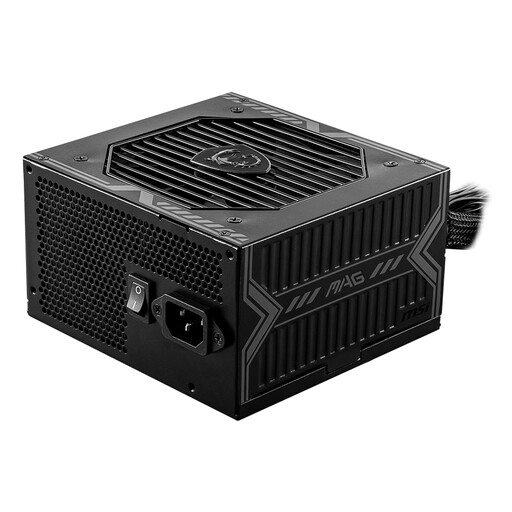
Why it suits this profile: A 650W ATX power supply is a suitable starting point for a modest desktop configuration, as long as total power consumption stays within its specifications.
The product specifications list 650W, ATX, five SATA connectors and two PCIe connectors. Check that this is enough for your graphics card.
650W output, an 80 Plus Bronze rating, and protection against short circuits, overloads and voltage issues.
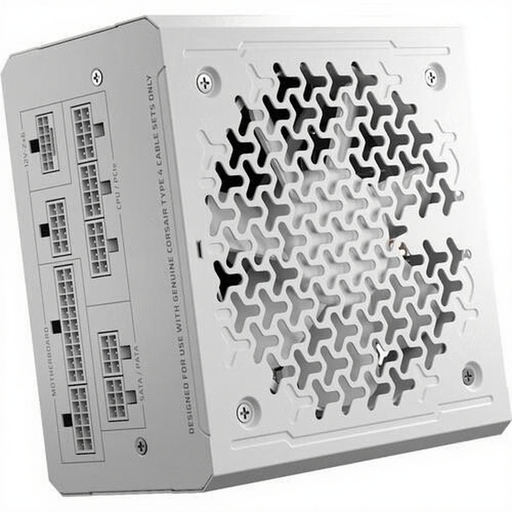
Why it suits this profile: This power supply is a good match for powerful ATX systems with multiple add-ons and high power demands.
The modular cable design means you don’t have to deal with unused fixed cable bundles. Check in advance that it includes the PCIe cable your graphics card needs.
1000W total output, ATX 3.1, 80 Plus Gold and fully modular cables.
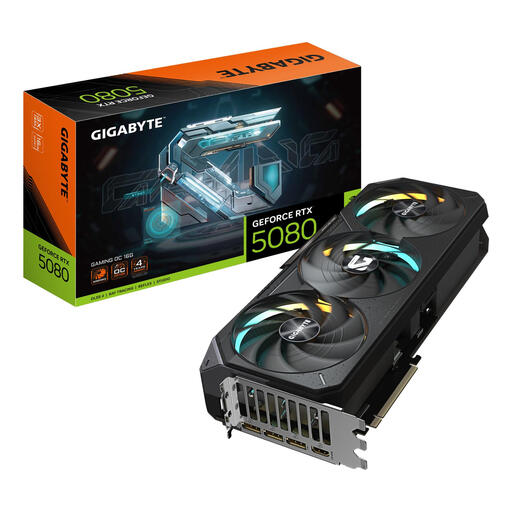
Why it suits this profile: Designed for users looking for a powerful graphics card for high resolutions, creative software or multiple displays.
The product listing gives the dimensions, 360W power consumption and required 12+4-pin connector. Also check that you have enough physical space and a suitable power supply.
16GB GDDR7, PCIe 5.0 x16, three DisplayPort connectors and one HDMI connector.
We’ve put together a complete, up-to-date list of products that meet these strict selection criteria and the applicable European safety regulations.
At a minimum, you’ll need a motherboard, processor, computer memory, storage, PC power supply, case and cooling. Add a graphics card if your system doesn’t have integrated graphics. Before buying, check the socket, RAM type, motherboard form factor and power connectors.
DDR4 RAM can still be a good choice for a system with a DDR4 motherboard. For example, choose a 16GB or 32GB kit with two modules if you want to use dual-channel. A new AM5 platform generally requires DDR5 RAM. DDR4 and DDR5 can’t be fitted in the same memory slot.
Upgrade when a component is holding you back in a specific way: not enough RAM for multitasking, insufficient storage, long loading times or a graphics card that can’t handle your preferred resolution. First, check which component is causing the slowdown. That way, you can avoid replacing several PC components unnecessarily.
