
Vandaag of morgen in huis

Kwaliteit gegarandeerd

Welkomstaanbiedingen ontgrendelen: GRATIS bezorging | Tot 80% korting | Gratis 30 dagen JoyPlus-proefperiode
Download de app
A new mouse, gaming controller or gaming headset can seem like a quick choice. Yet many purchases end in disappointment because the specifications aren't read carefully. For example, a wireless gaming controller may have multiple connection options, but not every feature works on every device. Similarly, a high DPI value on a mouse doesn't automatically mean it suits your play style.
This guide helps you compare computer accessories on compatibility, connectivity, controls and everyday use. That way, you can make a more informed choice for your home office, gaming PC, laptop or multi-platform setup.
Manufacturers often quote a high polling rate, lots of DPI or a large number of keys. These are verifiable product specifications, but they don't tell the whole story.
Always look at the full use case. For office work, quiet keys and easy switching between devices are often more important than a high polling rate.
A wireless mouse or wireless gaming controller can work via Bluetooth, a 2.4GHz receiver, or both. Bluetooth is handy for laptops, tablets and phones. A USB receiver can be a practical solution on a PC, but it does take up a USB port.
Check before you buy:
With the Rapoo 9010M, for example, you can switch between 2.4GHz and Bluetooth 4.0/5.0 and pair up to four devices. That suits a workspace with a desktop, laptop, tablet and smartphone.
"Multi-platform" doesn't always mean every component works the same on every system. A headset with a 3.5mm jack can be widely compatible, while software features may only be available on Windows. With the JBL Quantum 300, the product information states that JBL QuantumSURROUND is only available on PC.
For PlayStation, Xbox, Nintendo Switch, Android and iOS, pay attention to:
First, make a list of the devices you want to use. For a PC and laptop, USB, Bluetooth and 2.4GHz are often sufficient. For a PlayStation 5 controller, compatibility with PS5 is essential. For mobile gaming, a compact Bluetooth controller or a model with a phone holder may be more practical.
The Sony PlayStation 5 DualSense Wireless Controller uses Bluetooth 5.1 and USB-C and, according to the product specifications, is compatible with PlayStation 5, PC, Android, iOS and macOS. However, features such as haptic feedback and adaptive triggers depend on the game and platform.
A compact mechanical gaming keyboard saves space, but sometimes lacks a numeric keypad or separate arrow keys. The Redragon M68 has a 68-key layout and an aluminium top plate. The AULA WIN60HE has a 60% form factor. That can be appealing for large mouse movements, but less convenient if you frequently use numbers or function keys.
For office and home use, a keyboard and mouse set often offers more simplicity. The Rapoo 9010M features low-profile scissor keys, quiet clicks and shortcut keys for Windows and Mac.
Wireless accessories give you a tidy desk, but you need to factor in charging or replacing batteries. The Rapoo set runs on batteries. The Trust GXT 929 Helox, according to the product description, has a built-in rechargeable battery with a stated battery life of up to 80 hours. The actual duration depends on usage and lighting.
With PC components, installation is just as important. A PC case fan must fit the size of your case and be connected to a suitable 4-pin PWM header. Also check the airflow direction. Always turn off the PC and unplug it from the mains before installing a fan.
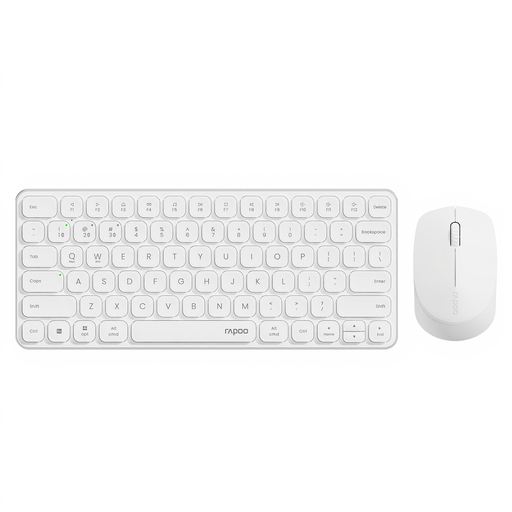
Why this fits the profile: This keyboard and mouse set is designed for daily typing, studying, working from home and easily switching between multiple devices.
The connection options and support for up to four devices are clearly stated. This means you're less reliant on a single type of connection.
Low-profile scissor keys, quiet mouse clicks and adjustable mouse sensitivity from 800 to 2400 DPI.

Why this fits the profile: Ideal for PS5 players who value features such as haptic feedback, adaptive triggers and a built-in microphone.
The compatibility and connections are specified. However, check per game and platform which advanced features are available.
Bluetooth 5.1, USB-C, built-in microphone and a rechargeable battery of 1,560 mAh according to the product specifications.
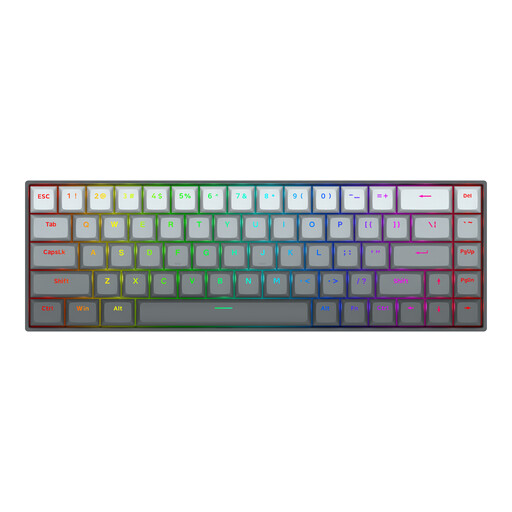
Why this fits the profile: Aimed at PC gamers looking for a compact mechanical gaming keyboard with adjustable actuation and a Rapid Trigger function.
The layout, Windows and macOS support, and adjustable actuation are clearly stated. Check beforehand whether a US layout suits you.
68 keys, magnetic switches, adjustable actuation from 0.2 to 4.0 mm and a stated polling rate of 8000 Hz.
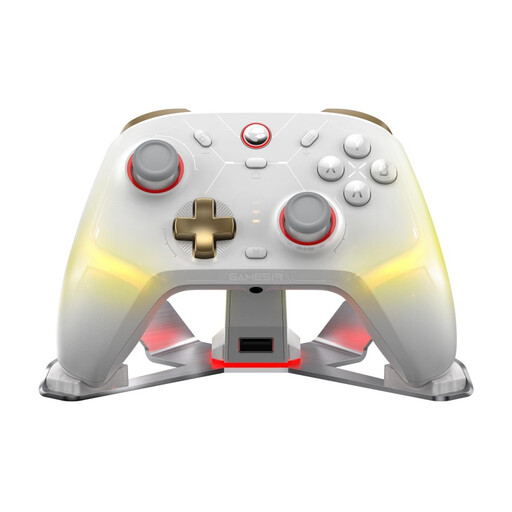
Why this fits the profile: Handy for anyone switching between PC, Nintendo Switch, iOS and Android who wants to use multiple connection methods.
The tri-mode connection via Bluetooth, cable and 2.4GHz dongle makes compatibility verifiable. Check features per platform before ordering.
TMR sticks, Hall-effect triggers, programmable buttons and an included charging stand according to the product information.
We've put together a full, up-to-date list of products that fully meet these strict selection criteria and comply with current European safety regulations.
For a basic setup, you'll usually need a keyboard, mouse and monitor. Gamers often add a gaming headset, gaming controller or mechanical gaming keyboard. A PC case fan may be relevant if your case needs extra airflow. Check the connections and space inside your PC case for each component.
That depends on the connection and usage. A 2.4GHz mouse with a USB receiver is designed for a direct wireless connection. The Trust GXT 929 Helox, according to the product specifications, has a 2.4GHz connection, an adjustable sensor up to 4800 DPI and a rechargeable battery. For office work, Bluetooth may be more practical because you don't need a free USB port.
The lifespan depends on materials, intensity of use, maintenance and battery usage. Avoid liquids and extreme heat, store USB receivers safely and charge devices according to the manual. In the European Union, consumers are generally entitled to a statutory warranty of at least two years; additional rights may depend on the situation and national rules. Therefore, keep your purchase records and check the current warranty conditions with the product.
