Who is this choice relevant to?

Photographing the sky and harbour wall

You want to retain detail in a harbour scene beneath a bright, cloudy sky and adjust the exposure if needed. Canon Europe describes exposure compensation as a way to adjust automatic exposure in unusually bright or dark scenes.

Looking for both a harbour view and boat details

You want to switch between a wide harbour view and subjects further away. Which? highlights zoom range as something to consider, so check which lens is actually supplied with the camera.

Walking along the harbour

You want to take a camera with you without carrying lots of unnecessary kit. Cameranu notes that portability and whether or not you need to change lenses are among the factors to consider when choosing between a compact and a mirrorless camera. If rain is forecast, the specifications of the lens you use matter too.

What should you look for when choosing?

Mirrorless camera with interchangeable lens

A good fit if: you want to choose different angles and match the lens to a wide harbour view or subjects further away.

Keep in mind: an extra lens gives you more options, but you’ll need to buy and carry it; stabilisation varies between camera and lens combinations.

Compact camera with fixed zoom

A good fit if: you want to switch between a wide view and distant details while out and about, without changing lenses.

Keep in mind: the lens isn’t interchangeable, so check the zoom range and stabilisation for each model. The features of one compact camera don’t automatically apply to other models.

What to consider What to look for when buying Who this matters to
Exposure and editing options Check for exposure compensation and RAW support. Assess stabilisation separately: it helps reduce camera shake, but won’t automatically counter movement from boats. Do you want to manage the exposure carefully yourself for a bright sky and darker harbour subjects, and perhaps edit your photos afterwards? Around 36% of consumers give exposure and editing options top priority.
From a wide view to a distant boat Check the exact zoom range and which lens is included in the kit; you may need a different lens to capture details further away. Do you want to frame both the harbour and a boat further away with one set of kit? Around 29% of consumers consider the range of shots they can frame their most important priority.
Easy to carry on the go Compare the weight of the camera with the lens you want to use, and consider whether you want to change lenses during your walk. Do you want to take a camera on a walk and take photos without too much hassle? Around 21% of consumers put portability first.
Using it in the rain Check the weather-sealing specifications and user instructions for both the exact camera body and the lens. Do you want to keep taking photos if overcast skies turn to rain? Around 14% of consumers make rain protection their most important consideration.

Common buying mistakes

  • Choosing a camera body without checking the lens range

    A standard zoom kit and a kit with an additional telephoto zoom may include different items. The lens you take with you can therefore determine which shots you can frame from the harbour wall.

    Compare the full kit names and decide in advance whether you mainly want to capture a wide harbour view, details on the opposite bank or both.

    An extra lens also means more kit to carry.

  • Assuming image stabilisation will keep boats still

    Stabilisation can reduce camera shake, but it won’t automatically prevent a moving boat from appearing blurred.

    For moving subjects, choose an appropriate shutter speed and consider stabilisation separately as an aid to handheld photography.

  • Assuming a weather-sealed body makes the whole kit weatherproof

    The weather-sealing specifications of a camera body and lens are separate features. An IP53 rating on a body doesn’t mean every lens is suitable for rain or that the camera can be submerged.

    Before using the camera in the rain, check the instructions and specifications for the exact body and lens.

    You may need a suitable lens or additional protection for the combination.

  • Confusing an additional warranty product with your statutory rights

    A paid-for extended warranty is separate from your statutory rights if a product isn’t of satisfactory quality. The Dutch government states that there is no fixed time limit for the statutory guarantee in the Netherlands.

    Check what additional rights an extra cover plan actually offers and keep these separate from your statutory rights.

    An additional warranty product may cost extra.

Camera brands to consider

Canon

The EOS R50 is an APS-C mirrorless camera for anyone who wants to use interchangeable lenses.

  • Canon Netherlands lists an RF-S 18–45 mm lens with the kit examined.
  • Canon doesn’t specify sensor-shift stabilisation for the EOS R50, so check the stabilisation features of your chosen lens.

Nikon

The Z50II was examined with several DX zoom kits, so the lens bundle determines the range you get.

  • Nikon lists optical VR in the Z50II kit with 16–50 mm lens.
  • The 50–250 mm lens is included in a separate kit, not the standard kit with 16–50 mm lens.

Fujifilm

The Fujifilm X-S20 bundle examined combines the camera with an XF 16–50 mm lens.

  • Fujifilm specifies five-axis in-body stabilisation and RAW support for the X-S20.
  • The quoted stabilisation figure is a manufacturer’s specification, not an independently measured result.

OM SYSTEM

The OM-5 Mark II kit examined combines the camera with an M.Zuiko 12–45 mm F4.0 PRO lens.

  • OM SYSTEM lists IP53-certified weather-sealing for the body and separate weather-sealing for the lens.
  • If you choose a different kit, check the lens separately; weather-sealing doesn’t mean the combination can be submerged.

Sony

The RX100 VII is a compact camera with a fixed zoom lens for anyone who wants to take photos without changing lenses.

  • Sony lists a 24–200 mm full-frame equivalent lens and image stabilisation for this model.
  • The lens can’t be changed; these features apply to the RX100 VII and don’t automatically apply to all Sony compact cameras.

Cameras at Joybuy

These products are suited to different ways of taking photos at a harbour, from zooming in on subjects further away to capturing a wide view.
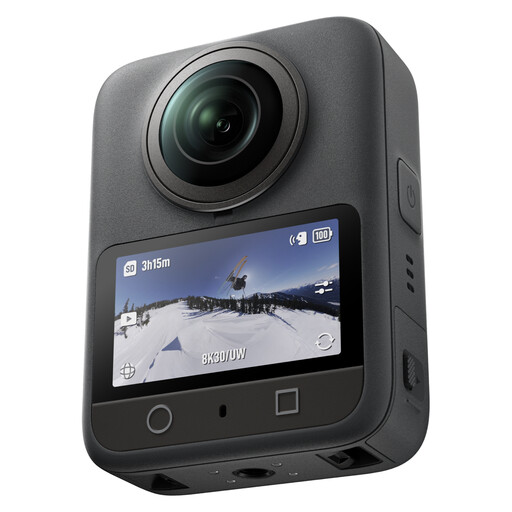
DJI Osmo 360 Standard Combo

DJI Osmo 360 Standard Combo

Worth considering if you want to capture a harbour scene as a 360° image; check that this approach suits the shots you want to take.

View at Joybuy

Komery W6 camera with 12× optical zoom

Komery W6 camera

The stated zoom may be useful if you want to frame subjects further away from the harbour wall.

The product name lists 12× optical zoom.

View at Joybuy

DJI Osmo Pocket 3

DJI Osmo Pocket 3

The product name presents this model as a vlogging camera; consider whether that suits the way you want to photograph at the harbour.

The product name lists a 1-inch CMOS sensor, 4K/120fps video and 3-axis stabilisation.

Purchase link unavailable
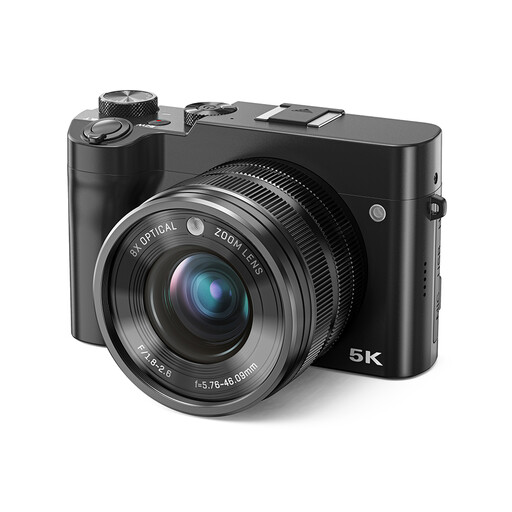
Songdian digital camera with 8× optical zoom

Songdian digital camera

The stated optical zoom may be useful if you want to frame details of boats further away.

The product name lists 8× optical zoom, 5K and 64 MP.

View at Joybuy
Sony ZV-E10 with 16–50 mm zoom lens

Sony ZV-E10 with 16–50 mm zoom lens

The supplied zoom lens gives you different angles without having to fit a different lens for every shot.

The product name lists a 16–50 mm zoom lens.

View at Joybuy

Frequently asked questions

Do I automatically need a more expensive camera for a bright, cloudy sky?

No. Start by checking whether you can adjust the exposure and review the result. Canon Europe describes exposure compensation as a way to adjust automatic exposure in an unusually bright or dark scene. RAW can be useful if you want to adjust the white balance later.

Can image stabilisation always capture a moving boat sharply?

No. Stabilisation helps reduce camera shake, but it won’t stop a moving boat. Your shutter speed still matters; a faster shutter speed can help freeze movement.

What should I look for when using a camera on a wet harbour wall?

Follow the instructions for the exact camera and lens, and check their weather-sealing specifications separately before using them in the rain. The IP53 rating of the OM-5 Mark II body isn’t a specification for every lens that fits it.

What costs and rights should I consider when buying online in the Netherlands?

Check which lens and accessories are included in the bundle and what additional costs the seller lists. In many cases, you have 14 days to change your mind when buying remotely from a business. According to the Dutch government, there is no fixed time limit for the statutory guarantee in the Netherlands; this is separate from any paid-for extended warranty.

Can I publish photos of recognisable passers-by at the harbour online?

Not necessarily. According to the Dutch Data Protection Authority, recognisable people count as personal data. The exception for strictly personal use doesn’t automatically apply when you share images with a wider audience or publish them publicly online; consider each specific publication separately.
