Choose a compact standard tablet if you want to use book apps or other tablet features as well as read detective novels; compare the dimensions, weight and reading app settings. If you mainly read text and want a device designed for reading, consider e-ink and check in advance that your book provider and chosen titles are available on it. The RIVM says there is no proven evidence that a blue-light filter improves sleep.
Who is this choice relevant to?
Readers who hold a device while lying down
If you read in bed, you’ll need to balance the size and weight against how much screen space you want for text. Samsung Netherlands, Lenovo Netherlands and Apple publish specifications for specific versions. Compare like for like, and remember to factor in any case.
Readers who read just before bed
You’ll want to adjust the lighting and text display to suit your reading conditions. The RIVM says more research is needed to establish whether built-in blue-light filters reduce the effects on sleep.
Readers with library or Kobo books
Your choice depends on the app, operating system and availability of the detective novels you want to read. The Online Library advises checking availability for each title; Kobo says you can’t buy e-books in its iOS app.
What should you consider when choosing?
Compact Android tablet
Best for: reading detective novels in compatible Android apps, while also using other tablet features.
The trade-off: you’re choosing a standard tablet with a backlit screen and extra features, rather than a device designed solely for reading text.
Compact iPad
Best for: combining iPad apps and other tablet features with reading on a compact screen.
The trade-off: Kobo says you can’t buy e-books in the Kobo app for iOS. You can buy them through Kobo.com and then sync them.
E-ink device as an alternative
Best for: if reading text matters more to you than general tablet features.
The trade-off: check that you have access to the books you want on each device and app; the Online Library says that not every e-book is available on an e-reader.
| What to consider |
What to look for |
Who it matters to |
| Holding it in bed |
Compare the screen diagonal and the stated weight of the exact version; a case adds to the overall weight. |
If I read lying down, I want to hold the device comfortably without giving up more screen space than necessary. Around 36% of consumers prioritise ease of handling. |
| Reading in low light |
Check the brightness controls and the app’s text and background settings; for e-ink, check whether the version you’re considering has a front light. |
When reading in a dark room, I want to adjust the text and lighting to suit my preferences. Around 29% of consumers prioritise reading in low light. |
| Access to detective novels |
Check the current app requirements, your book provider and whether the titles you want are available on the device. |
If I read library or Kobo books, I want to know in advance whether my app and titles will work on the device. Around 21% of consumers let access to books determine their choice. |
| Other tablet features |
Decide which other apps you’ll actually use and whether you need a standard tablet for them. |
If I want to use other apps as well as read, I’ll factor those features into my choice. Around 14% of consumers prioritise extra tablet features. |
Common pitfalls
-
Assuming a blue-light filter is a proven way to improve sleep
A screen filter doesn’t prove that you’ll sleep better. The RIVM says more research is needed into the possible effects of built-in blue-light filters on sleep.
Choose screen settings that make reading comfortable, and don’t treat a filter as a guarantee of a better night’s sleep.
-
Checking the size but forgetting about access to books
A device might feel comfortable to hold, but still not support the app or title you want to use. The Online Library lists the devices available for each e-book.
Before you buy, look up a few detective novels you actually want to read and check that they’re supported by your book provider and device.
-
Confusing the manufacturer’s warranty with your statutory rights
According to the Dutch government, there is no fixed statutory warranty period for all products in the Netherlands. If a product is faulty, the seller is responsible for putting things right.
If you’re offered an extended warranty, check what extra cover it provides and how it relates to your statutory rights.
Brands to compare
Samsung
Samsung’s Galaxy Tab A11 range in the Netherlands includes compact Android tablets. Compare the Wi-Fi and LTE versions separately.
- Samsung Netherlands lists an 8.7-inch screen with 1340 × 800 pixels for the 64 GB Wi-Fi version.
- The stated 90 Hz refresh rate is a motion and scrolling specification, not a proven benefit for static book pages.
Lenovo
The Tab One 8.7 is a compact Android tablet for anyone who wants to use general tablet features too.
- For the 4 GB/64 GB version reviewed, Lenovo Netherlands lists an 8.7-inch screen and a weight of around 320 g.
- The stated weight doesn’t necessarily apply to other versions or to a tablet with a case.
Apple
The iPad mini (A17 Pro) is a compact iPad for readers who also want access to the range of iPad apps.
- Apple lists a weight of 293 g and an 8.3-inch screen for the Wi-Fi version.
- Kobo says you can’t buy e-books in its iOS app. You can buy them through Kobo.com and then sync them.
BOOX
The Go 6 (Gen II) is an Android e-paper device for readers who mainly read text but also want to install apps.
- BOOX says this model has a 6-inch monochrome screen, adjustable front lighting and a stated weight of 160 g.
- Being able to install apps doesn’t guarantee that every Dutch book app or title will work.
Kobo
The Clara BW is a dedicated e-reader, not a replacement for all tablet features.
- Kobo describes the Clara BW as an e-reader.
- The Online Library warns that not every e-book is available on an e-reader; check each title individually.
Joybuy products
This selection includes compact Android tablets and e-ink devices for reading detective novels in bed. Check that each device supports your book provider and the titles you want.
 No image available
Bigme B751C S, 7-inch colour e-ink e-reader
A reading-focused e-ink device to consider if reading text is your priority; check that your book provider and chosen titles work on it.
The Joybuy product listing mentions a 7-inch colour e-ink screen, 4+64 GB storage, 300 ppi and 36-level front lighting. According to the product information, no power adapter is included.
Joybuy
 No image available
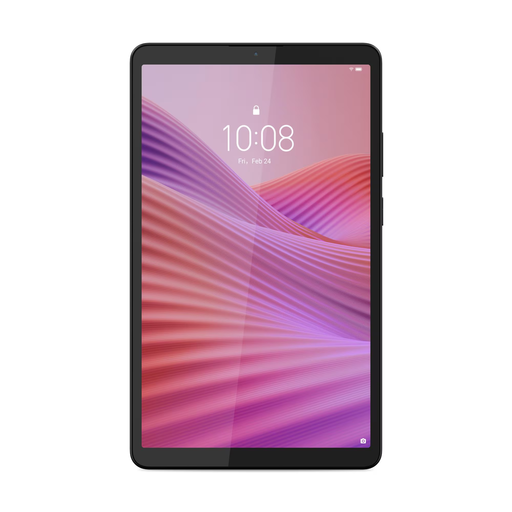
Lenovo Tab One 8.7-inch Wi-Fi, 4 GB/128 GB, with case
A compact Android tablet to consider if you want to combine reading apps with other tablet features.
The Joybuy product listing mentions an 8.7-inch screen, 4 GB RAM, 128 GB storage, an IPS touchscreen and an included protective case. According to the product information, a USB power adapter is not included.
Joybuy
 No image available
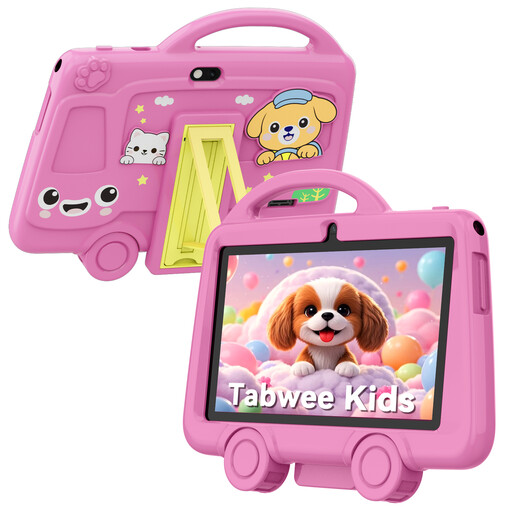
TABWEE K8 kids’ tablet, 7 inch, 2 GB/32 GB, pink
The product name describes this model as a kids’ tablet; only consider it if that audience and specification suit your needs.
The product name lists a 7-inch screen, 2 GB RAM and 32 GB storage.
Joybuy
 No image available
Samsung Galaxy Tab A11 X135 LTE, 4 GB/64 GB, grey
A compact Android tablet to consider if you want to use reading apps and other tablet features; check that your book apps work on this version.
The Joybuy product listing mentions LTE, 4 GB RAM, 64 GB storage and an 8.7-inch TFT screen with a resolution of 1340 × 800 pixels. The stated weight for this version is 337 g.
Joybuy
 No image available
Bigme HiBreak Pro, 6.13-inch colour e-ink e-reader
A reading-focused e-ink device to consider if you’re looking for something smaller; check that the apps and titles you use work on it.
The Joybuy product listing mentions a Kaleido 3 colour e-ink screen, Android 14 and 8 GB RAM/256 GB storage.
Joybuy
Frequently asked questions
Will every borrowed detective novel work on an e-reader?
No. Not every e-book from the Online Library is available on an e-reader. Check the title’s information page to see which devices you can use to read it.
Can I change the text of a borrowed book on my tablet?
While reading in the Online Library app, you can adjust settings such as the font size and background. These settings aren’t available for every book. According to the library, the app requires at least Android 10 or iOS 16.
What should I know about library fees and warranty rights?
The terms and costs of a library subscription can vary. For tablet warranties in the Netherlands, the Dutch government says there is no fixed statutory period for all products; if a product is faulty, the seller is responsible for putting things right.
Can I always return a tablet I buy online within 14 days?
Not always. The Dutch government says that a 14-day cooling-off period applies to many distance purchases, but there are exceptions. Check the terms for the specific purchase.


