Start with the available width, your viewing distance and the mounting options, then choose the aspect ratio. A single 21:9 screen can give you more horizontal viewing space without side monitors, while a 16:9 screen may be easier to fit in a tight setup. Three screens need extra space and careful alignment. Set the field of view using the actual screen dimensions and viewing distance, not just the diagonal measurement.
Who is this relevant to?
Driver with limited cockpit space
You want a clear view of corners and reference points, but need to keep the screen and mount within a narrow setup. Sim-Lab lists several VESA sizes for its monitor mount; also check the dimensions and weight limit of your own mount.
Driver looking for more side visibility
You’re weighing up one wide screen against three monitors, and need to compare the available cockpit width with your desired viewing angle. The distance between your eyes and the screen also affects which option is right for you.
Driver with limited PC performance
You want a smooth picture during practice laps, so you need to match the screen resolution and stated refresh rate to your PC, connection and simulator.
What should you look for?
One 16:9 monitor
A good fit if: available width, straightforward mounting or an existing screen matters more than extra visibility alongside the car.
Trade-off: at the same screen height, 16:9 gives you less horizontal screen space than 21:9.
One 21:9 ultrawide
A good fit if: you want more horizontal viewing space without side monitors, and the dimensions and mounting options work with your cockpit.
Trade-off: the higher resolution puts more demand on your PC, and the maximum refresh rate shown on the box doesn’t guarantee that your simulator can achieve it.
One 32:9 monitor
A good fit if: you have plenty of width available and would rather use one screen than three separate monitors.
Trade-off: check the width, weight, mounting options and connections. Support for a large screen on one mount doesn’t guarantee it will fit your cockpit setup.
Three monitors
A good fit if: side visibility is your main priority and you have room for three screens, a mount and the required connections.
Trade-off: you’ll need to align the screens and configure the setup. iRacing’s settings take into account screen width, viewing distance and the angle between screens.
| Concern |
What to check |
Who is this important to? |
| Will the screen fit in the cockpit? |
Measure the available width and viewing distance. Compare the dimensions, VESA pattern and weight with your own mount. |
If my cockpit is narrow, I want to know first whether the screen and mount will physically fit; around 36% of consumers put available space first. |
| Will I have enough side visibility? |
Compare the aspect ratio and screen width from your normal seating position. Enter the actual measurements in iRacing’s field-of-view settings. |
If I want a better view of corners and traffic alongside the car, I’ll weigh up the viewing angle and extra screen width; around 29% of consumers prioritise side visibility. |
| Can my PC handle the picture? |
Check the resolution and supported refresh rate for each connection, as well as what your PC can display in the simulator. |
If smooth visuals matter more to me than extra screen width, I want to match the monitor to my PC; around 21% of consumers put that combination first. |
| What does the complete setup require? |
Include any extra screens and mounts in your calculations. For screens covered by EU energy labelling rules, compare the label for the exact model variant. |
If I want to weigh up the screen, mounting and power consumption together, I’ll consider the complete setup; around 14% of consumers put those costs first. |
Common buying mistakes
-
Choosing based on screen size alone
The diagonal measurement doesn’t tell you whether the whole monitor and mount will fit in your cockpit.
Measure the space from your normal driving position and compare it with the dimensions and mounting measurements of the exact model and your mount.
-
Assuming an ultrawide is the same as three screens
A single wide screen and three angled screens offer different ways of showing the view around the driver.
Decide what viewing angle you want at your seating distance and whether there’s room for side screens. With a triple-screen setup, allow for alignment and configuration too.
-
Assuming the maximum Hz rating guarantees gaming performance
The maximum refresh rate is a screen specification, not a measurement of the frame rate in your simulator.
Check whether your PC, connection, resolution and game settings can work together to deliver the refresh rate you want.
-
Treating a product title as proof of the exact resolution
For the Gawfolk 34-inch model listed, the title gives the resolution as WFHD 2560 × 1080, while the description states UWQHD 3440 × 1440.
Ask for clarification about any conflicting core specifications before comparing that model with other monitors.
Brands to compare
Samsung
The Odyssey G5 LC34G55TWWPXEN is an example of a 34-inch 21:9 monitor with 3440 × 1440 pixels, 1000R curvature and a stated 165 Hz refresh rate. These are Samsung’s specifications for this model.
- The aspect ratio, resolution and curvature give you specific features to compare with your setup.
- Measure the full casing and check that the curvature suits your viewing distance and cockpit.
AOC
AOC lists the CU34G2XP/BK as a curved 34-inch 21:9 screen with 3440 × 1440 pixels and a stated 180 Hz refresh rate.
- AOC lists FreeSync Premium and 1 ms GtG for this model.
- The manufacturer’s specifications don’t predict the frame rate your PC and simulator will achieve together.
Philips
The Evnia 3000 34M2C3500L/00 is a curved 34-inch model with 3440 × 1440 pixels and a 180 Hz refresh rate stated by Philips.
- The listed screen size, resolution and refresh rate are useful for comparing this model with others.
- Check the dimensions and mounting options for the exact /00 version before deciding whether it will fit your cockpit.
LG
The UltraGear 34GX900A-B is a 34-inch 21:9 OLED model with 3440 × 1440 pixels, a stated 240 Hz refresh rate and 800R curvature.
- LG’s product specifications offer a different combination of panel type, curvature and maximum refresh rate to consider.
- The stated 240 Hz and 0.03 ms GtG aren’t a measured advantage when learning a circuit. Also check the mounting options and dimensions, and consider what they mean for your overall setup.
Joybuy monitors
The Joybuy products below are standalone gaming monitors. Compare the listed resolution, refresh rate and mounting options with your PC and cockpit; these specifications alone don’t determine whether a model will physically fit or achieve the frame rate you want.
 No image available
Samsung Odyssey G5 G50F 32-inch IPS LS32FG502EUXEN
A standalone 16:9 monitor to compare if you want to use a single screen.
32 inches; IPS; 2560 × 1440 pixels; stated 180 Hz; VESA 100 × 100 mm.
Joybuy
 No image available
MSI MAG 272QPF E20 27-inch
A 27-inch 16:9 option to compare with other standalone screens for a compact setup.
2560 × 1440 pixels; IPS panel; stated 200 Hz.
Joybuy
 No image available
AOC Gaming Q27G42XNE 27-inch
A 27-inch gaming monitor to compare if you’re looking for a standalone screen with QHD resolution.
2560 × 1440 pixels; stated 180 Hz; FreeSync Premium.
Joybuy
 No image available
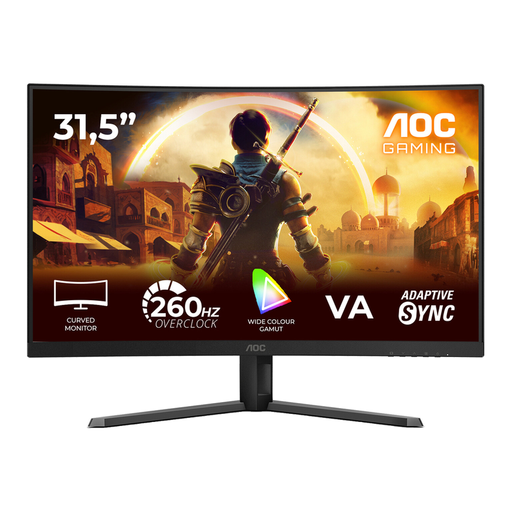
AOC Gaming C32G42ZE 32-inch curved monitor
A curved 16:9 monitor to include in your comparison of single-screen setups.
1920 × 1080 pixels; 240 Hz native and 260 Hz overclocked; 1500R; Adaptive-Sync.
Joybuy
 No image available
Ochama 27-inch gaming and office monitor
A 27-inch model to compare if you’re looking for a gaming monitor for a standalone setup.
The product title lists 200 Hz and 2K.
Joybuy
Frequently asked questions
How do I set the viewing angle after mounting the screen?
In iRacing, enter the screen width and the distance from your eyes to the screen in the monitor settings. With three screens, you’ll also need to measure the angle between them. For other simulators, use their own setup method.
Will every 49-inch monitor fit an integrated cockpit mount?
No. Support for a 49-inch monitor doesn’t automatically mean it will fit every mount or cockpit. Sim-Lab says its Integrated Vario mount supports one 49-inch 32:9 monitor and lists specific VESA patterns. Also check the available space and weight limit of your own mount.
Where can I compare monitors’ power consumption?
For electronic displays covered by EU energy labelling rules, you can compare the A–G label for the exact model variant. The European Commission says additional model information is available through EPREL; check the label and model number.
Do I have a cooling-off period for a monitor bought online in the Netherlands?
For many distance sales made by a business to a consumer, a 14-day cooling-off period applies. The Dutch government lists some exceptions and distinguishes these purchases from those made from a private individual. Check who the seller is and which terms apply to your purchase.
Who should I contact about a fault or delivery problem?
Check which party is acting as the seller and who is responsible for delivery and returns. The Dutch government says online platforms and webshops must inform consumers about this. If there’s a fault, contact the seller to find out how it will be handled.


