
Player with limited storage space
You want to put away as little loose hardware as possible after a games night, so you’re comparing compact gamepads, controllers that can be shared and phone controls. First, check which features your game requires.


Start with the console and controls required by the mini-game you’ve chosen, then consider storage space and player numbers. Joy-Cons that can be used individually suit supported Switch games, while a very small gamepad is mainly an option for games that don’t need motion controls. For Jackbox games that support phone controls, players can use their own device instead of an extra controller.
You want to put away as little loose hardware as possible after a games night, so you’re comparing compact gamepads, controllers that can be shared and phone controls. First, check which features your game requires.
You’re looking for controls for mini-games that use swinging, tilting or other game-specific inputs. Check that the game mode you’ve chosen supports the required feature.
You want to know whether your existing controllers can be used individually and how many players the local game mode supports before buying extra hardware. For example, Nintendo lists a maximum of four local players for Super Mario Party Jamboree.
First, check the console, game and game mode. Then work out how many people want to play at once and which controller features they’ll need.
| What to consider | What should you check? | Who is this important for? |
|---|---|---|
| Easy to store | Compare dimensions and cables, then check that the game supports the available buttons and features. | I want to put the controller away easily after playing and keep as few loose items as possible. Around 34% of consumers put easy storage at the top of their buying priorities. |
| Game and control compatibility | Check your console model, the specific game and game mode, and whether they require motion controls or another special input. | I want to make sure the gamepad I choose works with the mini-game we want to play. Around 33% of consumers prioritise compatibility with the game and its controls. |
| Multiple players | Count the players you want and the controllers available; check the maximum player count and the controller layouts supported by the game. | I want enough individual controls for my guests without buying more controllers than the game mode can use. Around 20% of consumers put the number of players first. |
| Buying and charging | Check what you already own, how the controller charges and whether you’ll need an extra accessory. | I want to know in advance what extra charging equipment I’ll need and how many loose items I’ll have to store. Around 13% of consumers focus mainly on buying and charging. |
A compact model may lack features required by a specific game mode. For example, 8BitDo states that the Micro doesn’t have motion controls.
Before buying, check which controls the game and game mode require.
Nintendo states that Joy-Con 2 only works with Switch 2. Original Joy-Cons can be used wirelessly with Switch 2, but they don’t attach to or charge from it.
Check your console model, and look at both how the controllers sync and how you can charge them.
The number of connected controllers doesn’t automatically determine how many players a game supports. Nintendo lists a maximum of four local players for Super Mario Party Jamboree.
Count the players you want and the controllers available, then check the maximum for your chosen game.
The HORIPAD Mini reviewed here connects to the Switch dock with a 3,0 m cable and doesn’t have motion sensors.
Check that your dock and cable route are practical, and that the game can be played using standard buttons.
The Joy-Con and Joy-Con 2 ranges are designed for Switch games and Switch 2 games respectively.
The Micro is a very small Bluetooth gamepad for compatible Switch games, particularly those controlled with buttons.
The Nano Enhanced Wireless Controller is a compact gamepad for supported Switch games.
The HORIPAD Mini reviewed here is a wired option for use with a Switch dock.
This selection includes wireless gamepads and Joy-Con pairs for Switch and Switch 2 games. Check which console and control features your mini-game requires before you buy.
 No image available
An option to consider for a supported Switch mini-game; check that this model’s controls suit the game mode.
The product name lists Bluetooth, 7-colour LED lighting, vibration feedback and a range of 10 m.
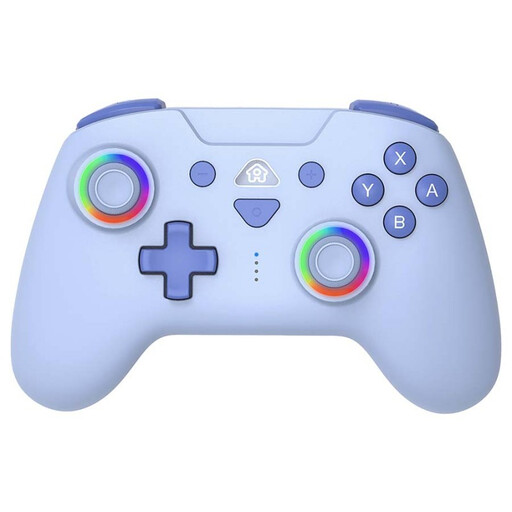 No image available
The product name mentions Switch and Switch Lite; also check that your chosen mini-game works with this controller layout.
The product name lists wireless controls and LED lighting. Colour: blue.
 No image available
A gamepad to consider for supported Switch mini-games; check whether the controls listed are enough for each game mode.
The product name lists dual vibration, a gyroscope and use with Switch and PC.
 No image available
Suited to supported local Switch mini-games where two Joy-Cons can be used individually. Nintendo lists motion controls for the original Joy-Con.
Original Joy-Cons can be used wirelessly with Switch 2, but they don’t attach to or charge from the console.
 No image available
For supported Switch 2 mini-games where Joy-Con 2 is used individually or with motion controls. Nintendo states that Joy-Con 2 only works with Switch 2.
The product name identifies this as a pair for Nintendo Switch 2. Check the controller layout for your chosen game mode.
No. Nintendo states that Joy-Con 2 only works with Switch 2. Original Joy-Cons can be synced wirelessly with Switch 2.
Joy-Con 2 can be charged while attached to a powered Switch 2; the separate Joy-Con 2 charging grip is sold separately. Original Joy-Cons don’t charge from Switch 2: you’ll need an original Switch or a suitable charging accessory.
Nintendo recommends attaching and wearing the wrist straps when using original Joy-Cons wirelessly. Choose a game mode with movements you can perform in the space available to you; a small controller doesn’t change how much room you need to play.
ACM ConsuWijzer states that your statutory warranty exists alongside any seller’s warranty. If your product develops a fault, contact the seller; what you can expect from the product depends on the circumstances.
The Dutch Authority for Digital Infrastructure lists the applicable CE marking as one of the requirements for equipment placed on the market. Check the product information and marking on the item in question.
Yes. In Jackbox games that support phone controls, players can open the specified website on their device and enter the room code shown on the host screen. Check your chosen title and which device you’ll need.