
Data explorer with a cramped desk
You want to point and click while leaving room for your keyboard and other items. Consider whether you’d rather move a standard mouse or control the cursor with a trackball.


Choose a compact standard mouse if you still have room to move it and prefer familiar controls; pay attention to the scroll wheel and how it fits your hand. If space to move the mouse is the main issue, consider a stationary trackball if you find thumb or finger control comfortable. When you spend long periods working at a screen, a suitable workstation and changing your activities remain important; Arboportaal advises varying your posture and tasks.
You want to point and click while leaving room for your keyboard and other items. Consider whether you’d rather move a standard mouse or control the cursor with a trackball.
You scroll through datasets and then want to select cells or controls accurately. Assess the scroll controls and cursor speed separately.
You want to choose a mouse that suits your hand and the space available for movement. Arboportaal advises alternating screen work with other tasks and changing your posture while you work.
Choose this option: if you have some room to move the mouse and want to keep using the familiar mouse movement.
The trade-off: even a compact mouse needs to move across your desk, so also check that its shape suits your hand.
Choose this option: if you have little room to move a mouse and find the chosen thumb or finger controls comfortable.
The trade-off: a trackball works differently, so consider whether you prefer a thumb-operated or finger-operated model.
| What to consider | What should you look for? | Who should give this more thought? |
|---|---|---|
| Room to move | Measure the clear space beside your keyboard and consider how much room you need to point and click. | If there’s barely any room beside my keyboard, I want to know whether I can still move the mouse freely. Around 33% of consumers give limited room to move the highest priority. |
| Working through long tables | Compare the wheel, scroll ring or scroll settings, and try to see whether you can point accurately afterwards. | When working with long lists, I want to scroll quickly and still be able to stop precisely on a cell. Around 27% of consumers give navigating tables the highest priority. |
| Fit for your hand | Check your hand size and which hand you use, and try the grip. Change your posture and activity while working at a screen. | When using a mouse for long periods, I mainly want a grip and controls that suit my hand. Around 20% of consumers put hand fit first. |
| Connection | Check whether the version you’re considering uses Bluetooth or the required USB connection, and whether it’s compatible with your computer. | If I switch between devices or have few ports available, I want to check the connection for each version. Around 13% of consumers give the choice of connection the highest priority. |
| Quiet buttons | Check whether the exact version has quiet buttons; assess the wheel noise and fit separately too. | In a quiet workspace, I want to avoid distracting clicking sounds. Around 7% of consumers put quiet operation ahead of the other factors. |
A standard mouse still needs to move across your desk. A trackball stays in place, but works differently.
Check both the space the device takes up and the room you need to point and click.
Trust lists Bluetooth and 2.4GHz for the Yvi+ Multi-Device, while the Yvi+ Silent is a separately named version.
Compare the full product name and connection specifications of the version you’re considering.
Fit varies from person to person. Arboportaal also stresses the importance of varying your posture and tasks.
Try the grip and see whether the mouse suits your hand. Change your posture and activity while working at a screen.
The MX Anywhere 3S, ERGO M575S and Lift offer different ways to control the cursor; features of one model don’t automatically apply to the others.
The Orbit Wireless Trackball with scroll ring offers stationary, symmetrical finger control.
The Yvi+ Multi-Device is a compact standard mouse with quiet buttons and several connection options.
The HP 480 Comfort Bluetooth Mouse is a standard mouse for anyone who values wheel controls and switching between devices.
This selection includes a thumb-operated trackball, compact standard mice and vertical mice. For each model, consider whether you have room to move the mouse itself and whether its controls suit your hand.
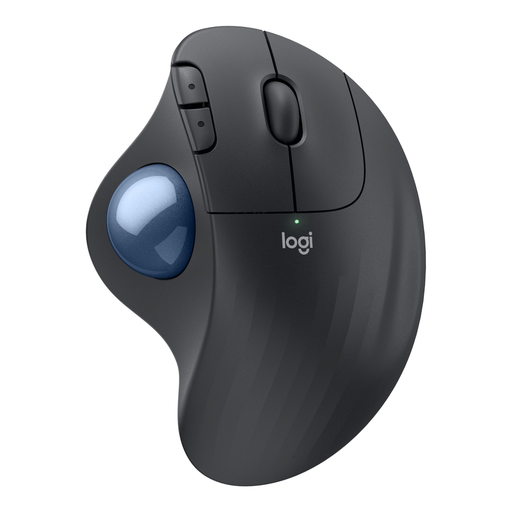 No image available
A good fit for limited space to move the mouse, if you find thumb control comfortable. Logitech says you can move the cursor without moving the mouse itself.
Thumb control works differently from a standard mouse.
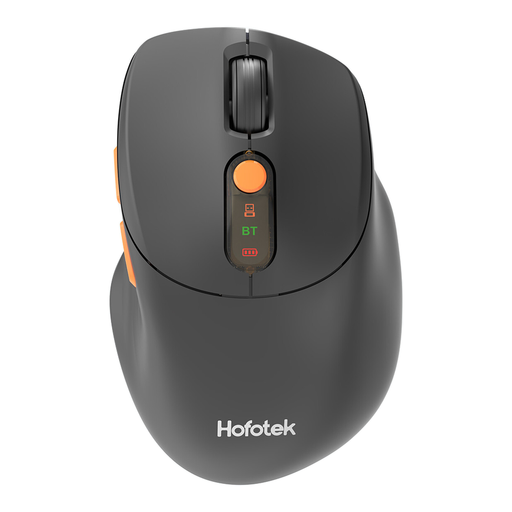 No image available
A compact standard mouse for anyone with some room to move it who wants quiet clicks.
The product name lists 2.4G+BT, adjustable DPI levels and an AA battery.
 No image available
A compact standard mouse for scrolling in a quiet workspace, provided you have enough room to move it.
The product name describes it as compact and quiet.
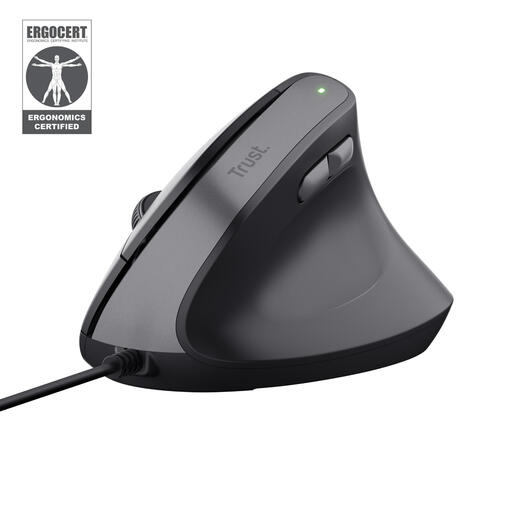 No image available
A vertical mouse for anyone who prefers this grip and still has room to move the mouse.
It connects via a USB cable; this version is designed for right-handed use.
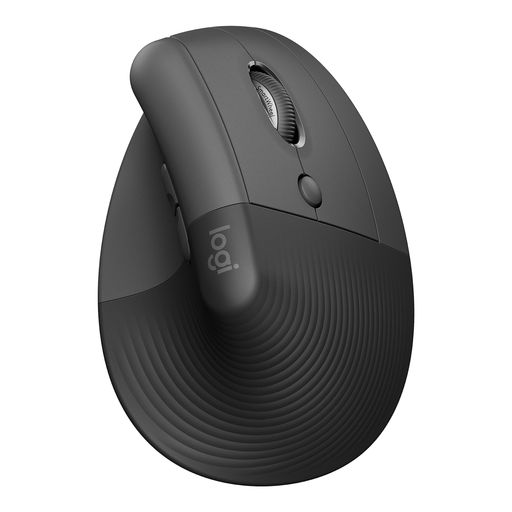 No image available
A vertical mouse for anyone looking for this type of grip and with enough room to move the mouse itself.
It’s described as fitting small to medium right hands; check whether it suits your hand.
Don’t choose based on the highest figure alone. Try the cursor speed to see whether you can point accurately, and assess the scroll controls separately. Logitech and Kensington describe different ways to adjust these controls.
Check which connection the exact version supports and whether your computer has Bluetooth or the required USB port. Trust lists Bluetooth and 2.4GHz for the Yvi+ Multi-Device; Kensington lists these connection options for the Orbit Wireless. That doesn’t automatically apply to other versions with a similar name.
When a consumer in the Netherlands buys online, they generally have a 14-day cooling-off period from delivery, subject to legal exceptions; ACM ConsuWijzer explains this right. If a product is faulty, your statutory warranty is separate: the seller is responsible for providing an appropriate solution, as the Authority for Consumers and Markets explains.
The Dutch rules on screen work referred to here don’t specify a particular mouse model. Arboportaal says that screen work must be alternated with other work or a break at regular intervals. Employers’ obligations depend on the working situation and don’t automatically amount to a product requirement for every individual buyer.