Cameras at Joybuy
Here you’ll find cameras with zoom for flexible framing, as well as two Sony mirrorless cameras with a 16–50mm zoom lens. Compare the type of lens and the details of the exact version with the requirements for your photo and any print you may be planning.
 No image available
Komery W6 digital camera, 12× optical zoom, 4K, Wi-Fi, 64 MP
The stated 12× optical zoom lets you adjust your framing, from the row of trees to details on the opposite bank.
The product title lists 4K, Wi-Fi and 64 MP.
View at Joybuy
 No image available
Songdian 4K pocket camera, 44 MP, 16× digital zoom, pink
This pocket camera is a portable option for a walk; its stated 16× zoom is digital.
The product title lists 4K and 44 MP. The description mentions autofocus.
View at Joybuy
 No image available
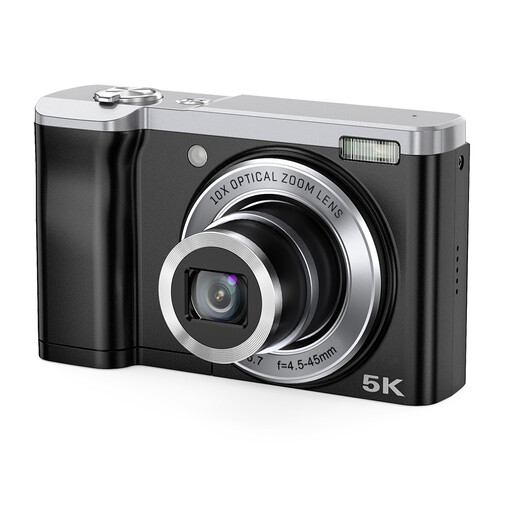
Songdian 5K camera, 56 MP, 10× optical zoom, black
The stated 10× optical zoom gives you the option to adjust the framing of distant subjects.
The description states that 56 MP is interpolated and also mentions 12 MP and 16 MP cameras. Check which output is right for the crop and print you want.
View at Joybuy
 No image available
Sony ZV-E10 with E PZ 16–50mm zoom lens, black
According to the product description, this mirrorless camera version includes a zoom lens for flexible framing along the canal.
The product description lists an APS-C sensor and 24.2 MP. Check the crop you want and, if possible, assess a test print.
View at Joybuy
 No image available
Sony Alpha A6100 with 16–50mm f/3.5–5.6 OSS II
The included 16–50mm lens gives you a zoom option for different types of framing as you walk.
The product description lists an APS-C sensor, 24.2 MP and an electronic viewfinder. Check the lens and box contents for the exact version you’re buying.
View at Joybuy
Frequently asked questions
Do I need to buy a camera with a particular megapixel count for the exhibition?
Don’t base your decision on megapixel count alone. Ask the organiser about the print size and file specifications, then assess your crop and, if possible, make a test print.
Will a polarising filter help with reflections of trees in the canal?
A polarising filter can reduce reflections on water. If you want to keep the reflections, assess the effect before taking the photo and check that the filter size fits your lens.
What should you check when using a mirrorless camera for the first time?
Check the lens mount and exact box contents, and test the focus and exposure well before the exhibition. A camera body doesn’t automatically include the lens you need to capture the canal scene you want; also check that you have a suitable memory card.
Who can help if my camera develops a fault after I buy it?
For a consumer purchase in the Netherlands, the seller is your point of contact if the product is faulty. The Dutch Government explains that a manufacturer’s guarantee is in addition to your statutory rights, and those rights don’t automatically end when a commercial guarantee period expires.
Can I exhibit a canal photo that shows identifiable passers-by?
Not necessarily, if people can be identified. According to the Dutch Data Protection Authority, identifiable images are personal data, and the exception for purely personal or household use doesn’t apply to wider distribution. Whether a particular photo can be shown depends on the people in it, the purpose and the applicable legal basis. If in doubt, take photos without identifiable people or seek appropriate privacy advice before making them public.


