What should you look for when choosing?
Start with the crop you want and your lighting set-up, rather than megapixels alone. The Consumers' Association lists both the lens and sensor as factors that affect a photograph; when photographing an etching under artificial light, how evenly you can illuminate the work matters too.
Mirrorless camera with interchangeable lens
Choose this option: if you want to capture small details as well as the entire etching, or match the lens to the size of the print.
Bear in mind: the right lens may be a separate purchase; check the mount and focusing capabilities of the specific lens.
Compact camera with fixed lens
Choose this option: if you mainly want to take the occasional overview shot and would rather not put together a lens set-up.
Bear in mind: you can't fit a different lens later; check in advance that the fixed lens can achieve the crop and focus you want.
High-resolution mirrorless camera
Choose this option: if you need a large final file or detailed crops.
Bear in mind: Sony lists approximately 61.0 effective megapixels for the Alpha 7CR; that specification alone does not prove it will reproduce an etching better.
| What to consider |
What should you check? |
Who should consider this? |
| Fine lines and crop |
Check the lens mount, which lens is included, the focusing capabilities and whether the print fits well in the frame from your set-up distance. |
If I want to capture small lines as well as the whole etching, I want to be able to match the lens and crop to the print. Around 36% of consumers prioritise detail in the lines. |
| Light and colour |
Check whether you can set the white balance and, if you want to adjust colour afterwards, whether the exact model supports RAW. Also allow room for even lighting. |
When taking several shots under artificial light, I want to keep colours and tones as consistent as possible. Around 29% of consumers give consistent colour top priority. |
| Stable set-up and paper care |
Use a stable camera support and a clean workspace; limit unnecessary exposure to light and make sure the set-up does not clamp or damage the paper. |
I want to handle the etching carefully and take repeatable shots. Around 21% of consumers prioritise a careful, stable set-up. |
| Simplicity and complete kit |
Check whether the offer includes a lens and which other items you need for your photography set-up. |
If I mainly want an overview shot and want to avoid researching lots of separate items, I look for a simple, complete kit. Around 14% of consumers prioritise simplicity. |
Cameras at Joybuy
This Joybuy selection includes cameras for still photography, from compact models to a camera with an interchangeable lens. Before choosing one for an etching, check the lens, focusing capabilities and the items included with each model.
 No image available
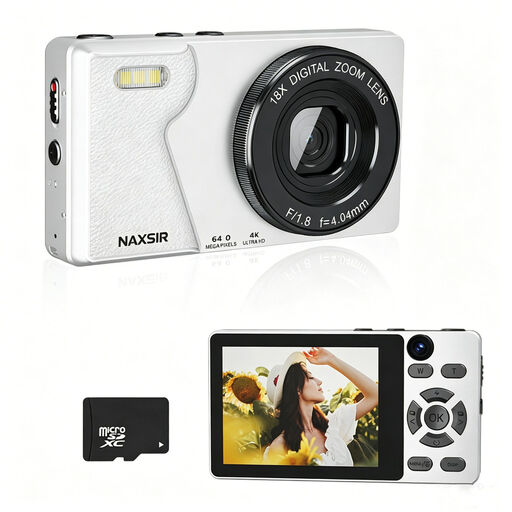
NAXSIR 4K digital camera, 64 MP, 32 GB card
The product description lists autofocus and 64 MP photos; check whether the lens and focusing capabilities suit the distance and crop you need for your etching.
The description lists 18× digital zoom and an included 32 GB memory card. Digital zoom alone doesn't tell you whether fine lines will be captured sharply.
View at Joybuy
 No image available
KINSI Mini Vlog Camera 4K, 64 MP
The product description lists 64 MP photos and an included mini tripod; check how the camera can be positioned straight and securely to photograph a flat etching.
The description lists a 330° rotating lens and a 1.72-inch touchscreen. These details alone don't tell you how sharply the camera will capture fine etching lines.
View at Joybuy
 No image available
DJI Osmo Pocket 3 Creator Combo
The product description lists a 1-inch CMOS sensor and fast focusing; check whether the camera can be positioned straight and securely above a flat etching.
The description lists 3-axis stabilisation and a microphone. Check which items are included in the bundle and whether the recording settings are suitable for still reproduction photography.
View at Joybuy
 No image available
Sony ZV-E10 + 16–50mm zoom, black
This kit lists a 24.2 MP APS-C sensor and a 16–50mm lens; check whether the lens can focus at the distance and achieve the crop you need for your etching.
The description lists an E mount and states that the adapter, charger and memory card are not included.
View at Joybuy
 No image available
Sony ZV-1 compact camera
The product specifications list a 1-inch sensor and RAW support; check whether the fixed lens gives you the crop and focusing capabilities you need for your etching.
The listed lens is 24–70mm with 2.7× optical zoom; the specifications also list 20 MP.
View at Joybuy
Frequently asked questions
What lighting should I use for an overview shot, and how can I show the paper's texture?
For an evenly lit overview shot, the Canadian Conservation Institute describes using two lamps on either side at a 45-degree angle. For a separate shot that emphasises the surface texture, the institute describes using raking light from a low angle; this produces a different image from an evenly lit overview shot.
Does RAW help when photographing an etching under artificial light?
RAW gives you scope to adjust the white balance afterwards. Set a suitable white balance while taking the photograph too, and check that the exact camera model supports RAW.
How can I handle a delicate etching carefully while taking photographs?
Work on a clean surface and handle the paper carefully. Limit unnecessary exposure to light: according to the Library of Congress, light damage to heritage materials is cumulative.
Who should I contact if my camera breaks down too soon?
For a purchase made by a consumer in the Netherlands, the seller is responsible for the statutory guarantee. ACM ConsuWijzer states that if a product breaks down sooner than you could reasonably expect under normal use, the seller must help you by repairing or replacing it free of charge or, where applicable, refunding you. A manufacturer's warranty does not replace this right.
Can I publish a photograph of an etching?
This depends, among other things, on the rights to the work shown and how you intend to use the photograph. The Dutch Government distinguishes between a private copy for personal use and distributing or making protected work available to the public. Before publishing, check the rights to the specific etching and, if necessary, the terms set by the rights holder or venue.


