A 75% layout can be a good compromise for a small desk, provided the keys you need for writing and editing are easy to reach on your chosen model. A 65% layout can free up space, but may mean using key combinations more often. Arboportaal notes that a narrow keyboard can help you position your mouse closer to your body. Also check the exact layout, switch and connection: a switch name is not a measure of how loud it is.
Who might benefit from a compact mechanical keyboard?
Writers with limited mouse space
If you work with text and images side by side for a pitch, you’ll want to fit your keyboard and mouse into the space available on your desk. Arboportaal notes that a narrow keyboard can help you position your mouse closer to your body.
Editors who want keys within easy reach
If you often use arrow, navigation or function keys while writing or editing, it’s worth checking the specific layout. RTINGS.com points out that smaller keyboard layouts may leave out some keys.
Writers in shared workspaces
If you want to type mechanically without automatically opting for a noticeably clicky model, check which switches are fitted to the version on offer. Logitech and Ducky use different names for their switch options.
What should you look for when buying?
75% layout
Suitable if: you want to save space while keeping as many of the keys you use for editing as possible within easy reach.
Bear in mind: key positions vary by model. Keychron describes the K3 Max as a 75% layout with 84 keys; check the layout of the exact version.
65% layout
Suitable if: having more room for your mouse matters more to you, and you’re happy to use key combinations for missing functions.
Bear in mind: dimensions vary by model. Ducky lists the One 3 AURA 65% as 335 × 110 × 40 mm; this size does not automatically apply to other keyboards.
| What to consider |
What should you check? |
Who is this important for? |
| Space for your keyboard and mouse |
Measure the available space and compare it with the dimensions of the exact version. |
At my small desk, I want to keep my mouse close and leave room to work with text and images. Around 33% of consumers give space for the keyboard and mouse their highest priority. |
| Editing keys within easy reach |
Check the function row, arrow keys and the keys you use in your word-processing software. |
When writing and editing, I want to reach the keys I use most often directly. Around 27% of consumers prioritise direct access to editing keys. |
| Typing noise and switch feel |
Check the switch in the exact version and, where possible, try out how it feels to type. |
In a shared workspace, I want to consider other people and not rely on a switch name alone. Around 20% of consumers prioritise quieter typing. |
| Connection and switching between devices |
Check the available connections and whether they suit your devices and the way you work. |
If I switch between devices while working on my pitch, I want to know which connection I need and whether I’d prefer to work wired or wirelessly. Around 20% of consumers give connection type or switching between devices their highest priority. |
Things to watch out for when buying
-
Assuming all compact layouts are the same
A smaller keyboard may leave out keys you use when editing. The layout percentage alone doesn’t tell you where those keys are on a specific model.
Before choosing a layout, compare the key positions with the way you currently write and edit.
It can take time to learn key combinations for missing keys.
-
Going by the model name alone
Connection type, switch, ISO or ANSI layout and hot-swap capability can vary between versions.
Before ordering, compare the full version and layout specifications with the manufacturer’s information.
-
Assuming ‘quiet’ means ‘inaudible’
A switch name describes a particular option, but without comparable measurements it doesn’t tell you how much noise the keyboard will make in your workspace.
Choose with your surroundings in mind and, where possible, judge the sound for yourself.
Relevant brands to consider
Logitech
The MX Mechanical Mini is a compact range of wireless mechanical keyboards with different switch options.
- Logitech says the keyboard can switch between up to three devices. The options listed are Tactile Quiet, Clicky and Linear.
- Check the switch and keyboard layout of the version on offer. Tactile Quiet is the manufacturer’s name for a switch option, not an independent noise measurement.
Keychron
According to Keychron, the K3 Max combines a 75% layout and low profile with several connection options.
- Keychron lists Bluetooth, 2.4 GHz, wired use and key remapping.
- According to Keychron, hot-swap is available on the RGB Backlight Hot-Swappable version. ISO versions differ from the ANSI version, so check the exact model.
Ducky
The wired One 3 AURA range includes a 65% version for anyone who values having more space for their mouse.
- Ducky lists hot-swap capability and several switch options, including Cherry MX Silent Red.
- Ducky lists the One 3 AURA 65% as measuring 335 × 110 × 40 mm. Check that the wired connection and keyboard layout suit the way you work.
Compact mechanical keyboards at Joybuy
This Joybuy selection includes compact mechanical keyboards with 65% and 75% layouts, as well as models with wired or multiple connection options.
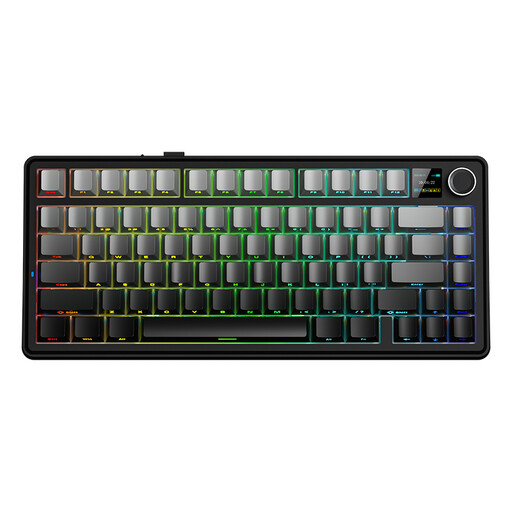 Image unavailable
AULA F75 MAX 75% mechanical keyboard, US QWERTY, Gradient Grey, Reaper Switch
A 75% layout to consider if you’re weighing up desk space against the keys you need to access directly.
The product name lists wired, Bluetooth and 2.4G connection options. Check that the exact keyboard layout suits the way you work.
View at Joybuy
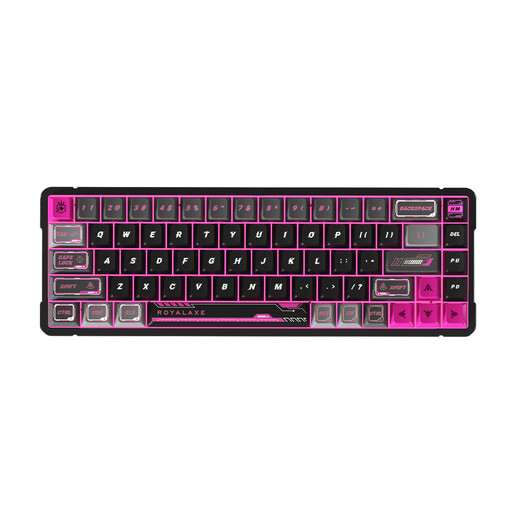 Image unavailable
Royalaxe X68 Full Aluminum 65%, 68 keys, US layout, wired, Gateron HE Magnetic Switch
A wired 65% version to consider if you’re looking for a compact layout and are happy to work with this particular keyboard layout.
The product name lists 68 keys, a US layout and Gateron HE Magnetic Switch. Check that the US layout suits the way you use your keyboard.
View at Joybuy
 Image unavailable
AJAZZ AK820 MAX 75% wireless mechanical keyboard, US QWERTY, Flying Fish Switches
A 75% model to consider if you’re looking for a compact layout and want to explore several connection options.
The product name lists wired, Bluetooth and 2.4G connections, hot-swap capability and an 8000mAh capacity. Check the exact version and connection options.
View at Joybuy
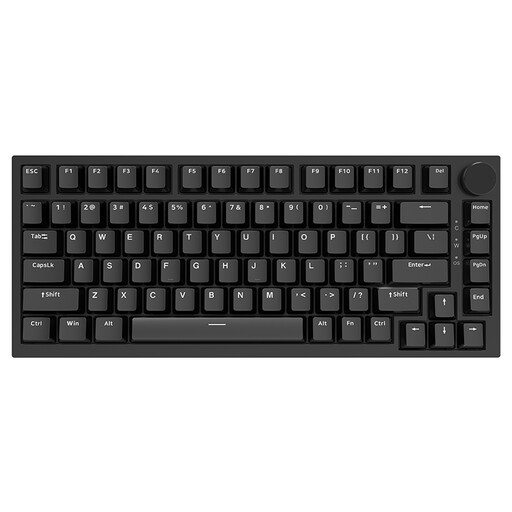 Image unavailable
AJAZZ AK820 75% wired keyboard, US QWERTY, Red Switch-Black
A wired 75% version to compare if you don’t need a wireless connection.
The product name lists 83 keys and hot-swappable linear switches. Check the US layout and the other features of this version.
View at Joybuy
 Image unavailable
AJAZZ AK820 Pro 75% Tri-Mode keyboard, US QWERTY, Flying Fish Switch Gray
A 75% version to consider if you’re looking for a compact layout with several connection options.
The product name lists wired, Bluetooth and 2.4G connections, hot-swap capability and a TFT display. Check the exact version and keyboard layout.
View at Joybuy
Frequently asked questions
How can I tell whether a compact keyboard will fit my workspace?
Measure the space for both your keyboard and mouse, then compare it with the dimensions of the exact version. Arboportaal recommends a narrow keyboard when it helps you position your mouse closer to your body. This is workspace guidance, not a guarantee that a particular model will prevent discomfort.
Can I fit different switches later?
Only if the version you choose has compatible hot-swap sockets. Keychron limits this feature on the K3 Max to the RGB Backlight Hot-Swappable version; Ducky lists hot-swap capability for the One 3 AURA. Check that replacement switches are compatible before buying.
What are my rights if I’m unhappy with how the keyboard feels to type on, or if it develops a fault?
For online purchases from a business in the Netherlands, you generally have a cooling-off period of up to 14 days after delivery, subject to exceptions. Separately, if a product does not perform as you could reasonably expect under normal use, you have the right to seek a solution from the seller. ACM ConsuWijzer explains that there is no single fixed statutory guarantee period that applies to every keyboard.


