
Designer with limited desk space
Wants to leave room for a mouse and other materials, but likes to have the arrow keys within easy reach when editing text. The Keychron K3 Max is listed as a 75% keyboard with arrow keys.


Start with a 75% layout if you want to save space on a small desk while keeping the arrow keys and function row readily available. Choose a smaller layout only if extra desk space matters more to you than having to access some keys via key combinations. Also check the exact switch variant, layout and connection type: a label such as ‘quiet’ doesn’t tell you how a keyboard will sound in your workspace.
Wants to leave room for a mouse and other materials, but likes to have the arrow keys within easy reach when editing text. The Keychron K3 Max is listed as a 75% keyboard with arrow keys.
Types a lot and therefore wants to consider the sound and feel of the switches. Logitech offers Tactile Quiet, Clicky and Linear variants for the MX Mechanical Mini; the experience differs between variants.
Works on text and design across more than one device and wants a suitable connection option. Logitech says the MX Mechanical Mini can switch between up to three devices; Keychron lists Bluetooth, 2.4 GHz and wired connections for the K3 Max.
When designing a wedding album at a small desk, the layout, typing feel, connection and overall workstation setup are the main factors to weigh up.
Best if: you often navigate through text and want the arrow keys and function row readily available.
Trade-off: this layout takes up more room than a smaller keyboard; 75% alone doesn’t tell you its exact width.
Best if: desk space is especially important and you’ve checked which keys and functions are directly available on the layout you’re considering.
Trade-off: the CHERRY variant reviewed has 68 keys; check which functions you’ll need to access via key combinations.
| What to consider | What should you look for? | Who is this for? |
|---|---|---|
| Desk space and keys | Measure the available width and check the exact key layout; Keychron lists the K3 Max as 306 mm wide. | If I need room for my mouse but want to use the arrow keys while editing text, I’ll prioritise that combination; around 40% of consumers put desk space and readily accessible keys first. |
| Typing feel and sound | Check the exact switch variant and consider how it sounds in your workspace; ‘Tactile Quiet’ is not a published sound measurement. | When I do a lot of writing, I want a typing feel and sound level that suit my space; around 30% of consumers give typing feel or sound top priority. |
| Connection and devices | Check that the connection type you want works with your device, and see which accessories come with the variant you’ve chosen. | If I work on text and design across different devices, I want to know how to connect the keyboard or switch between them; around 20% of consumers prioritise connection and switching between devices. |
| Workstation setup | Consider the position of your keyboard and screen together; a compact keyboard alone won’t determine whether your whole workstation is set up well. | When I work at a screen for long periods, I want to assess my entire setup rather than just the keyboard size; around 10% of consumers give their workstation setup top priority. |
The size percentage doesn’t tell you exactly how wide the keyboard is or which keys you can use directly. That can matter if you often edit text while designing.
Measure the available space and compare the exact variant’s key layout with the shortcuts you use.
According to the manufacturer, switch variants can differ in feel and sound. Internal dampening alone doesn’t provide a measured sound level for your workspace.
Check which switch variant you’re choosing, and distinguish the manufacturer’s description from a sound measurement taken under comparable conditions.
Sharing a model range name doesn’t necessarily mean the key layout, switches or full specification are the same.
Before buying, compare the full model code, layout, switches and variant. The Joybuy listing reviewed for the CORSAIR K65 PLUS specifies US QWERTY and MLX Fusion Tactile; check these details for the version you’re considering.
The MX Mechanical Mini is a compact option if you’re looking for a mechanical keyboard with a choice of switch variants.
The K3 Max is a low-profile mechanical 75% keyboard with a published width and several connection options.
The MX-LP 2.1 Compact Wireless is a 68-key option for anyone considering a smaller layout.
The K65 PLUS WIRELESS TACTILE is a 75% option with tactile switches.
This Joybuy selection includes compact mechanical keyboards with 60%, 65% and 75% layouts. For each model, check which keys are readily available, the layout and the connection type you need.
 Image unavailable
The 75% layout with navigation keys is well suited to editing text at a compact desk.
Tri-Mode: wired, Bluetooth and 2.4 GHz. The product name specifies a US QWERTY layout and side-engraved keycaps.
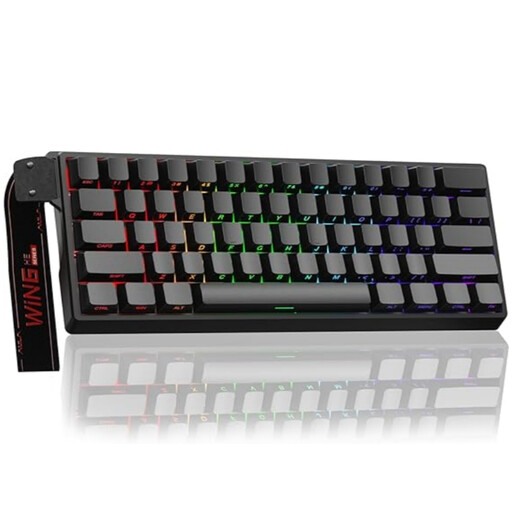 Image unavailable
The compact 60% layout is an option if desk space matters more to you than having more keys readily available.
The product name specifies Hall Effect Magnetic Switches, Rapid Trigger, an 8K polling rate and adjustable 0.01 mm actuation. Wired connection; check the layout of the version you’re considering.
 Image unavailable
The 65% layout with 68 keys is a compact option; the product description lists arrow and navigation keys for editing.
The product name specifies Gateron HE Magnetic Switches. US layout and wired connection.
 Image unavailable
The 75% layout suits anyone looking for a compact setup while keeping keys readily available.
The product name specifies TTC Magnetic HE switches, hot-swapping and a wired connection.
 Image unavailable
With 68 keys, this is a compact option for a desk with limited space.
The product name specifies magnetic linear switches and a metal top plate. US layout.
If you often select text and navigate between pages, a 75% layout with readily accessible arrow keys is a sensible starting point. A smaller layout can save space, but check in advance which keys you can use directly on the exact variant.
First check that the variant you’ve chosen works with your device and preferred connection method. Keychron lists Bluetooth, 2.4 GHz and wired connectivity for the K3 Max; Logitech says the MX Mechanical Mini can switch between up to three paired devices.
Assess your entire workstation setup and change your posture regularly. Arboportaal recommends a relaxed working posture and varying your position; a compact keyboard alone is no guarantee against discomfort.
When you buy as a consumer in the Netherlands, you’re entitled to a product that works as it should, and the retailer must provide an appropriate solution if there’s a fault. The Dutch government states that the Netherlands has no fixed statutory warranty period. For online purchases from a business, a 14-day cooling-off period applies in many cases; check the terms and any exceptions that apply to your purchase.
The Arboportaal guidance cited is aimed at employers and employees, not every individual working on a personal project. For employees who work at a screen for more than two hours a day, Arboportaal describes a requirement for a separate screen and keyboard; don’t automatically apply this rule for employees to personal use.