
Vandaag of morgen in huis

Kwaliteit gegarandeerd

Welkomstaanbiedingen ontgrendelen: GRATIS bezorging | Tot 80% korting | Gratis 30 dagen JoyPlus-proefperiode
Download de app
A compact mechanical gaming keyboard saves space, gives you more room for your mouse and can be comfortable for both gaming and typing. However, a small size is not automatically practical. Some models omit the arrow keys, while others use a layout that does not match Dutch keyboards. Terms such as rapid trigger, gasket mount and RGB may sound appealing, but they are not relevant to every user.
With this buying guide, you can compare the most important features and avoid paying for functions you are unlikely to use.
A 60% keyboard usually has 61 keys and omits the arrow keys, function row and number pad, among other keys. This is useful on a small desk or when travelling, but less practical for spreadsheets, keyboard shortcuts and everyday office work.
A 75% mechanical keyboard generally retains the arrow keys and a compact function row. A TKL gaming keyboard also has no number pad, but often offers a more traditional key layout. So, do not just check the percentage: look at the number of keys and the dimensions as well.
Many compact models are US QWERTY keyboards or use US International. Dutch users accustomed to an ISO-NL or BE layout may therefore find that punctuation marks and the Enter key are in different positions. For example, one Corsair model in this selection uses a BE AZERTY layout.
Check the following before buying:
RGB lighting does not change input speed. An RGB gaming keyboard can be useful for visibility and personal settings, but check the software support and whether the lighting can be switched off.
A Hall Effect or rapid trigger function is mainly relevant to competitive gaming. According to the product information from Redragon and AULA, their models use magnetic Hall Effect switches with adjustable actuation. That does not automatically mean every player will experience a noticeable advantage. The feature also requires configuration and a period of adjustment.
Choose the size based on how you use your keyboard every day:
Measure your available space, including room for mouse movement. A keyboard around 32 to 36 centimetres wide can already make a significant difference compared with a full-size model.
Mechanical switches are available in linear, tactile and clicky variants, among others. Linear switches move smoothly and are often chosen for rapid, repeated key presses. Clicky switches produce an audible click, which can be distracting in a shared workspace.
A wired mechanical keyboard offers a simple plug-and-play connection and eliminates the need for charging. A wireless mechanical keyboard gives you more flexibility on a tidy desk, but check the battery capacity, Bluetooth, 2.4GHz connectivity and whether you can continue using it in wired mode while charging.
If you want to replace the switches yourself, look for a hot-swappable keyboard. Compatible 3- or 5-pin switches can usually be installed without soldering. Use the correct tools and follow the instructions; applying too much force can damage the socket or circuit board.
A gasket mount keyboard uses a mounting system that, according to the product descriptions of some brands, can provide a softer typing feel and reduce vibrations. The result also depends on the plate, stabilisers, keycaps and dampening layers.
PBT keycaps are generally more resistant to wear than ABS keycaps, but the exact feel and profile vary by model. A keyboard with a volume knob is convenient when you want to adjust the volume quickly during a game or meeting. However, check whether the knob only controls volume or can also operate lighting, media functions and macros.
A stated lifespan, such as 50 or 100 million keystrokes, is a manufacturer’s product specification and not a guarantee for every usage scenario. Dust, liquid, cable damage and incorrect maintenance can affect the lifespan.

Why it suits this profile: The 75% layout retains important keys for everyday use, while the Type-C cable keeps things simple.
The model lists support for 3- and 5-pin hot-swapping, so you do not immediately need a completely new keyboard when changing switches.
82 keys, PBT keycaps, volume knob, gasket construction and multiple dampening layers according to the product information.
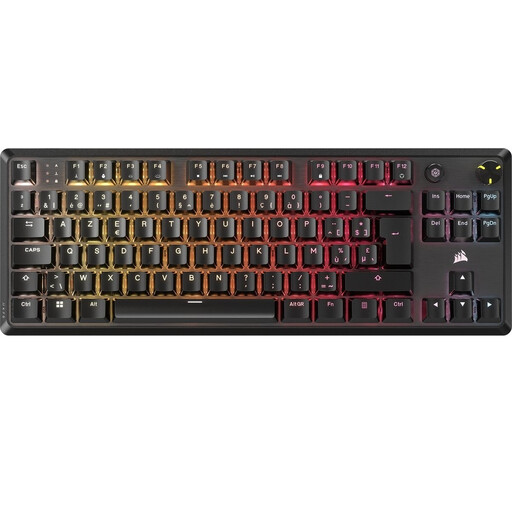
Why it suits this profile: The TKL design is ideal if you want to free up desk space without giving up the arrow and function keys.
The product specifications list BE AZERTY. This makes the layout easy to check before ordering, but less suitable for anyone looking for US QWERTY.
Linear MLX Red v2 switches, per-key RGB, two foam layers, a rotary knob and five profiles stored in the onboard memory.
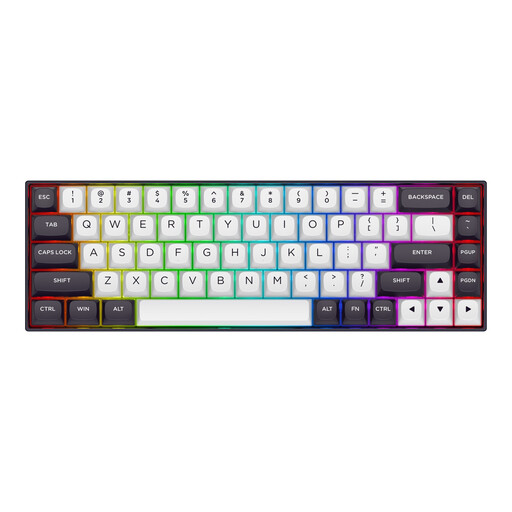
Why it suits this profile: Players of fast-paced competitive games can make targeted use of the Hall Effect features and compact 68-key layout.
Adjustable actuation and rapid trigger are explicitly listed in the product information. These features are therefore clearly stated, but they still require compatible software and fine-tuning.
68 keys, Hall Effect magnetic switches, adjustable actuation from 0.2 to 4.0 mm, 8,000 Hz polling and an aluminium top plate according to Redragon.

Why it suits this profile: A home office or gaming setup with multiple devices benefits from having wired, Bluetooth and 2.4GHz connectivity in one model.
The 80% layout is clearly stated. You retain more keys than with a 60% model, but you do need to allow space for the larger case.
Tri-mode connectivity, hot-swappable switches, gasket mount, programmable knob, PBT keycaps and a stated battery capacity of 4,000 mAh.
We have compiled a complete, up-to-date list of products that fully meet these strict selection criteria and the applicable European safety regulations.
Yes, especially a 75% or TKL model can be suitable for typing, video calls and everyday computer use. Check the noise level of the switches and the key layout. Clicky switches can be audible in a shared space; linear switches are often quieter, depending on the case and dampening.
A wired model does not use a separate battery and generally only needs a USB connection. With a wireless model, you need to factor in charging. RGB lighting can increase energy consumption, but you can usually dim it or switch it off. For wireless models, also check whether the keyboard continues to work in wired mode while charging.
The lifespan depends on the switches, keycaps, cable, stabilisers and maintenance. Manufacturers sometimes quote tens of millions of keystrokes; these are stated product specifications. Keep the keyboard dry, unplug it before cleaning and remove dust carefully. With a hot-swappable model, you can replace compatible switches later, which can make maintenance and customisation easier.
