What should you look for when choosing?
First, decide what you’ll do with the laptop during and after the session. Then check that its size, ports and configuration suit the way you work.
| What to consider |
What should you check? |
Who should pay particular attention? |
| Portability and limited space |
Compare the actual weight, screen size and dimensions of your workspace. Assess battery life under conditions similar to your session. |
If I often take my laptop with me and use it on a small table, I want enough room to work without unnecessary bulk. Around 36% of consumers say portability is their top priority. |
| Ports for your session |
Make a list of your screen, audio equipment and cables. Check the ports and any software or drivers required for the exact configuration. |
If I connect my own screen or audio equipment on location, I want to know it will work with the laptop I choose. Around 29% of consumers put ports for their session first. |
| Memory and storage |
Choose RAM and SSD capacity to suit your programmes and files. The Consumentenbond gives 16 GB RAM and 512 GB storage as benchmarks for creative use. |
If I regularly edit large files, I want enough space and smooth performance from my programmes. Around 21% of consumers say editing is their top priority. |
| Complete set-up and aftercare |
Factor in any adapters or a hub you’ll need, and compare any additional cover with your statutory rights. The Rijksoverheid says the retailer is your point of contact if a product is faulty. |
If I want to buy a laptop with the right connections and suitable aftercare, I look at the complete set-up rather than just the device. Around 14% of consumers put total costs and aftercare first. |
Joybuy products for working in compact spaces
This Joybuy selection includes laptops for compact workspaces and mobile use, with different screen sizes, ports and Windows or macOS configurations.
 Image unavailable
HP OmniBook 7 AeroNGAI 13-bg1051nd NL Copilot+
The 13.3-inch size and listed connections make this configuration worth comparing if you want to work in a compact space with wired equipment.
AMD Ryzen AI 5, 16 GB RAM and a 512 GB SSD. The product description lists Windows 11, HDMI, USB-A and USB-C; the stated weight is 1.46 kg.
Joybuy
 Image unavailable
ASUS Zenbook A14 UX3407QA-QD479W
A 14-inch configuration with a low stated weight and wired connections, worth comparing if you use your laptop in several locations.
Snapdragon X, 16 GB RAM, 512 GB SSD and WUXGA OLED. The description lists HDMI, USB-A, USB4 and a 3.5mm audio jack; the stated weight is around 0.98 kg.
Check that your software and any peripherals will work with the configuration you choose.
Joybuy
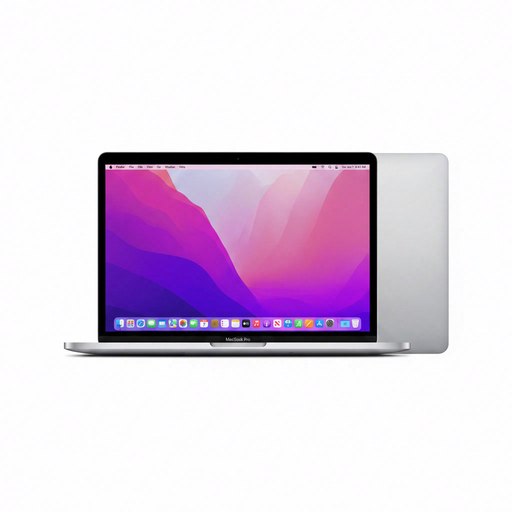 Image unavailable
Apple MacBook Pro 13-inch M2 24GB 256GB
The 13.3-inch screen and listed memory capacity are worth considering if you want to work in a compact space and use several programmes.
24 GB memory and 256 GB storage. The product description lists macOS, a Retina display, two Thunderbolt/USB 4 ports and a headphone jack.
Joybuy
 Image unavailable
Apple MacBook Air 13-inch M5 16GB 512GB
This compact configuration is worth comparing if you travel often and want a lightweight laptop for using several programmes.
16 GB RAM, 512 GB storage and a stated weight of 1.23 kg. Apple lists two Thunderbolt 4 ports for the 13-inch MacBook Air M5; you may need a separate connection solution for HDMI or USB-A equipment.
Joybuy
 Image unavailable
Apple MacBook Air 15-inch M5 16GB 512GB
The larger screen may suit you if you want more screen space. Bear in mind that a 15.3-inch laptop takes up more room on a small table than a smaller model.
16 GB RAM and 512 GB storage. The product description lists macOS and two Thunderbolt 4 ports.
Joybuy
Frequently asked questions
Do I need a powerful editing laptop straight away for a storytelling session?
Not if you mainly write, take notes and present. If you regularly edit large photo or video files, compare configurations designed for creative use; the Consumentenbond gives 16 GB RAM and 512 GB storage as benchmarks.
How do I check the connections I’ll need for a session?
Check the connectors and any drivers for your own screen and audio equipment against the ports on the exact laptop. Apple lists two Thunderbolt 4 ports for the 13-inch MacBook Air M5; Lenovo lists HDMI and USB-A, among other ports, for the ThinkPad X1 Carbon Gen 13. These port lists don’t prove that a specific device will work without further checks.
Can I use the same recording app on Windows, macOS and Linux?
Audacity offers downloads for Windows, macOS and Linux. Also check that your microphone, audio interface and any plug-ins work with your laptop. If you’re using Windows on Arm, pay particular attention to devices that rely on their own drivers.
What can I do if a laptop I bought online isn’t right for me?
According to the Rijksoverheid, consumers have a 14-day cooling-off period for distance purchases. Check whether your purchase qualifies; the cooling-off period is different from the statutory guarantee for a faulty product.
Does a two-year manufacturer’s warranty cover the full statutory guarantee in the Netherlands?
No. According to the Rijksoverheid, the Netherlands has no fixed statutory guarantee period: what you can expect from a product depends, among other things, on the product and the information provided at the time of purchase. If a product is faulty, the retailer is your point of contact for a solution.


