
Editing at a small table
You want to edit audio while looking at a transcript or your notes, but have little room for a large laptop or extra equipment.


Start by choosing a screen size that fits your table, then check that your recorder, headphones and any microphone will connect to the exact laptop configuration you’re considering. For editing in Audacity, you’ll need a suitable internal SSD and enough room for your projects; Audacity does not specify a particular CPU or GPU requirement for supported Windows systems. Also check your software and plug-ins, the keyboard, and how you plan to store your interview files.
You want to edit audio while looking at a transcript or your notes, but have little room for a large laptop or extra equipment.
You might use a recorder, headphones or a microphone, and want to check in advance that the ports on the configuration you choose are suitable.
You work with identifiable voices or personal stories and want to consider storage, access and any cloud processing, as well as editing.
Choose between Windows and macOS based on your software and equipment first; then compare the screen, storage and ports on the specific configuration.
| What to consider | What should you check? | Who is this most important for? |
|---|---|---|
| Screen and workspace | Compare the screen size and laptop dimensions with the space available on your table. Also consider whether you’ll be comfortable working without an external screen. | If my workspace is small, I want to leave enough room for notes and equipment. Around 29% of consumers prioritise compactness above all else. |
| Editing and project storage | Check the SSD capacity for recordings, editable projects and exports. The Dutch Consumers’ Association recommends 16 GB of memory if you want to run several programmes at once. | When I’m editing audio with a transcript open at the same time, I want enough room for my project files. Around 29% of consumers prioritise editing and storage above all else. |
| Ports | Compare the plugs on your recorder and headphones with the ports on the exact configuration; check whether you’ll need an adapter. | I want to connect my own recording and listening equipment without having to work out which connections I need every time. Around 21% of consumers prioritise connecting their equipment. |
| Managing interview files | Check where projects and backups are stored, who can access them and which cloud settings apply. | For identifiable interviews, I want to decide carefully who can see the files and where copies are stored. Around 21% of consumers make data management their top priority. |
Audacity advises against editing active projects directly from external drives, USB sticks or network drives. When working out how much storage you need, allow for the editable project as well as the recording, export and backup.
An editable project is different from the exported audio file. If you only account for the export, you may overlook the space needed for projects and backups.
Allow space for recordings, editable project files, exports and backups. Audacity advises against editing active projects from a USB stick, external drive or network drive.
Ports vary by model and configuration. Your recorder or headphones may need a connection or adapter you hadn’t accounted for.
Before choosing, compare the plugs on your own equipment with the ports on the exact configuration.
The Dutch Government distinguishes between a manufacturer’s warranty and your statutory rights. If a product is faulty, the retailer is your point of contact; according to the Dutch Government, the Netherlands has no fixed statutory warranty period.
Check exactly what additional cover is offered and how it relates to your statutory rights.
The MacBook Air is a macOS option if you’re looking for a compact workspace.
The Zenbook 14 OLED UX3405 is a compact Windows range with a selection of port types.
The ThinkPad X1 Carbon Gen 13 is a business range of 14-inch laptops with different configurations.
The Dell Pro 13 Premium PA13250 is a business laptop range that includes a 13-inch model.
The EliteBook Ultra G1i is a 14-inch Intel business range.
This selection includes laptops for editing interviews in a compact workspace. It also includes a larger screen as a possible trade-off if screen space matters more to you than table space.
 No image available
This 13.3-inch model is worth considering if you have little table space and want to view a transcript alongside your editing software.
The product description lists a 16:10 IPS screen, 16 GB of memory and a 512 GB SSD. Listed connections include USB-A, USB-C and HDMI.
 No image available
This MacBook Air is an option if you want to use macOS and the listed configuration fits your table space.
The description lists a 13.6-inch screen, 16 GB of memory, a 512 GB SSD and a stated weight of 1.23 kg. This configuration has two Thunderbolt 4 ports and a headphone jack; check whether you’ll need an adapter for USB-A equipment.
 No image available
This Windows laptop is an option if you’re looking for a 14-inch screen and the listed ports for your existing equipment.
The description lists 16 GB of memory, a 512 GB SSD, USB-A, USB4, HDMI and 3.5mm audio. Its stated weight is approximately 0.98 kg. The 65 W USB-C PD charger is not included. Check that older software, drivers and specialist peripherals are compatible with Windows on Snapdragon.
 No image available
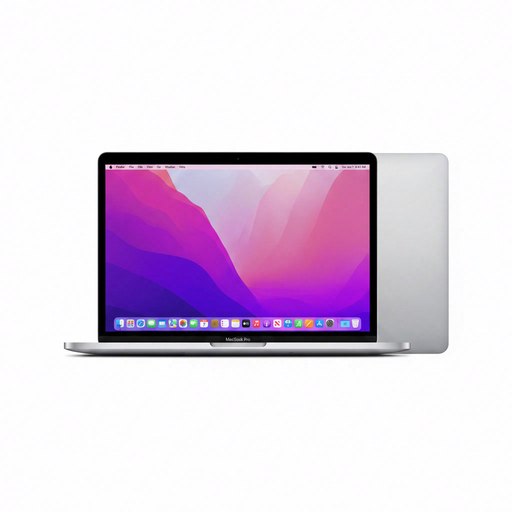
This 13-inch MacBook Pro is an option if you’re looking for a compact editing setup and the listed macOS configuration works with your software.
The product details list 24 GB of memory, a 256 GB SSD, two Thunderbolt or USB 4 ports and a 3.5mm headphone jack. Its stated weight is 1.4 kg.
 No image available
This larger model is worth considering if you want more screen space for audio and a transcript, and have enough room on your desk.
The description lists a 16:10 WUXGA IPS screen with an anti-glare finish, 16 GB of memory and a 512 GB PCIe 4.0 NVMe SSD. Its stated weight is approximately 1.50 kg. The USB-C power adapter is not included.
Not just to use Audacity on a supported Windows system: Audacity does not specify a particular CPU or GPU requirement. Check other software and plug-ins separately; for Windows on ARM, Audacity notes limitations with plug-ins and additional software.
Edit the active project on storage that offers fast, uninterrupted access. Audacity advises against editing active projects from external drives, USB sticks or network drives. Save the editable project and export as separate files, and make sure you have suitable backups.
The European Commission states that, since 28 April 2026, EU common charging rules also apply to laptops covered by those rules. Check the required charging power too, and whether a suitable charger is included; a USB-C port alone doesn’t tell you whether your existing charger is suitable.
General privacy rules don’t automatically mean that you can. If the GDPR applies, you’ll need to consider, among other things, a valid legal basis, appropriate security and a suitable retention period. Consent is one possible legal basis, but it isn’t automatically the required one; arrangements for publication and cloud use depend on the project.
In the Netherlands, consumer purchases already come with statutory rights if a product is faulty. According to the Dutch Government, there is no fixed statutory warranty period. When comparing extra warranty cover, check what it actually adds.