Who is this buying guide for?

Builders with limited mouse space

Your desk is small and you want enough room to move your mouse. Compare the dimensions of the exact keyboard version with the space you have available. RTINGS describes a 60% keyboard as a layout that usually omits the number pad, navigation cluster and function row; HyperX lists dedicated arrow keys on the Alloy Origins 65.

Builders who use shortcuts

You switch between things such as your inventory, chat and views while building, and want to know whether you’ll need dedicated keys or Fn combinations. Controls can vary by game and edition: Minecraft Help describes shortcuts for Java Edition, while the Minecraft Education Support Center explains the controls for Education.

Builders sharing a desk

You also use your desk for typing, or sit close to other people. As well as dimensions, the connection, switch type and layout can all matter; check the specific version rather than assuming that features of one model apply to an entire brand.

What should you look for?

60%

Choose this option if: you want to free up as much desk space as possible for your mouse and are happy to use key combinations for keys that aren’t present individually.

Trade-off: RTINGS explains that this layout usually has no separate function row or navigation cluster, so check the controls for your game and edition.

65%

Choose this option if: you want a compact layout but consider dedicated arrow keys important. The HyperX Alloy Origins 65 is a documented example.

Trade-off: check which navigation keys are present individually; a 65% layout doesn’t have the same function row as a 75% board.

75%

Choose this option if: you want both arrow keys and a separate function row on a compact desk. Razer lists both on the BlackWidow V4 75%; Keychron offers the K2 Version 3 ISO as another 75% option.

Trade-off: check the exact layout and version. Razer, for example, distinguishes between complete and barebones versions; Keychron’s ISO layout varies by version.

TKL

Choose this option if: you don’t need a number pad and want a roomier key layout. Logitech G lists LIGHTSPEED and Bluetooth among the features of the PRO X TKL.

Trade-off: TKL isn’t the most compact of the options discussed; measure the space available rather than going by the name alone.

What to consider What to check before buying Who might find this important?
Space for your keyboard and mouse Measure the space available and compare it with the dimensions of the exact version. RTINGS describes which keys are usually missing on 60% keyboards; HyperX lists dedicated arrow keys for the Alloy Origins 65. If space is limited, I want enough room to move my mouse. Around 36% of consumers put desk space first.
Building and navigation keys within easy reach Compare the key map with the controls for your game and edition. Minecraft Help and the Minecraft Education Support Center describe controls for their respective Minecraft editions. If I often switch between building, inventory, chat or views, I want to know which keys I can use directly. Around 29% of consumers prioritise keys that are easy to reach.
Key feel and sound Check which switches are included in the version on offer and whether it supports hot-swapping. Razer, Keychron and Logitech G list different switch options or versions. If I also use the keyboard for typing or sit close to other people, I want to choose my switches carefully. Around 21% of consumers say key feel or sound is the deciding factor.
Connection and switching between devices Check the connections supported by the exact version. Logitech G lists LIGHTSPEED and Bluetooth for the PRO X TKL; Keychron lists Bluetooth and wired use for the K2 Version 3 ISO. If I need a specific connection or want to switch between devices, I want to know which connections my version supports. Around 14% of consumers prioritise connectivity.

Common mistakes

  • Choosing a 60% board without checking which keys are missing

    A 60% layout usually omits dedicated arrow, navigation and function keys. This can mean using a key combination for actions you perform often.

    Compare the commands you use most often with the key map for the exact version. Consider 65% or 75% if dedicated keys matter more to you than the extra mouse space.

    Frequent Fn combinations can make controls more awkward to use.

  • Assuming a barebones or ISO version has the complete layout you expect

    Razer says the barebones version discussed is supplied without switches, keycaps or a wrist rest. Keychron offers several ISO layouts, but that doesn’t confirm that the key legends are in Dutch.

    Before buying, check the full version name, the key legends and what’s included in the box.

  • Thinking Rapid Trigger or high speed is essential for building

    SteelSeries describes Rapid Trigger and adjustable actuation for the Apex Pro Mini. This doesn’t establish a practical advantage when building a sandbox world.

    Prioritise a suitable size and keys within easy reach. Choose adjustable actuation only if you want to use that feature yourself.

Brands to compare

HyperX

The Alloy Origins 65 is an example of a compact layout with dedicated arrow keys.

  • HyperX also lists dedicated Page Up/Down, Home and Delete keys for this model.
  • Check the layout and switch type on offer; these are model specifications, not features of every HyperX keyboard.

Razer

According to Razer, the BlackWidow V4 75% combines a compact layout with a separate function row and arrow keys.

  • Razer lists hot-swapping for 3- and 5-pin switches.
  • According to Razer, the barebones version is supplied without switches, keycaps or a wrist rest; check which version you’re choosing.

Keychron

The K2 Version 3 ISO is a 75% alternative if you want to combine Bluetooth, wired use and assignable keys.

  • Keychron gives the dimensions of this model as 316,2 × 126,2 mm and lists UK, German, Swiss and Nordic ISO versions.
  • These versions don’t confirm Dutch key legends; hot-swapping is available only on the version designed for it.

Logitech G

The PRO X TKL is worth considering if you’re looking for a version without a number pad, with LIGHTSPEED, Bluetooth and programmable keys.

  • Logitech lists tactile, clicky and linear switch options.
  • TKL isn’t the most compact option discussed; measure to check whether it will fit your desk.

SteelSeries

The Apex Pro Mini is a 60% option for anyone looking for a compact layout and adjustable key actuation.

  • SteelSeries describes Rapid Trigger and adjustable actuation for this model.
  • The 60% layout means weighing up which keys aren’t available individually; manufacturer claims about speed don’t prove an advantage when building in a sandbox game.

Joybuy products for a small setup

The Joybuy products below are compact 60%, 65% and 75% keyboards. Compare the desk space you have with the keys you want to access individually, and check the version and connection.

Royalaxe X68 full-aluminium 65% gaming keyboard with US layout

Royalaxe X68 Full Aluminum 65% Gaming Keyboard

A good fit for a compact setup if you’re looking for a wired 65% layout with dedicated keys.

68 keys; US layout; wired; Hall Effect magnetic switches; Rapid Trigger.

View at Joybuy

AULA S75 Pro 75% wireless mechanical gaming keyboard

AULA S75 Pro 75% Wireless Mechanical Gaming Keyboard

A good fit for a small setup if you want to combine a separate function row and arrow keys with several connectivity options.

75% layout; 2.4 GHz, Bluetooth and USB-C; hot-swappable switches; TFT display and rotary knob.

View at Joybuy

AJAZZ AK820 75% wired mechanical keyboard, Red Switch-Black, US layout

AJAZZ AK820 75% (Red Switch-Black, US Layout)

A good fit for a compact wired setup if you’re looking for a 75% layout with hot-swappable linear switches.

83 keys; US layout; wired; red linear switches; compatibility listed for PC/Win/Mac.

View at Joybuy
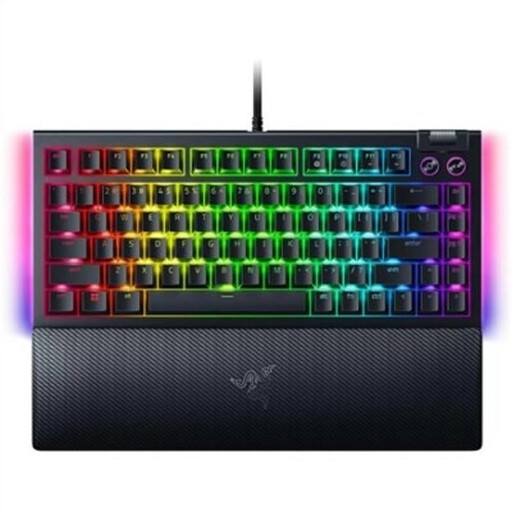
Razer BlackWidow V4 75% hot-swappable mechanical gaming keyboard, US QWERTY

Razer BlackWidow V4 75% Hot-Swappable (US QWERTY)

A good fit for a compact setup if you want a separate function row and arrow keys; Razer lists both for the BlackWidow V4 75%.

75% layout; hot-swappable mechanical switches; US QWERTY layout; wired USB connection.

View at Joybuy

RK ROYAL KLUDGE RK61 60% gaming keyboard, white with red switches

RK ROYAL KLUDGE RK61 60% (White, Red Switch)

A good fit for a setup where maximum compactness matters and you’re happy to use key combinations for missing keys.

61 keys; 60% layout; hot-swappable; Bluetooth for up to three devices and a detachable USB cable.

View at Joybuy

Frequently asked questions

Do I need a separate function row for building in Minecraft?

Not for every action. Minecraft Help and the Minecraft Education Support Center describe controls for different Minecraft editions. Check whether the features you use often in your version of the game require a dedicated function key or an Fn combination.

How do I set up a compact keyboard for my building game?

First, check the key map and try the default controls. The Minecraft Education Support Center explains where to change the controls in Education; those instructions don’t automatically apply to other editions or games.

What if I’m not happy with the keyboard or switches after buying?

For online consumer purchases, ACM ConsuWijzer says you generally have up to 14 days after delivery to change your mind, subject to legal exceptions. If a product is faulty under normal use, your statutory guarantee is separate from any manufacturer’s warranty, and you should contact the seller.

Which EU rules apply to a wireless keyboard?

The European Commission describes the Radio Equipment Directive as the framework for radio equipment on the EU market. According to Your Europe, CE marking is required when applicable harmonised EU rules say so. Check the product information for the exact wireless version; don’t assume it complies based on the brand name alone.

Where can I take my old keyboard?

The Dutch government describes a free take-back scheme for electrical appliances when you buy a similar appliance, including online purchases. Your local recycling centre may be another option.
