
Writer with limited desk space
You want room for a mouse and synopsis notes while you type. So check the dimensions of the keyboard and any wrist rest.


Start by considering the space taken up by your keyboard, mouse and source materials together. A compact model without a fixed numeric keypad can free up room beside the keyboard. If you mainly want to adjust the position of your hands, compare a fixed wave-shaped design with two adjustable halves, and check how much space your chosen setup needs. No keyboard shape can guarantee that discomfort will disappear.
You want room for a mouse and synopsis notes while you type. So check the dimensions of the keyboard and any wrist rest.
You’re comparing a fixed shape with individually adjustable keyboard halves, and want to check in advance that your chosen setup will fit on your desk.
You often move through text as you revise, so you want to know in advance which navigation keys are within easy reach.
Choose this design if: you want to leave room for your mouse and notes.
Bear in mind: which navigation and number keys you need close to hand; a compact design doesn’t automatically give you a suitable wrist position.
Choose this design if: you want a single-piece keyboard and can try out its fixed shape on your desk.
Bear in mind: the wrist rest and depth; the halves can’t be positioned separately.
Choose this design if: you want to be able to adjust the distance or angle between the halves.
Bear in mind: how much space the two halves take up in your preferred setup, as well as the layout and connectivity of the version you choose.
| Consideration | What to look for | Who is it most relevant to? |
|---|---|---|
| Room for your keyboard, mouse and notes | Measure the available width and depth, including the space for your mouse; compare the dimensions of the version you’re considering. | If I want to keep my mouse and source materials on the desk while writing, I prioritise available workspace. Around 36% of consumers put space first. |
| Hand and wrist position | Compare a fixed wave-shaped design with two adjustable halves, and try your preferred setup on your desk. | If I want to be able to adjust my hand position, I compare a fixed shape with halves that can be positioned separately. Around 29% of consumers prioritise hand position. |
| Keys for writing and revising | Check the navigation and function keys, diacritical marks and any Fn layer for the exact layout. | When I often move around a synopsis and edit passages, I want to know which keys are within easy reach. Around 21% of consumers prioritise text editing. |
| Connection to your writing computer | Check the connection on the exact version and whether your computer supports it. | If my computer requires a particular port or wireless connection, I want to check compatibility in advance. Around 14% of consumers prioritise connectivity. |
Working at a screen can also involve repetitive movements and a static posture. Simply switching to a different keyboard won’t automatically change your entire workstation.
Assess your whole setup and vary your working posture. Don’t treat manufacturers’ comfort or prevention claims as a guaranteed personal outcome.
The depth of a wrist rest and the spacing between two halves matter too. For example, Logitech specifies a depth of 218.9 mm for the Wave Keys; with a split model, the width you’ll need depends on how you position the halves.
Compare the full stated dimensions with the available width and depth of your desk, and leave room for your mouse and notes too.
A wrist rest or halves positioned further apart can take up extra workspace.
A product family may include different connections, layouts or switch options.
Before buying, check the full product number, key layout, switch type and connection for the version on offer.
The S-board 840 is a compact, wired keyboard without a fixed numeric keypad, for anyone who wants to position their mouse closer to the keyboard.
The Type Mini is a slim, compact keyboard available in separately specified wired and wireless versions.
The Wave Keys has a single-piece, wave-shaped design for anyone comparing a fixed keyboard shape with a split model.
The Split Break Version 2 is designed for anyone who wants to position two keyboard halves and, if they prefer, bring them back together as one compact unit.
The PERIBOARD-335 combines a fixed split-key design with mechanical switches.
These Joybuy products are compact keyboards to compare for typing at a small workspace. Check the layout, connection and available navigation keys for each version.
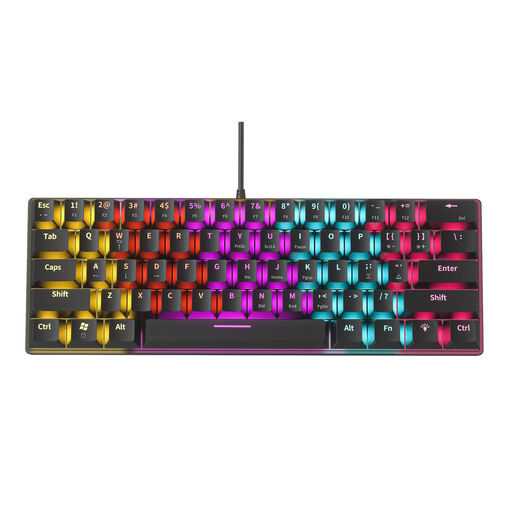 No image available
The compact design may suit you if you have limited desk space and are looking for a 61-key keyboard.
The blue mechanical switches described are clicky and audible.
 No image available
The tenkeyless version is worth comparing if you’re looking for a compact keyboard without a fixed numeric keypad.
The stated compatibility is for Mac models with Apple Silicon and macOS 11.4 or later.
 No image available
The foldable design may be worth considering if you want to compare compact keyboards with a touchpad.
The product name specifies Bluetooth and a touchpad; check that the layout suits your writing.
 No image available
The mini version may suit you if you’re looking for a compact keyboard for a small workspace.
According to the product information, you use modifier keys to access the navigation and arrow keys. Check whether that works for you when revising text. The layout is US QWERTY.
 No image available
The mini version is worth comparing if you have limited space and are looking for a compact keyboard.
The product name specifies Linear Optical Switch and a US layout. According to the product information, you use modifier keys to access the navigation and arrow keys; bear this in mind when revising text.
Not necessarily. If you don’t enter many numbers, a model without a fixed numeric keypad can free up space beside the keyboard; according to the manufacturer, the S-board 840 has an integrated numeric keypad. Check that the keys you use often are within easy reach.
First, check the exact version and your computer’s connections. According to Logitech, the Wave Keys supports Bluetooth Low Energy and a Logi Bolt receiver; Perixx lists a USB-A cable for the PERIBOARD-335. Kinesis advises new Freestyle2 users to start with the halves together, then move them apart gradually; this advice applies to that model.
Yes. Arboportaal recommends varying screen-based work and taking microbreaks; a keyboard is no substitute for varying your tasks. If work-related symptoms start to develop, Arboportaal advises employees to consult their occupational health physician if necessary.
According to the Dutch government, many online purchases from a business come with a 14-day cooling-off period; check the seller’s information about the returns process. If a product is faulty, contact the seller to find a solution. The Netherlands does not have one fixed statutory warranty period that applies to all products.
Arboportaal’s rules for screen-based work apply to employees and don’t require someone writing a synopsis privately to buy an ergonomic keyboard. For employees who spend more than 2 hours a day working at a screen, Arboportaal says the screen and keyboard must not be attached to each other.