Start with the space available on your desk and the keys you use to move through text and make corrections: a compact keyboard is only practical if you can still do those things comfortably. Then decide between a fixed cable and the freedom of wireless use. If you don’t want to disturb others, assess the feel and sound of the specific version; a manufacturer’s claim or the keyboard’s size alone won’t tell you how loud it is.
Who is this relevant to?
Editor with limited desk space
Wants to leave room for a mouse and other things while rewriting, without automatically giving up all the editing keys. Product information from Logitech, BakkerElkhuizen and Keychron describes compact models with different layouts.
Frequent proofreader
Often moves through paragraphs and uses keyboard shortcuts, so having direct access to the keys they need matters more than having the smallest possible keyboard. Keychron’s product information and Arboportaal’s workplace advice can help you weigh up the layout and your working posture.
Editor in a shared workspace
Wants to keep disruption to others to a minimum or switch between devices, so assesses key feel and sound, connectivity and compatibility separately. Logitech and CHERRY describe models that, according to the manufacturers, can switch between multiple devices.
What should you look for when buying?
First check that the layout suits your editing work and the space available; then compare the connection options and the sound of the specific version.
| What to consider |
What should you check? |
Who should consider this? |
| Size and space for your mouse |
Measure the space available and check the width and layout of the specific version. Make sure the keys you need are still within easy reach. |
If I want to leave room for my mouse on a small desk without losing useful editing keys, the layout is crucial. Around 33% of consumers prioritise workspace above all else. |
| Navigation and corrections |
Check where the arrow, Delete, function and punctuation keys are, and whether the keyboard shortcuts you rely on are comfortable to use. |
When I often move through paragraphs while editing, I want the navigation and correction keys I need to be within easy reach. Around 27% of consumers put access to these keys first. |
| Typing sound |
Where possible, assess the sound and feel of the exact version; a description such as “quiet” is a manufacturer’s claim, not a comparable sound measurement. |
In a shared workspace, I want to be able to type without disturbing others unnecessarily. Around 20% of consumers prioritise quiet typing above all else. |
| Connectivity and switching |
Check the ports or Bluetooth support on your devices, the operating systems supported and the connection options on the version you’ve chosen. |
If I edit my review on different devices, I want to know whether the keyboard works with them and how to switch between devices. Around 20% of consumers prioritise connectivity and portability above all else. |
Common mistakes
-
Choosing based on the word “compact” alone
A smaller keyboard may move or omit keys. This can make navigation and corrections less straightforward when you’re editing.
Compare the layout of the exact version with the keys you use for text corrections.
-
Mistaking a manufacturer’s “quiet” claim for a sound measurement
A description such as “quiet” doesn’t tell you how the keyboard sounds compared with other versions.
Where possible, assess the sound and typing feel yourself, especially if you work in a shared space.
-
Assuming every wireless version works with your devices
Connection methods, software features and supported devices can vary between models and versions.
Check the specifications of the version you’ve chosen against your own device and operating system.
Brands to consider
Logitech
The MX Keys Mini and Pebble Keys 2 K380s are compact keyboard models with different features, such as backlighting or the ability to switch between devices.
- Logitech describes the MX Keys Mini as having backlighting and sculpted keys; according to Logitech, the Pebble Keys 2 K380s can switch between devices.
- Check the layout of the version you’re considering. If sound matters, assess the typing feel of the Pebble Keys 2 K380s for yourself.
BakkerElkhuizen
The S-board 840 is a compact wired option; the UltraBoard 950 Wireless is a compact Bluetooth option.
- BakkerElkhuizen lists a scissor mechanism and integrated numeric keypad for both models.
- Choose the fixed or wireless set-up that suits your desk. Claims about health and typing accuracy aren’t independent performance measurements.
CHERRY
The KW 7100 MINI BT is a compact Bluetooth version designed for use with multiple devices.
- CHERRY lists three Bluetooth channels and a scissor mechanism.
- Check the layout and compatibility of the specific version with your devices.
Keychron
The K3 Max is a compact mechanical keyboard in a 75% layout, with several connectivity options.
- Keychron lists Bluetooth, 2.4 GHz and wired use.
- Check the switches and ANSI layout of the version you choose. According to Keychron, hot-swapping is only available on a specific version.
R-Go Tools
The Compact Break is a range of compact, slim keyboards with an indicator to remind you to take breaks.
- According to R-Go, the LED indicator works with R-Go Break Software; the range includes wired and wireless versions.
- For the version you choose, check that the software and layout suit your workspace. The indicator isn’t proof that the keyboard prevents complaints.
Keyboards at Joybuy
Explore compact keyboards for a small workspace, including wired and mechanical versions to compare with your preferred layout and connection options.
 No image available
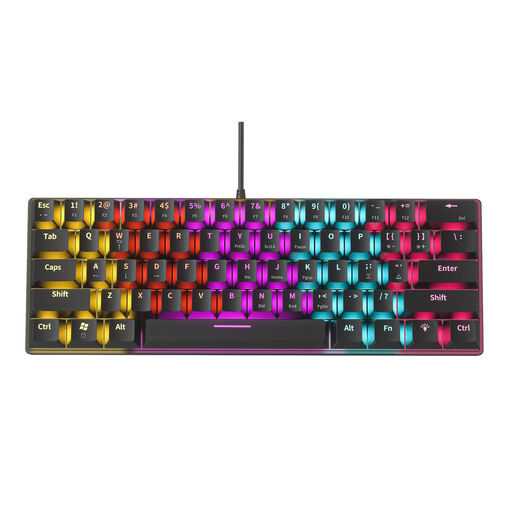
NAXSIR Mini Mechanical Keyboard, 61 keys
A compact wired version to consider if desk space is limited.
61 keys and blue mechanical switches. The description mentions an audible click, so bear that in mind if you’re looking for quiet typing.
View at Joybuy
 No image available
AULA WIN60HE, 60% wired keyboard
A compact wired version to consider if you want to keep desk space free.
The product title mentions Hall Effect magnetic switches and Rapid Trigger, with an adjustable actuation point of 0.01 mm.
View at Joybuy
 No image available
AULA F75 MAX, 75%, US QWERTY
A 75% version to consider if you’re looking for a compact layout that still retains navigation keys.
The connection options listed are wired, Bluetooth and 2.4 GHz. This model has a US QWERTY layout, so check that it suits the way you use your keyboard.
View at Joybuy
 No image available
Redragon M68, 68 keys, US layout
A compact version to compare with the keys you need when correcting text.
The title mentions magnetic switches and a US layout. Check that the layout suits the way you use your keyboard.
View at Joybuy
 No image available
AULA S75 Pro, 75%
A compact mechanical version to consider if you’re looking for a 75% layout with several connection options.
The description mentions wireless and wired use. The title lists a TFT display, rotary knob and hot-swappable Star Vektor switches.
View at Joybuy
Frequently asked questions
Is the smallest possible keyboard automatically a good choice for editing text?
No, not if the keys you use for navigation and corrections are hard to reach. Check the exact layout and make sure the keys and shortcuts you use most are comfortable to operate.
How can I set up a small workspace for longer editing sessions?
Position the screen directly in front of you, try to keep your shoulders and wrists relaxed, and vary your posture and tasks. Arboportaal offers this workplace advice; it doesn’t guarantee that one particular keyboard will prevent complaints.
What should I check when buying a wireless keyboard?
Check that your devices support the required connection and operating system, and look at the connection options for the exact version. If it has software features, also check that they work on your device.
What are my rights when buying a keyboard online in the Netherlands?
For an applicable online purchase from a business, consumers generally have 14 days to change their mind; the Dutch government lists exceptions and distinguishes these purchases from buying from a private seller. You’re also entitled to a product that is fit for purpose. According to the Dutch government, there is no fixed statutory warranty period in the Netherlands, and the retailer is your point of contact if a product is faulty.
Should an employee who types on a laptop for long periods use a separate keyboard?
That depends on the working situation. According to Arboportaal, for employees who use display screen equipment for more than 2 hours a day, the screen and keyboard must not be attached to each other. In that situation, laptop users must be able to use a separate screen or keyboard; this isn’t a general purchasing requirement for private reviewers.


